- 8 -
7. Change the channel of remote controller
7.1 Basic Setup
There is “A~E” channels on the remote control and on the time of
delivery, the entire channel is set on channel “A”
7.2 The method to check a channel between the
remote control and a machine
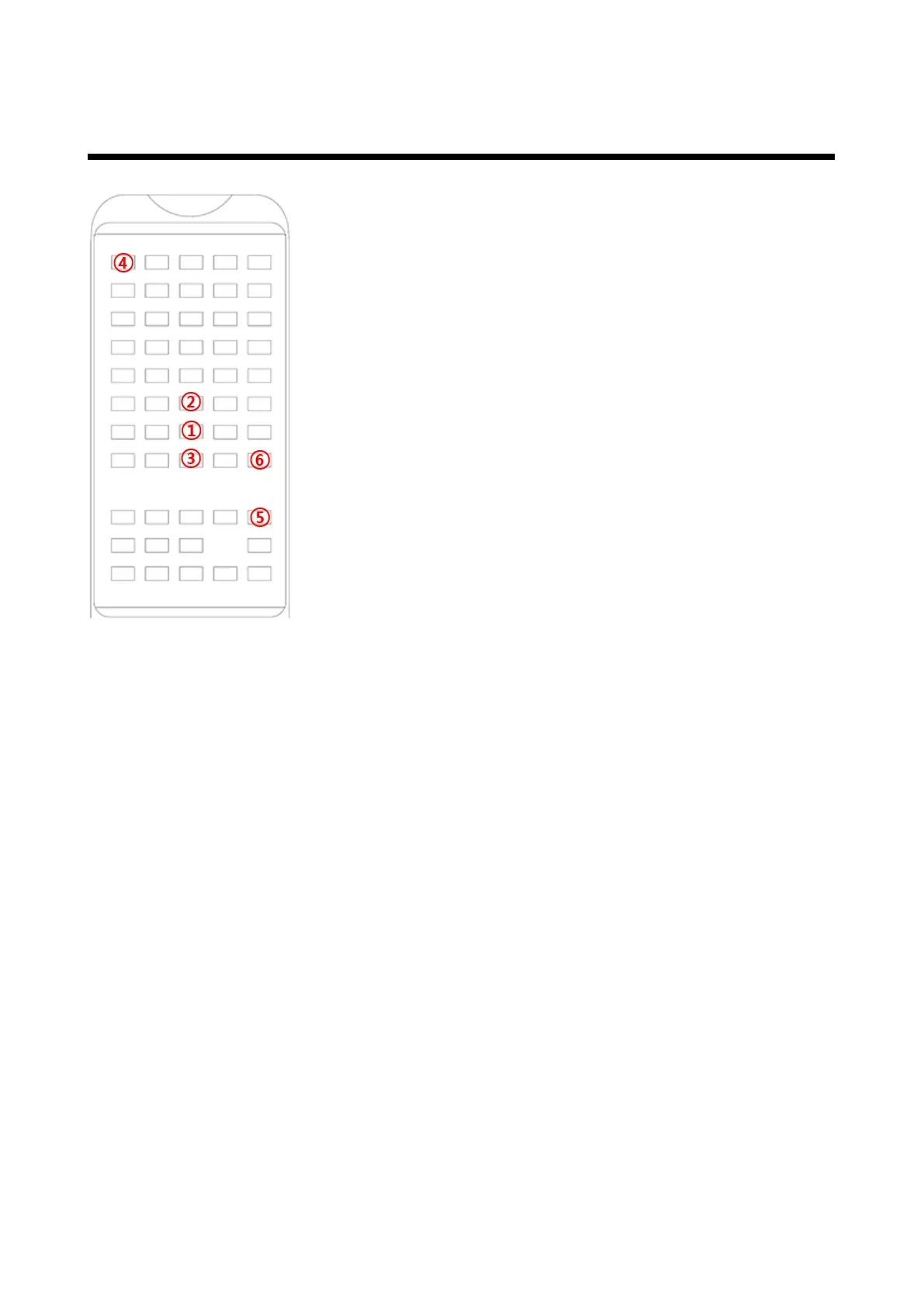
if a machine recognizes a signal of “①” which a user presses 3
times continually, a machine let a user know the channel of
remote control showing blinking LED on the each side.
(A=1, B=2, C=3, D=4, E=5)
if a machine recognizes a signal of “②” which a user presses 3
times continually, a machine let a user know the channel of a
machine showing blinking LED on the each side.(If the remote
control and the machine's channels match)
(A=1, B=2, C=3, D=4, E=5)
if a machine recognizes a signal of “③” which a user presses 3
times continually, a machine let a user know the channel of a
machine showing blinking LED on the each side (If the remote
control and the machine's channels do not match)
7.3 The method to change a channel of remote control and channel
of a machine at the same time
For your reference, in case a channel of a remote control and a machine is connected, you
can follow this step.
Push and release button “④” and button “⑤” at the same time. Push button “⑤” again to
notify the new channel on the remote control by blinking the LED on the each side.
(A=1, B=2, C=3, D=4, E=5)
A user needs to repeat above process till a new channel appears.
When a user presses “⑥” button, a machine let a user know showing blinking LED two times
on the each side and The channel change is complete.
7.4 The method of adjusting a channel of a machine to the one of
remote control unconditionally
(In case of a channel of the machine and remote control is different) When a user presses
“④” button, a remote control transmits data of a setting channel a machine let a user know
the channel of a machine showing blinking LED on the each side. (A=1, B=2, C=3, D=4, E=5)
When a user presses “⑥” button, a machine let a user know showing blinking LED two times
on the each side.



 To Next Page