- 41 -
(12)
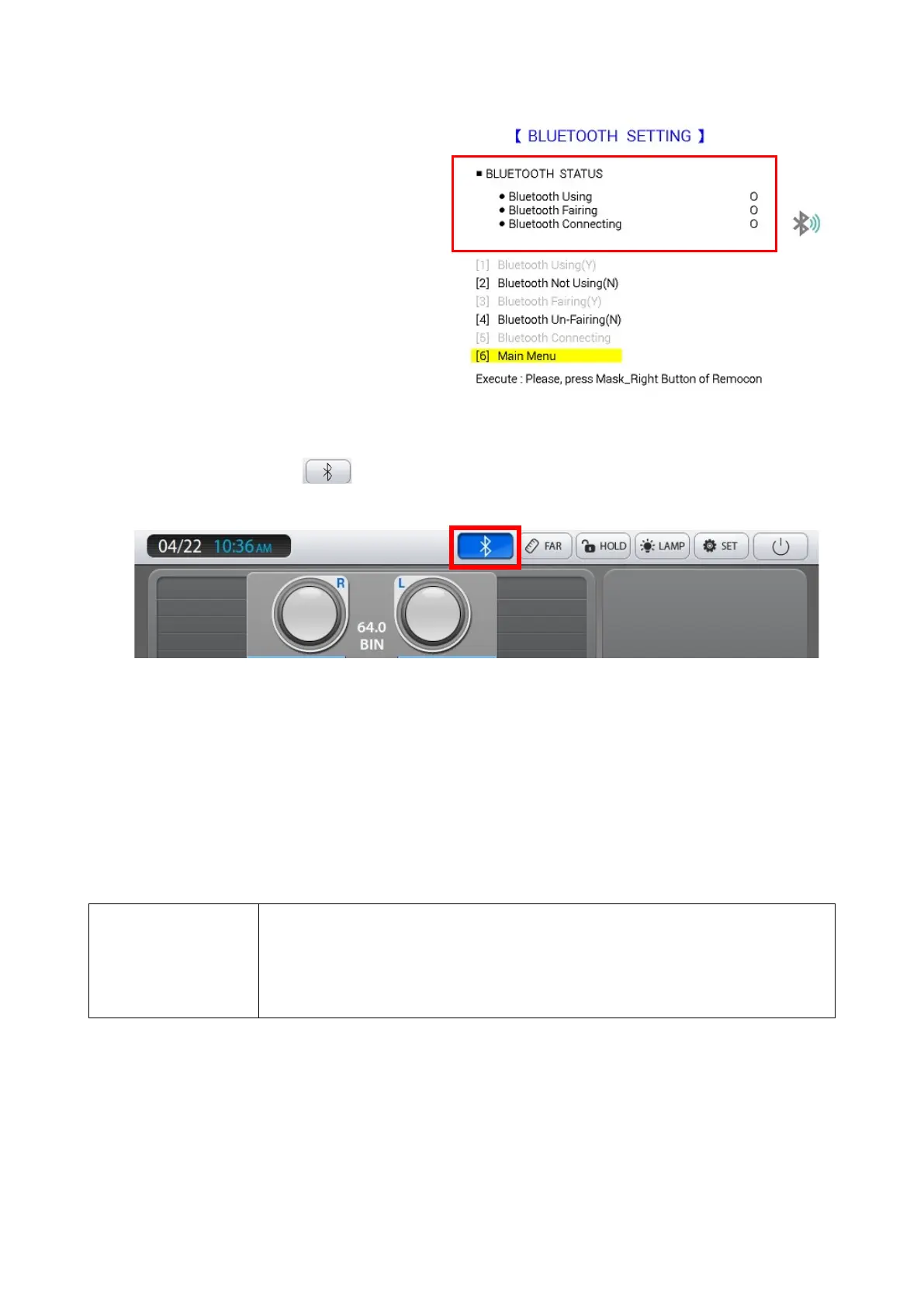
For more information, refer the “Bluetooth
Communication Setting”.
The Bluetooth icon on the screen of PDR-7000 control box turn blue when
wireless function is working properly. (Figure 6)
Figure 6
If connection is not successful, press [4]Bluetooth Un-Pairing, press [2]Bluetooth Not
Using(N), then turn the power of PDR-7000 and PLC-8000 off and on again. At this time,
the PDR-7000 should be booted up before PLC-8000. If the power is turned on at the
same time, the PDR-7000 will boot up first. After booting is complete, try again from (5)
above.
27.4 PDR-7000 Version 4 Bluetooth connection
NOTE
If there are several Bluetooth devices (smart phone, etc.) during
Bluetooth connection operation of PDR-7000 and PLC-8000 chart,
communication may be interrupted. In the Bluetooth Pairing step, it
is safe to turn on only the Bluetooth device of the set 1 device to be
connected.
Initial pairing with PDR-7000 require the following items.
Bluetooth Dongle: 1 EA
Initializing PDR-7000 Bluetooth Settings



 To Next Page