- 42 -
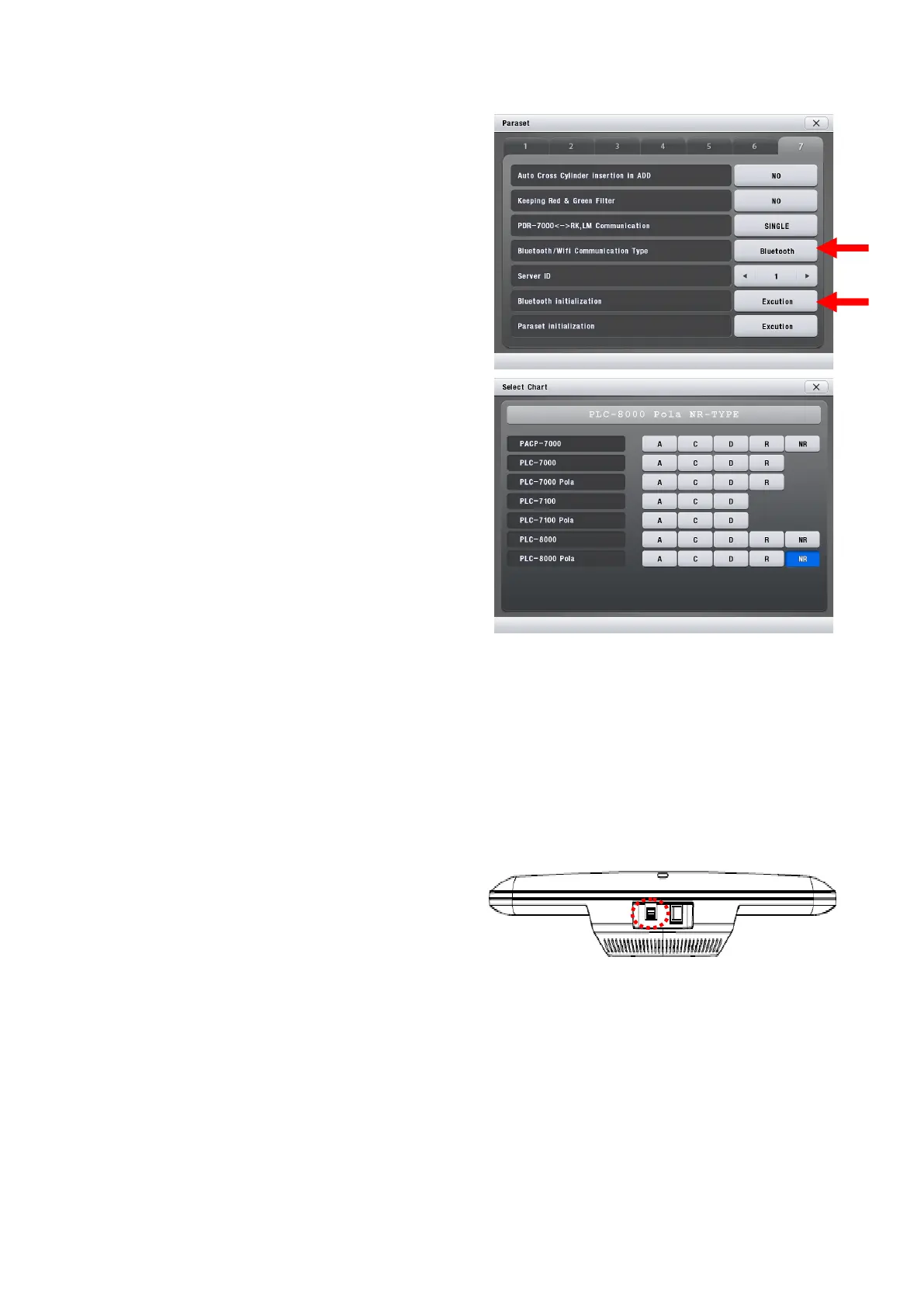
(1) On the PDR-7000's Paraset page 7, set the
'Bluetooth / Wifi Communication Type' item to
"Bluetooth".
(2) Bluetooth Initialization Execution.
(Bluetooth initialization is required before
proceeding with Bluetooth pairing.)
(3) The Select PLC-8000(pola) from the 'Select
Chart' menu.
※ When using PLC-8000 R type, check the
version of PLC-8000. Version of the PLC-8000 can
be checked from the top left of the screen after
pressing the PLC-8000 Remote Control Menu.
Select "R" type when the PLC-8000 version is
lower than 1.2.10 (1.2.00 to 1.2.09), or "NR" type
when it is higher than 1.2.10.
(4) Reboot PDR-7000.
PLC-8000(pola) Bluetooth communication connection
(1) Insert Bluetooth dongle into USB hub at the
bottom of PLC8000 to pair with wireless Mouse
and turn on power.



 To Next Page