EasyManua.ls Logo

Potter PFC-6200 - Uploading from Panel to Computer

Potter PFC-6200
125 pages
Print Icon
To Next Page IconTo Next Page
To Previous Page IconTo Previous Page
Loading...
5-50

Uploading from Panel to Computer
Upload Conguration File to Computer transfer icon


To upload programming changes to computer:
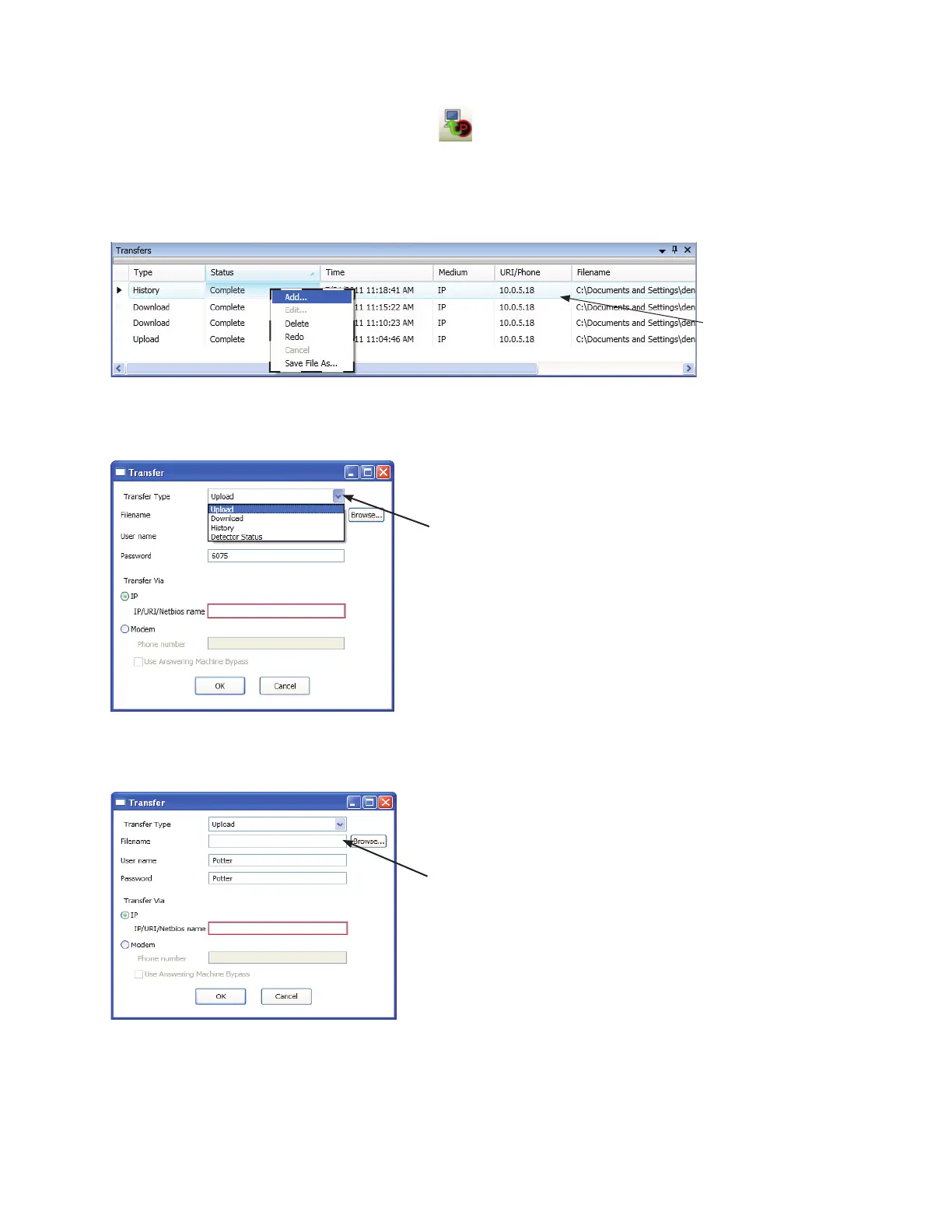
1. Upload Conguration File to Computer icon “Transfers” region
Example of Transfer Shortcut Menu Figure 49.
Note"Add" option
Transfer dialog box
Example of Transfer Upload Dialog Box Figure 50.
2. Upload“Transfer Type” eld.
3. conguration lename“Filename” eld 
Example of Transfer – Upload WindowFigure 51.
Notes:
 •y

•y Browse button to

Click here to choose applicable
transfer type, if necessary.
Enterlenameorleaveblank
to auto-name.
Right click anywhere in the
transfer window to display
the shortcut menu.

Table of Contents

Related product manuals