To navigate between hyperlink topics using a keyboard, select ALT+◄ or ALT+►.
20
Table of Contents
Shutdown
◊ You must shut down the generator using the same method you chose for startup.
To shut down the generator:
1. Turn o any appliances connected to the generator.
2. Shut down the generator using the same method you chose for startup.
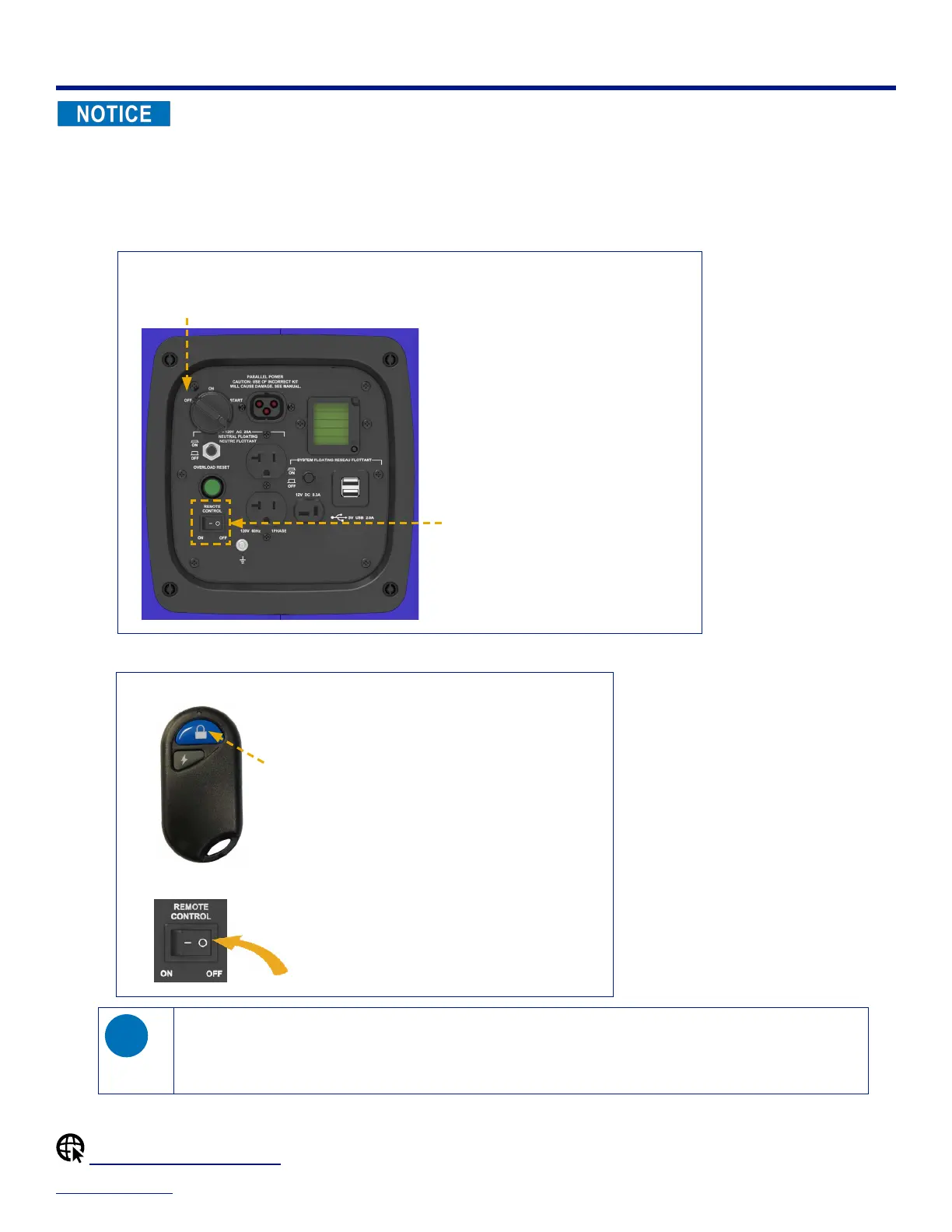
If you started the generator with the ignition key or recoil starter grip:
– On the control panel, turn the ignition key to the OFF position to shut down the generator.
– Verify that the remote switch is in the OFF position.
OFF
OFF
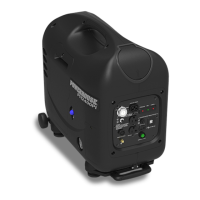
If you started the generator with the remote key fob:
– On the remote key fob, press the STOP button to shut down the generator.
Press to
STOP
– On the control panel, set the remote switch to the OFF position.
If you leave the remote switch ON:
◊ You can use the remote key fob to restart the generator within 12 hours of shutdown.
◊ After 12 hours, the generator automatically hibernates to conserve battery power. To deactivate hibernation and
re-enable startup, you must toggle the remote switch: OFF–ON.
Shutdown (Parallel Operation)


 To Next Page