POWERVAR Security Plus UPS
45
Security Plus Unpacking Instructions
For 8-15kVA Models
The UPS is packed in a heavy duty cardboard carton. The carton is securely attached to a
heavy duty shipping pallet. The packing materials may be retained for use in shipping the UPS
to another location. Should you find it necessary to do so, please observe the correct
orientation of the UPS when packing. The side faces of the carton are printed with appropriate
packing notices as well as the equipment model number.
Unpacking the UPS requires simple tools such as a screwdriver and an adjustable wrench. To
remove the UPS from the shipping container and packing materials, follow these simple steps
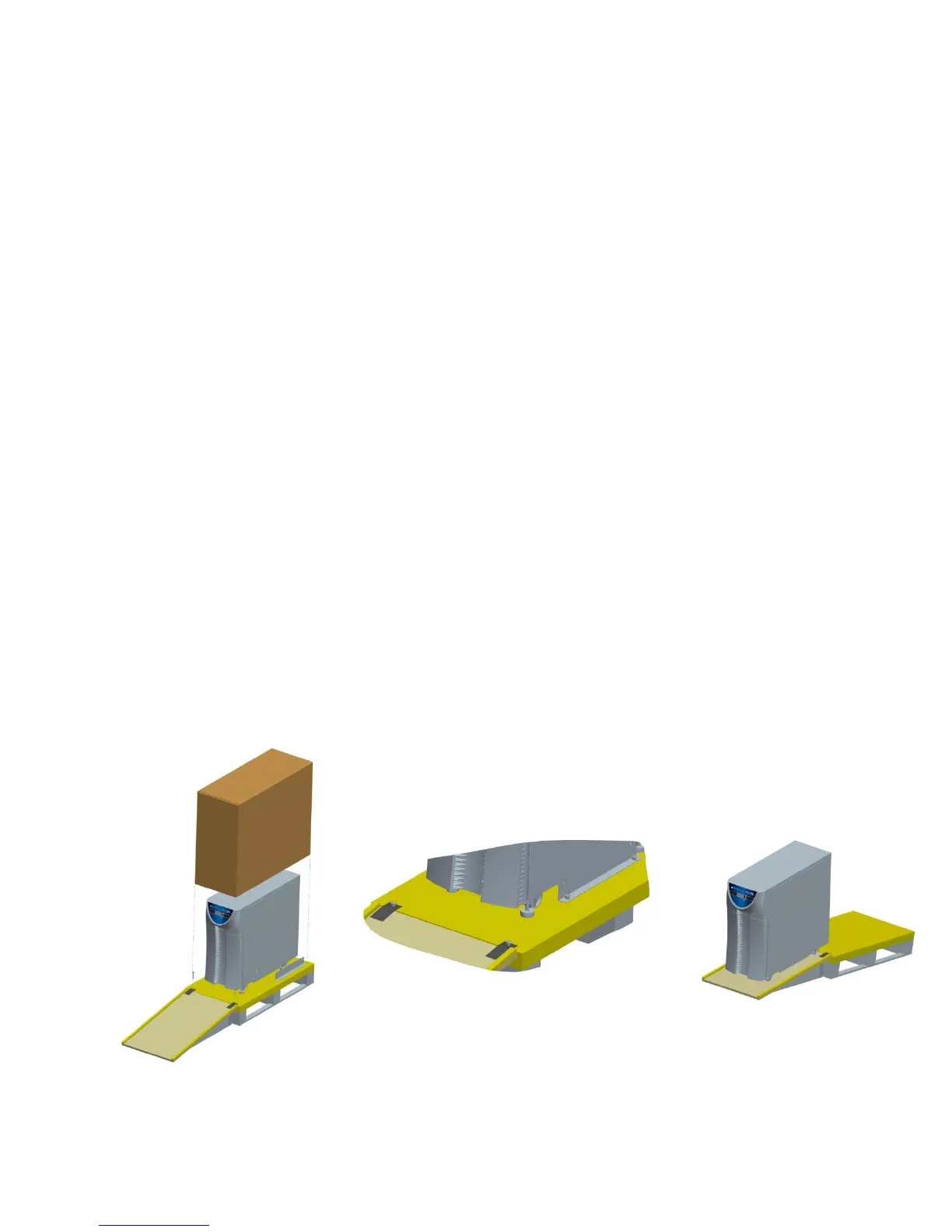
while referring to Figures 3-3 below.
9) On each side of the cardboard carton there are two bolts (four bolts total) which attach the
cardboard carton to the shipping pallet. Remove these four bolts and save them, if
necessary, for re-use later.
10) With help from an assistant, raise the cardboard carton straight up from the pallet until it is
clear of the unit packaging and ramp.
11) The plywood assembly inside of the cardboard carton is a ramp for rolling the UPS off the
shipping pallet. Remove the plywood ramp and set it to one side.
12) Remove any foam packing/cushioning material and save for re-use.
13) Remove the protective plastic cover from the UPS.
14) The UPS is attached to the shipping pallet with two shipping brackets – one on each side of
the UPS. Using an adjustable wrench or socket set, remove the two bolts that attach the
bracket to the UPS. Remove the two bolts that attach the bracket to the shipping pallet.
These bolts should be set aside to secure the ramp to the pallet. Repeat for the other side
of the UPS.
15) The UPS has four leveling feet. Be sure to check that the levelers are up against the bottom
of the UPS to ensure the UPS rests completely on its four casters.
16) Attach the ramp as shown in Figure 3-3. The bolts used to attach the shipping brackets
should be used to secure the ramp to the pallet. CAUTION: The ramp brackets must
align with the holes in the pallet and be secured by the bolts for SAFETY. With the
help from an assistant, carefully roll the UPS off the pallet and down the ramp to the floor of
your facility. The UPS may now be easily moved on its casters to the installation location.
Figure 3-3
USE BOLTS REMOVED FROM SHIPPING
BRACKETS TO SECURE THE RAMP.



 To Next Page