Indicator Function
Indicates Alarm-1 status if Alarm-1 for Flow Total is set to other than ‘Enable’
• Flashes while the Alarm-1 is active.
• Glows when the Alarm-1 is active and latched.
• Remains OFF while the Alarm-1 is inactive.
AL1
TOTAL
Indicates Alarm-2 status if Alarm-2 for Flow Total is set to other than ‘Enable’
• Flashes while the Alarm-2 is active.
• Glows when the Alarm-2 is active and latched.
• Remains OFF while the Alarm-2 is inactive.
AL2
TOTAL
• Glows while the Flow Total value overflows the maximum Total value.
• Remains OFF while the Flow Total value is less than the set Total value.
OVF
KEYS
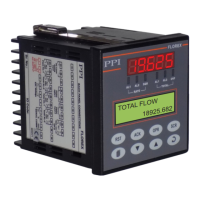
There are eight tactile keys provided on the front panel for configuring the FLOREX selecting View Only parameters, setting-
up the program Mode and selecting Operation Parameters.
The Table 1.2 below lists each key (identified by the front panel symbol) and the associated function.
Table 1.2
User Manual
FLOREX
2
Symbol
Key
Function
ACKNOWLEDGE
OPERATOR
SCROLL
RESET
UP
ENTER
DOWN
PAGE
Press to enter or exit set-up mode.
Press to store the set parameter value and to scroll to the next
parameter on the PAGE.
Press to increase the parameter value. Pressing once
increases the value by one count;keeping pressed speeds up
the change.
Press to decrease the parameter value. Pressing once
decreases the value by one count; keeping pressed speeds up
the change.
Press to Reset the Flow Total value to zero.
Press to scroll through the various display fields individually on
Lower Readout in View Only Mode.
Press to access the Operator Mode.
Press to manually Acknowledge the Rate/Total Alarms if the
Alarm latch is enabled.


 To Next Page