9494
PreSonus StudioLive
™
24.4.2
Quick Start:
Level
Setting
Overview Hookup Controls Connecting
to a
Computer
Tutorials Technical
Information
Trouble-
shooting
and Warranty
Scenes, Presets, System Menu,
and MIDI Control
Software: Universal Control,
SL Remote, Capture,
and Studio One Artist
7.3 Using StudioLive Remote for iPad
7 Software: Universal Control, SL Remote, Capture, and Studio One Artist
In the upper right-hand corner of every page in StudioLive Remote
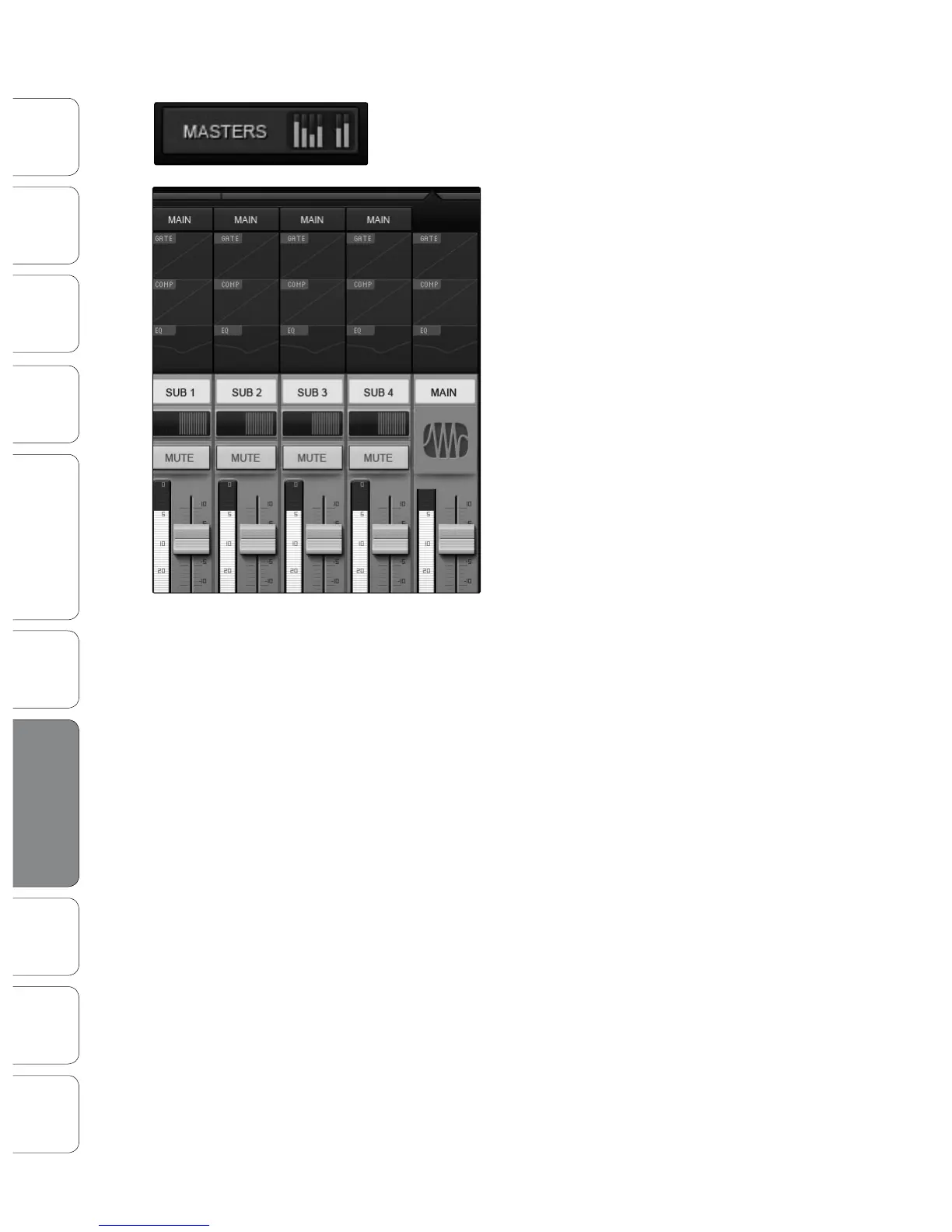
(Overview, Aux Mixer, and Graphic EQ), you will nd the Masters
Overview. This displays the metering for the Main bus.
Tapping on the Masters Overview will
open the Masters Section page.
The Masters Section page displays the fader,
meter, and Fat Channel Microviews for the Mains,
Subgroups (16.4.2 and 24.4.2) and Auxes (16.0.2).
These parameters are controlled the same way they
are controlled for channels in the Overview page.
Tapping on any of the Fat Channel Microviews
will close the Masters Section page. The Fat
Channel Zoom will open with the selected
parameter in focus for the selected bus.
To close the Masters Section page, simply tap
anywhere outside it.





 To Next Page