9191
Owner’s Manual
Quick Start:
Level
Setting
OverviewHookupControlsConnecting
to a
Computer
TutorialsTechnical
Information
Trouble-
shooting
and Warranty
Scenes, Presets, System Menu,
and MIDI Control
Software: Universal Control, SL Remote, Capture, and Studio One Artist 7
Software: Universal Control,
SL Remote, Capture,
and Studio One Artist
Using StudioLive Remote for iPad 7.3
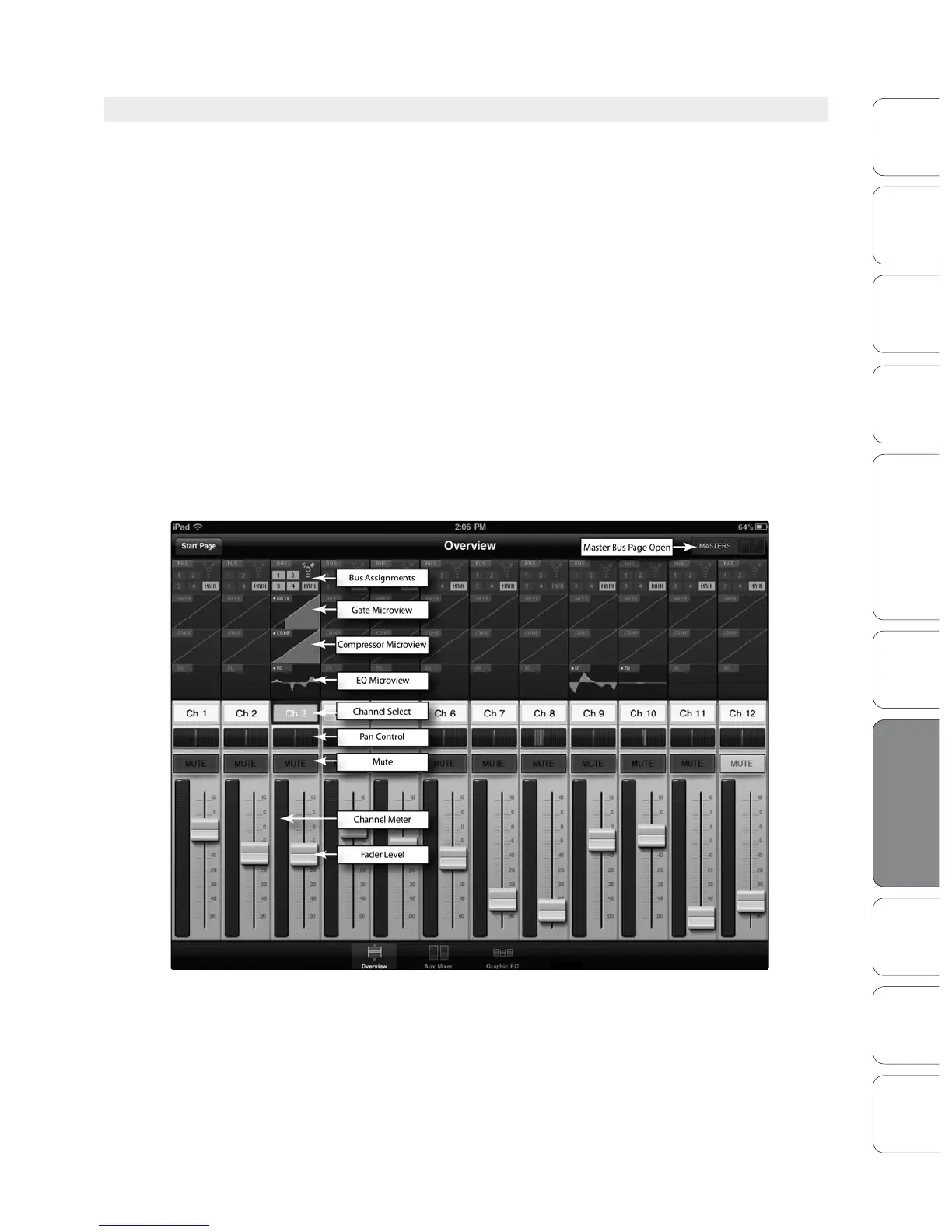
7.3.2 SL Remote: Overview Page
The Overview page in StudioLive Remote corresponds directly with
most of the controls on the Overview Page in VSL. The following
parameters can be controlled and/or viewed from this page:
• Channel and Main Volume
• Channel and Main Select
• Channel Mute
• Channel and Master Metering
• Channel Panning
• Channel FireWire Return
• Channel and Main Gate, Compressor, and EQ overview
• Channel and Main Gate, Compression, and EQ zoom
If you have labeled your channels using the Scribble Strip on the Overview
Tab in VSL, you will also be able to see your channel names.
POWER USER TIP: Because StudioLive Remote is a wireless controller for Virtual StudioLive, the
fastest way to get comfortable with StudioLive Remote is to get well acquainted with VSL.













 To Next Page