Chapter 7 CANopen Interface
7-3
7.1 CANopen Specifications
7.1.1 CANopen Interface
7.1.2 CANopen Data Transfer Settings
CANopen is the networking concept based on the international standard CAN. CANopen is defined as a uni-
form application layer by the DS 301 specifications of the CiA (CAN in automation).
7.1.3 CANopen cable arrangement
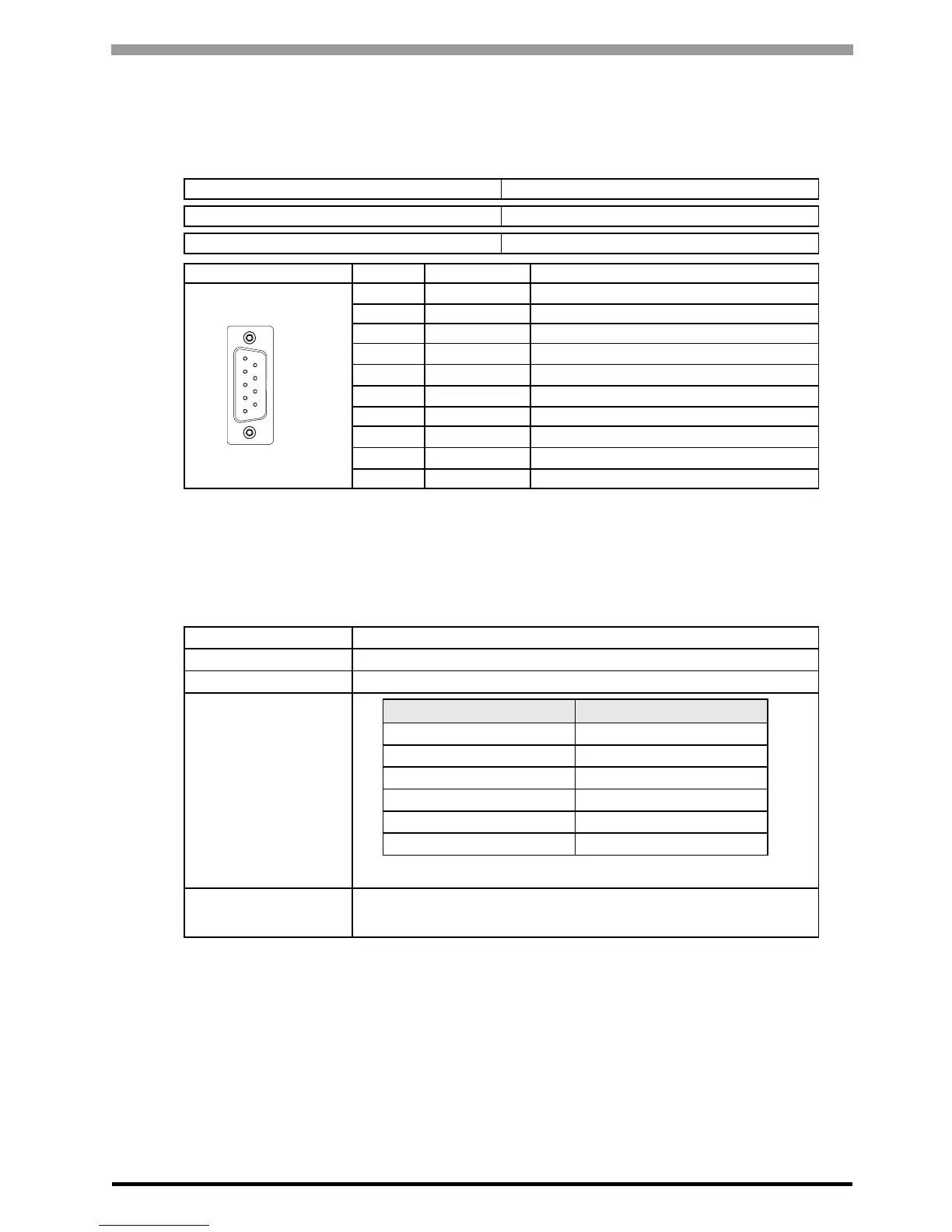
The CANopen interface uses D-sub 9-pin plug connector. The plug is assigned with the CAN_H, CAN_L and
CAN_GND connections. CAN_H and CAN_L are two physically different bus levels. CAN_GND is the
common reference potential.
Connector (GP unit side) XM2C-0942-502L <OMRON Co.>
Recommended Cable Connector (Cable side) See page 7-5.
Interfit Bracket #4-40 (UNC)
Pin Arrangement Signal Name Meaning
1
-
2 CAN_L CAN-L bus line
3 CAN_GND CAN ground
4
-
5
-
6
-
7 CAN_H CAN-H bus line
8
-
9
-
Shell FG Frame Ground (Common with SG)
Communication Type
1:N
Connection Method
Bus
Transfer Method
CSMA/NBA. Half-duplex serial transmission.
Transfer distance
speed/Transmission
length
No. of nodes
63 nodes max. Bit variable input: 256 points, Bit variable output: 256
points, Integer variable input: 64 points, Integer variable output: 64
points.
1
(GP Unit Side)
6
9
5
Baud rate
*1
*1 Set the baud rate with the software.
Bus length
1000 kbps 20m
800 kbps 40m
500 kbps 100m
250 kbps (factory settings) 250m
125 kbps 500m
50 kbps 1000m





 To Next Page