GP3000 Series Hardware Manual
3-4
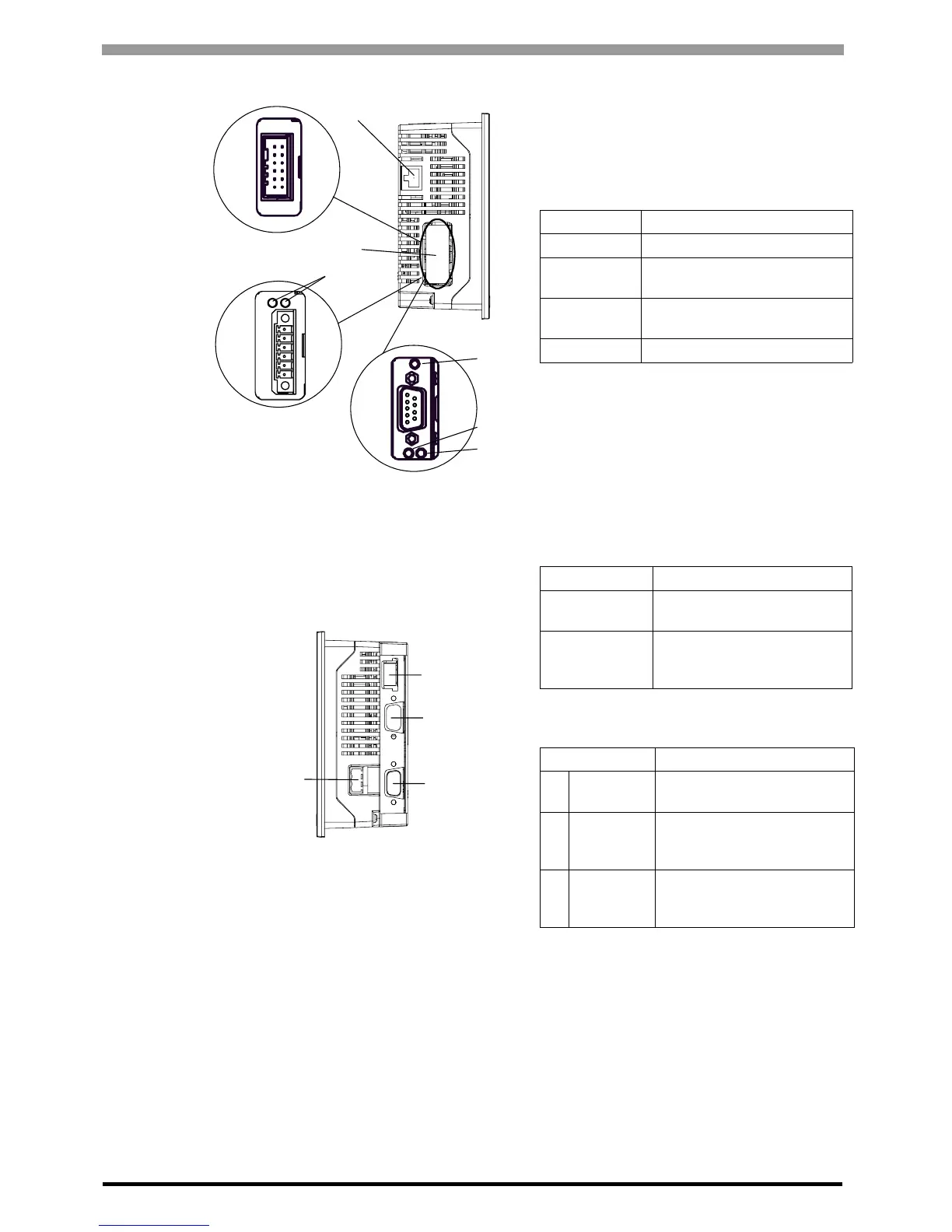
D: Ethernet Interface
(10BASE-T/100BASE-TX)
The Ethernet transmission interface (10BASE-T/
100BASE-TX).
An RJ-45 type modular jack connector (8-pole) is
used. The LED turns on or off to indicate the
current status. (Except AGP-3301*/AGP-3302B)
E: DIO Interface (DIO board type only)
FLEX NETWORK Interface (FLEX
NETWORK board type only)
CANopen Interface (CANopen board type
only)
The interface to which the unit with
communication capabilities is connected.
F: FLEX NETWORK Communication Status
LED
The LED indicates the status of FLEX NETWORK
communication. The LED turns on to indicate the
current status.
G
, H, I: CANopen Status LED
This LED indicates the communication status of
the CANopen.
J: Power Plug Connector
K: USB Host Interface
Complies with USB 1.1. Uses a “ TYPE-A”
connector. Power supply voltage: 5VDC
±5%,
Output current: 500mA(max). The maximum
communication distance : 5m.
L: Serial Interface (COM1)
AGP-3300∗/3301∗/3310T/3360T:
RS232C/RS422/RS485 serial interface. D-sub 9-
pin plug type connector. Communication method is
switched via software.
AGP-3302
∗:
RS232C serial interface. D-sub 9-pin plug type
connector.
LED Indicates
Green ON Data transmission available
Green OFF
No connection or subsequent
transmission failure
Yellow ON
Data transmission is
occurring.
Yellow OFF No data transmission
Status LED Indicates
RUN (Green)
Turns on when
Communication is enabled.
ERR (Red)
Turns on when failure
occurs in connected I/O
Unit.
Status LED Indicates
G
PWR
(Green)
ON: When applying current,
OFF: When light is off
H
RUN
(Green)
Turns on when
Communication i4
s enabled.
IERR (Red)
Turns on when failure
occurs in connected slaves
(ex.) Hybrid Terminal Block.
F
G
H
I
Left side
D
E
DIO board type
FLEX NETWORK
board type
K
L
M
Right side
J
CANopen board type





 To Next Page