Chapter 3 Part Names and Functions
3-5
M: Serial Interface (COM2)
AGP-3300∗/3301∗/3310T/3360T:
RS422/RS485 serial interface. D-sub 9-pin socket
type connector.
AGP-3302
∗:
RS422 serial interface. D-sub 9-pin plug type
connector.
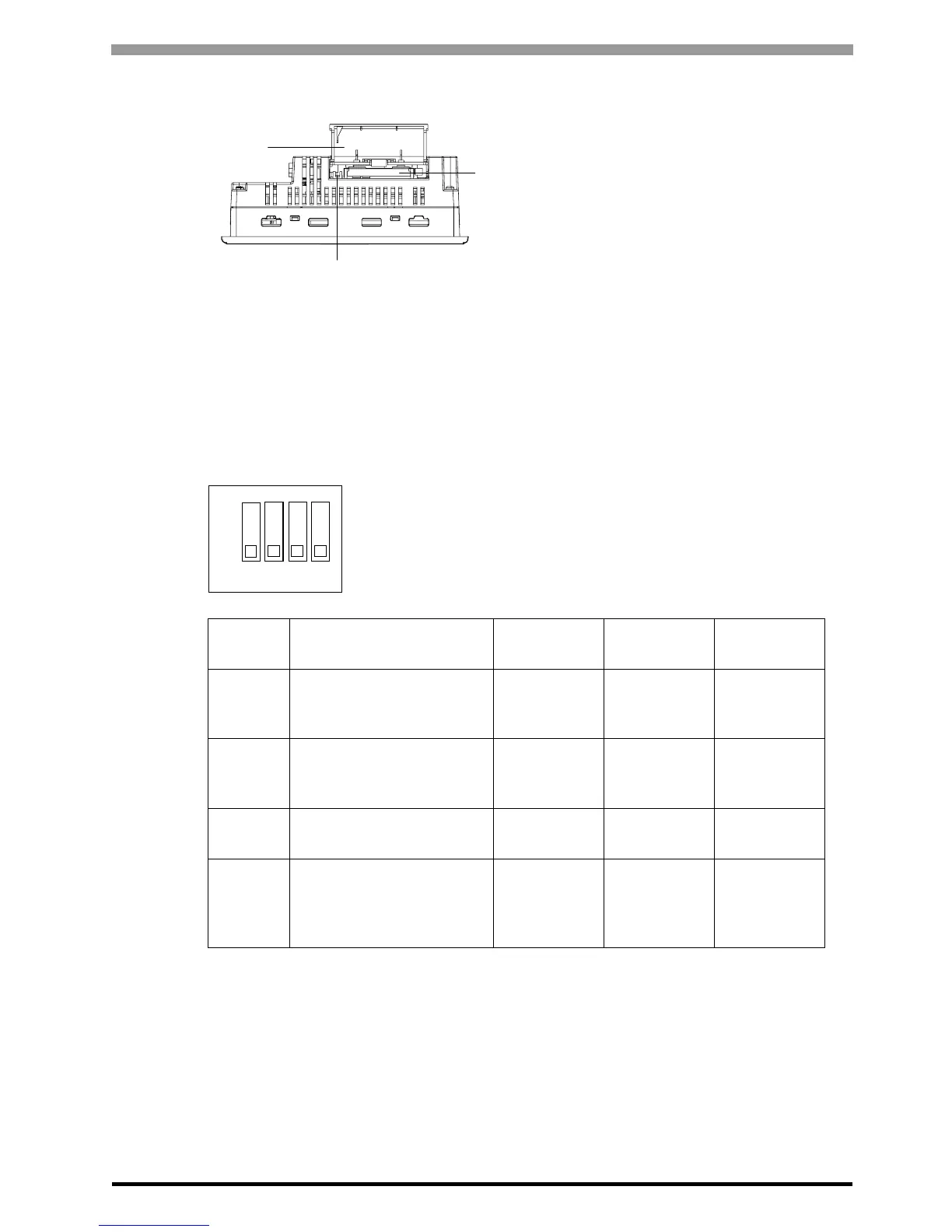
N: CF Card Cover
The CF Card I/F and Dip Switches are located in
the CF Card Cover open. This cover must be
closed when accessing the CF Card. (Except AGP-
3302B)
O: CF Card Interface
Insert the CF Card in this slot. (Except AGP-
3302B)
P: Dip Switches
(Except AGP-3302B)
Q: Audio Input Interface (L-IN/MIC)
This interface connects a microphone. Use for mini jack connector (Φ3.5mm). (AGP-3360T only)
R: Video Input Interface (V-IN)
This interface connects a video camera. Supports NTSC (59.9Hz) / PAL (50Hz) formats. Use RCA Connector
(75Ω). (AGP-3360T only)
Dip
Switches
Function ON OFF Note
1
CF Card Startup Settings
(Controls unit startup from
the CF Card.)
Startup from
CF Card is
enabled.
Startup from
CF Card is
disabled.
CF Card with
startup data
required.
2
*1
*1 When power supply is turned ON at dip switch 2 is ON, it starts with Transfer Mode.
Usually, use it in OFF.
Forced Transfer Mode
Forced
Transfer
Mode: ON
Forced
Transfer
Mode: OFF
-
3Booking - -
Constantly
OFF
4
This setting controls the
forced closing of the CF
Card cover.
Forced close
enabled.
Forced close
disabled.
Used when
CF Card
cover is
damaged.
Bottom
(With CF Card Cover open)
P
O
N
1
2
3
4
ON





 To Next Page