8. 8
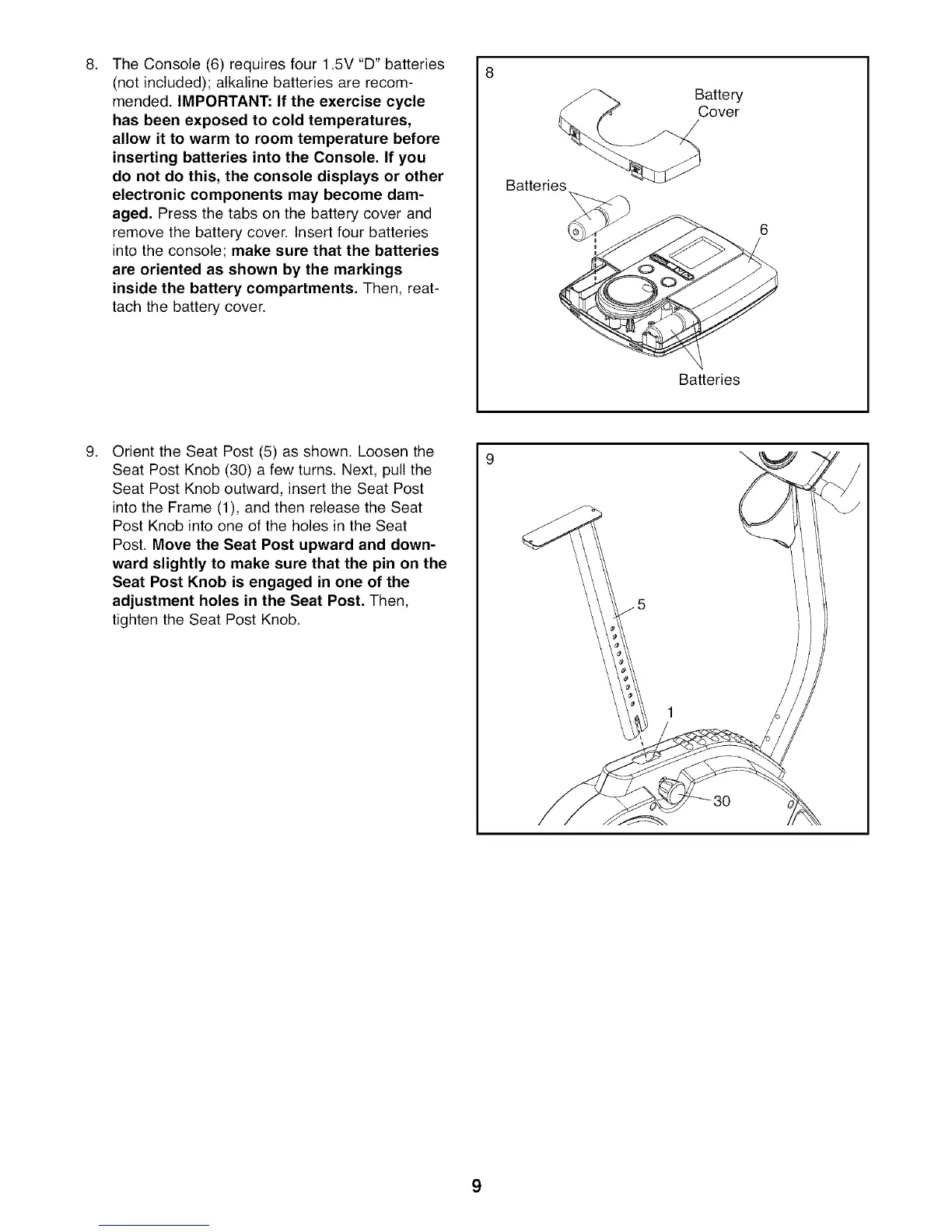
TheConsole(6)requiresfour1.5V"D"batteries
(notincluded);alkalinebatteriesarerecom-
mended.IMPORTANT:Ifthe exercisecycle
hasbeenexposedto coldtemperatures,
allowit towarmto roomtemperaturebefore
insertingbatteriesintotheConsole.If you
donotdothis,the consoledisplaysor other
electroniccomponentsmaybecomedam-
aged.Pressthetabsonthebatterycoverand
removethebatterycover.Insertfourbatteries
intotheconsole;makesurethatthe batteries
areorientedasshownbythemarkings
insidethe batterycompartments.Then,reat-
tachthebatterycover.
Batteries
Battery
Cover
Batteries
.
Orient the Seat Post (5) as shown. Loosen the
Seat Post Knob (30) a few turns. Next, pull the
Seat Post Knob outward, insert the Seat Post
into the Frame (1), and then release the Seat
Post Knob into one of the holes in the Seat
Post. Move the Seat Post upward and down-
ward slightly to make sure that the pin on the
Seat Post Knob is engaged in one of the
adjustment holes in the Seat Post. Then,
tighten the Seat Post Knob.
9 \
9




 To Next Page