15
FreeAssignRouting
Ifnoneofthepresetconfigurationsareappropriatetotherequiredsystemsetup,itispossibletomanually
selecttheroutingofthecrossover.Thisisachievedthrough theCrossover Menu -> Design A
Crossover.
PressingENTER willstartthecrossoverdesignwizard,withthefirstoptionbeingtochoosetherouting.
Thedisplaywillshow
D
esign A Crossover ->
Routing = 2 X 4 WAY *
orwhateverthecurrentconfigurationissetto.
PressBACK untilthedisplayshows
Design A Crossover ->
Routing = Free Assign
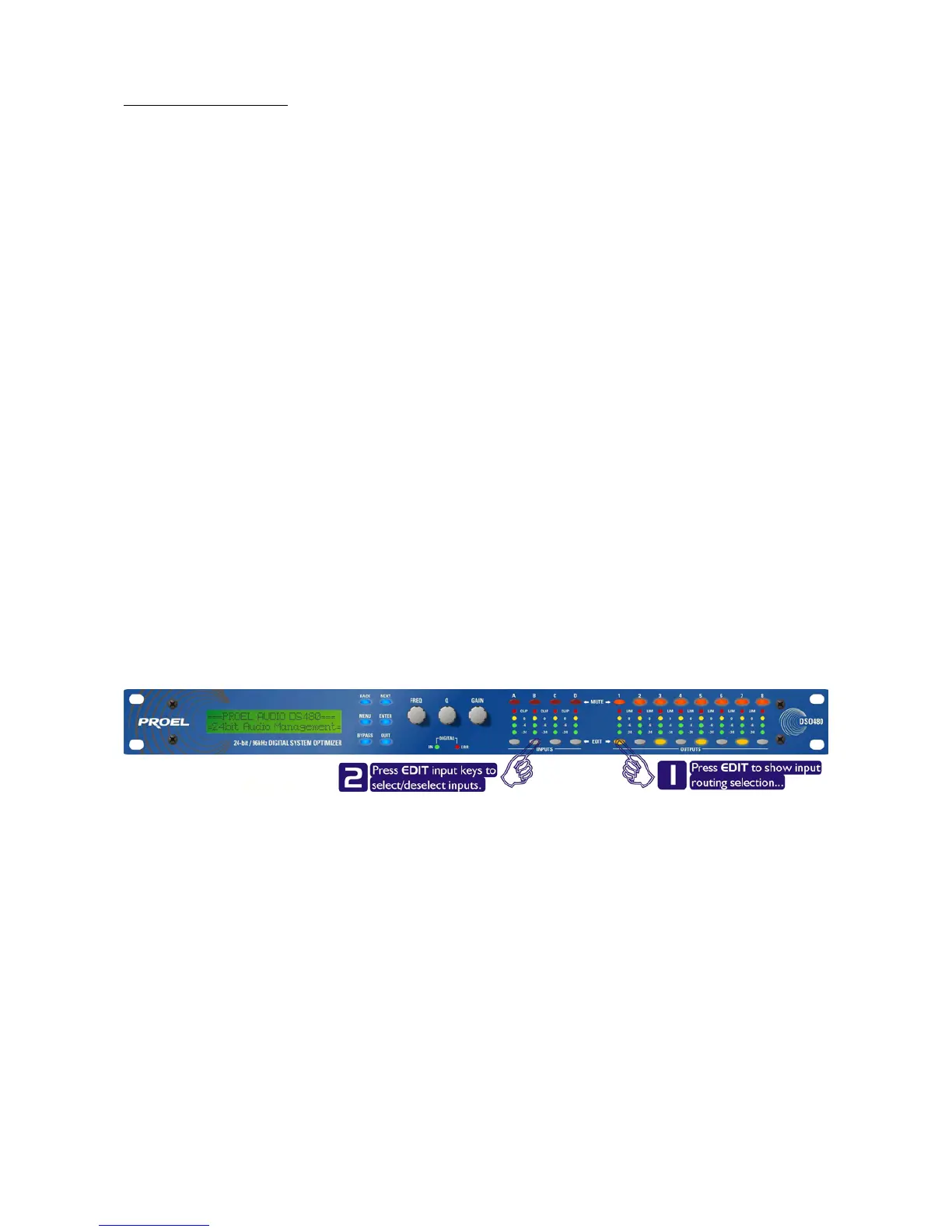
AndthenpressENTER. TheEDITkeywillilluminateforoutput1,aswillanyrelevantinputEDITkeys,
showingwhichinputsarefeedingoutput1.Thedisplaywillalsodetailthecurr
entcombinationofinputs
feedingthisoutput.Tochangetheroutingforanyoutput,pressitsEDITkey,andthenchoosetherequired
inputchannelcombinationbyjustpressingtheinputEDITkeysasappropriate.Theinputcombinationscan
alsobesteppedthroughinturnbypressingNEXT,orBACK.
Tocompl
etetheprocedure,pressENTER.Thewizardwillcontinue,andiftheroutinghasbeenchanged,all
outputswillbemutedonexit.



 To Next Page