UNICO
10
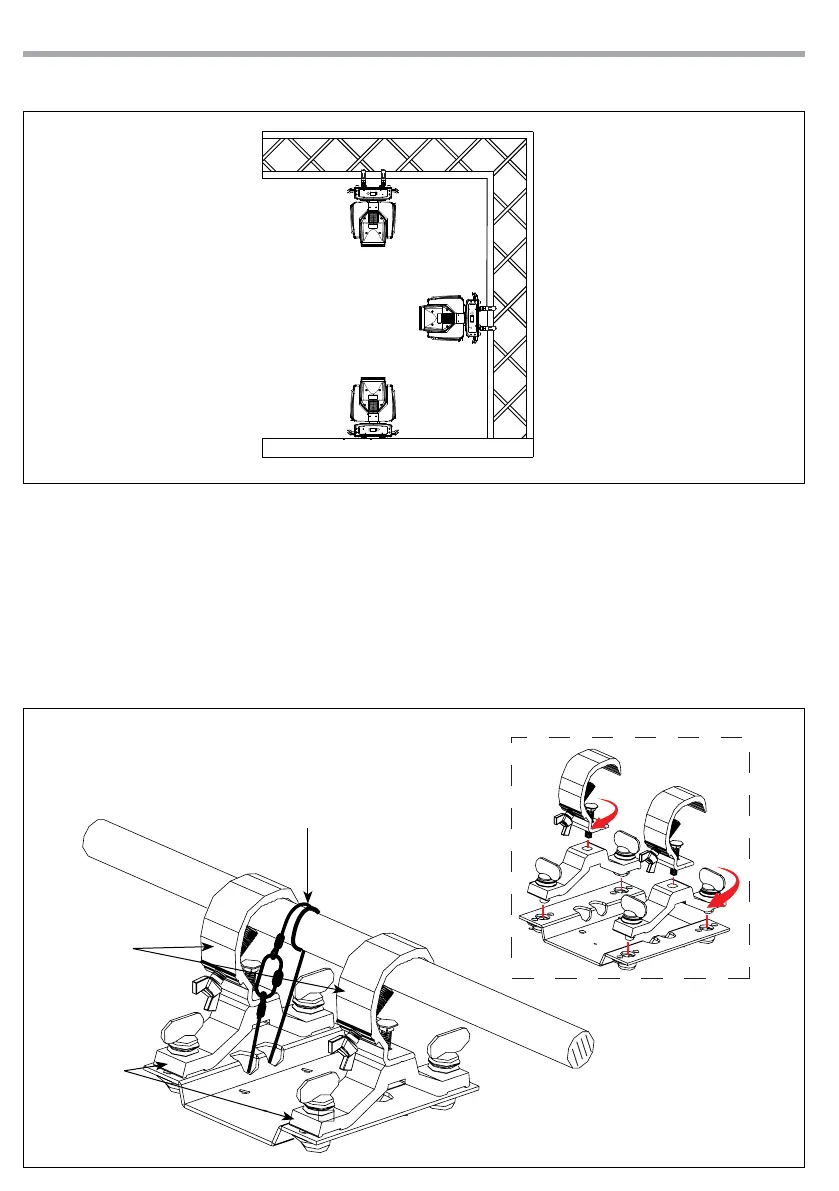
Fig.5
Fig.6
ALISCAFF
CLAMP
SAFETY
CABLE
OMEGA
BRACKETS
The UNICO may be set up on a solid and even surface. By means of the xing facilities of the baseplate, the
unit can also be mounted upside down to a cross arm. The base plate is shown in g.5.
For xing, stable mounting clips are required. According to the gure, the bolts of the brackets are placed
into the openings provided in the base plate and turned clockwise until they lock (to the stop).
The mounting place must be of sucient stability and be able to support a weight of 10 times of the unit’s
weight. When carrying out any installation, always comply scrupulously with all the regulations (particu-
larly regarding safety) currently in force in the country in which the xture’s being used. Always addition-
ally secure the projector with the safety rope from falling down. For this purpose, fasten the safety rope at
a suitable position so that the maximum fall of the projector will be 20 cm.
2.3 MOUNTING



 To Next Page