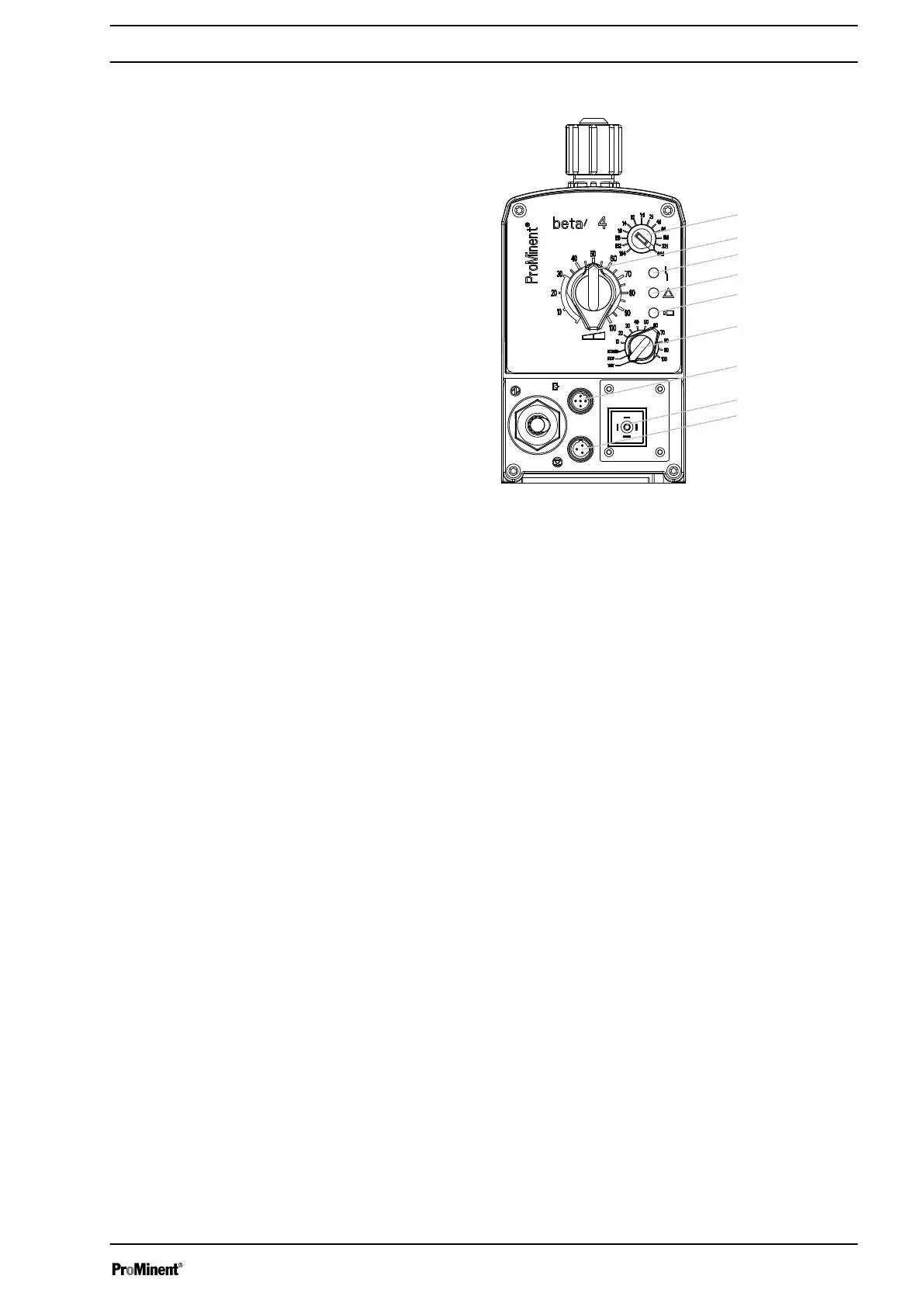
5.2 Control Elements
Fig. 4
1 Pulse Control Switch
2 Stroke Length Adjustment Knob
3 Fault indicator (red)
4 Warning indicator (yellow)
5 Operating indicator (green)
6 Multifunctional Switch
7 "External Control" Terminal
8 Relay connection (optional)
9 "Level Switch" Terminal
5.2.1 Pulse Control Switch
In the Extern Contact operating mode, either a series of strokes can
be triggered or an inbound series of contacts can be stepped down
via the pulse control switch by a single contact (on the "external
control" terminal).
5.2.2 Stroke Length Adjustment Knob
The stroke length adjustment knob can be used to adjust the stroke
length.
5.2.3
Multifunctional Switch
The multifunctional switch can be used to set the following func‐
tions, operating modes and stroke rate.
The operating modes that can be set are:
n Test (priming function)
n Stop
n Extern (Contact)
n Manual (setting stroke rate in 10 %
increments)
Overview of the Device and Control Elements
17







 To Next Page