LIZARD
This document is protected by copyrights.
Copying, using, or distributing without permission of PROMOTECH is prohibited.
14
To change the language of the menu, go to setting by rotating the
knob F1 to the right, and then rotate the knob F2 to choose among the available
languages. After the rest of the parameters from Tab. 1 is set, go to ,
choose a program number by rotating the knob F2, and press the knob to save the
current values under this number. The action is confirmed by showing message
for a short period. To load a previously saved program, proceed as described, but
from setting. Then, to go back to the main menu (Fig. 6), press the
knob F1 and hold it for 3 seconds. If the chosen parameters are not saved, they will
be active only until the current program number is changed in the main menu.
3.6. Welding procedure
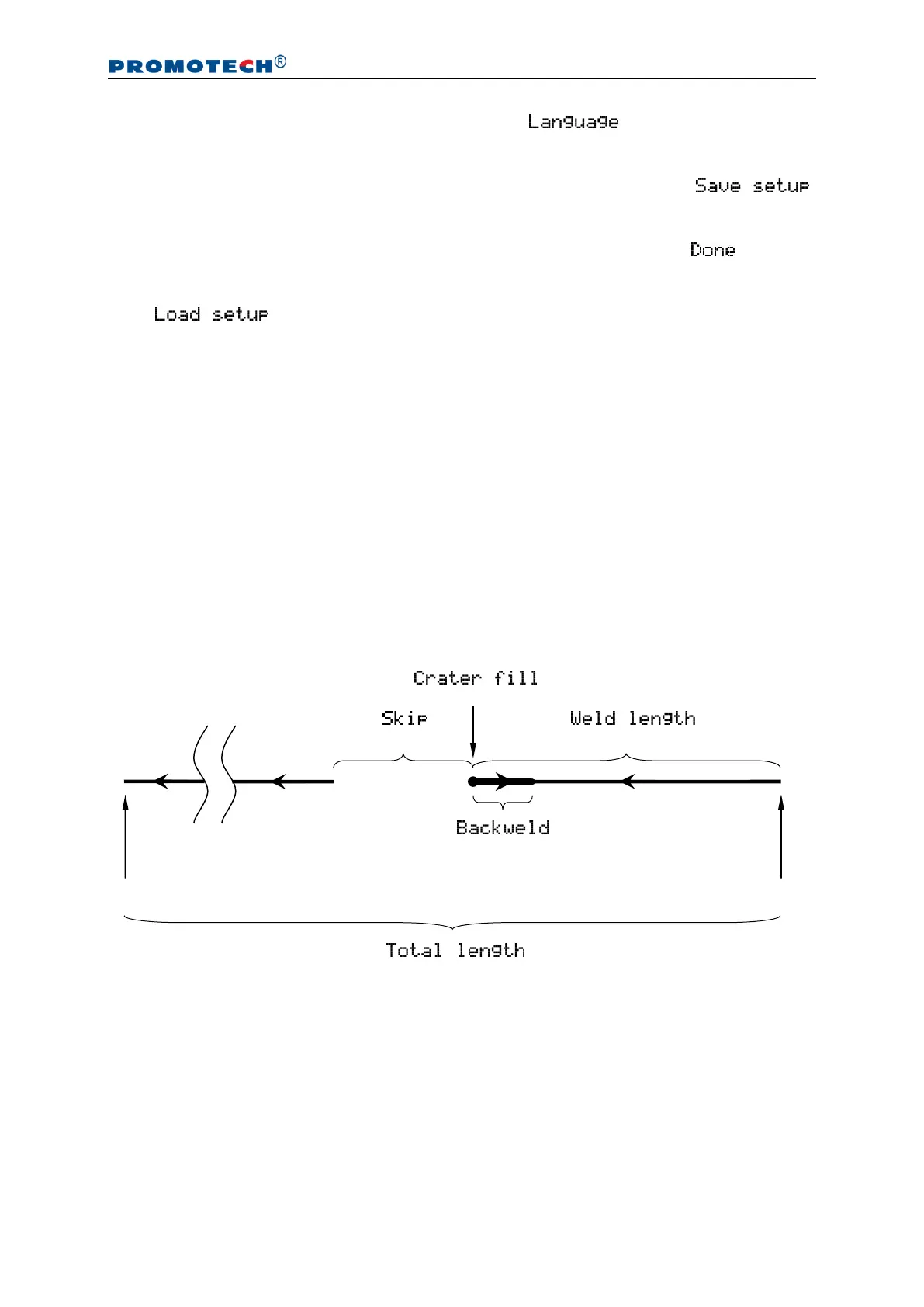
Fig. 8 shows a graphic description of the welding procedure that starts with the speed
value shown in the main menu when selecting a travel direction. The first stage
involves producing the weld, after which the carriage fills the crater (stage 2) for the
chosen time. Next, the carriage performs the backweld (stage 3) and then moves to
the starting point of the next weld (stage 4). This process is repeated until the carriage
reaches the value of the total length.
Fig. 8. Visualization of the welding procedure according to parameters from Tab. 1
Starting point of the first weld
Final point of the welding procedure


 To Next Page