EasyManua.ls Logo

Proteco myGate Q81A - User Manual

Proteco myGate Q81A
21 pages
Print Icon
To Next Page IconTo Next Page
Loading...
Q81A
05_2021
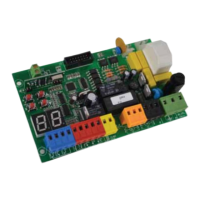
CONTROL PANEL FOR
DOUBLE/SINGLE SWING GATES
Control panel for 230V ac operators – single and double leaf swing gates
Automatic programming mode with obstacle detection
Sequential programming mode: adjustable force, slow down, working time per single motor
Immediate closing
Pedestrian opening
Multi-occupation feature
Second radio channel interface (optional)
Output for electrolock connection
Ram blow and lock pulse function
Removable radio receiver 433,92 MHz (32 codes) suitable for fixed or rolling code transmitters
Input for 8K2 resistive safety edge
Self diagnosis of malfunctions by LED coding
230V ac
TECHNICAL FEATURES
Item code PQ81A, PQ81A1D
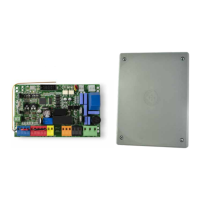
Pcb’s dimensions 137 x 84 x 37 mm
Junction box dimensions 220 x 290 x 90 mm
Pcb’s weight 160 g
Main Power supply 230V, 50-60 Hz
Power supply Tolerance -10% +20%
Transformer 230/21Vac – 15VA
Main Fuse 5 A
Rated power 600 W
Max. power draw 3.5 A
Power draw in stand-by 30 mA
Blinker 24 Vac, max 20 W
Accessories 24 Vdc , max 5 W
Electrolock 12 Vdc, max 15 W
Operating temperature -20 +50 °C
Protection rating IP55
Instructions Manual
PROTECO S.r.l. Via Neive, 77 - 12050 Castagnito (CN) ITALY Tel. +39 0173 210111 - Fax +39 0173 210199 info@proteco.net - www.proteco.net

Questions and Answers

  • A
    Alexandra Jones DDSAug 13, 2025
    What to do if DL4 is ON on my Proteco myGate Q81A?
    • D
      djacobsonAug 13, 2025
      If the DL4 light is ON, it indicates a permanent START command. To resolve this, check the operation of the accessories wired to the START (N.O. contact).
  • D
    danny77Aug 16, 2025
    Why is my Proteco myGate Q81A Control Panel OFF?
    • M
      Michael Reid MDAug 17, 2025
      If your Proteco Control Panel is OFF, it means the power supply is disconnected. Check the connection to the power supply to ensure it is properly connected.
  • A
    Austin StokesAug 20, 2025
    What to do if DL7 is OFF on my Proteco myGate Q81A Control Panel?
    • J
      jasonclarkAug 21, 2025
      If the DL7 light is OFF, several issues could be the cause: * The photocell in closing might be non-aligned. Check the photocell alignment. * There might be an obstacle detected between the photocells. Check for and remove any obstacles. * There could be incorrect electric wiring. Check the wiring diagram. * The photocell may be disconnected. Check the power connection. * The photocell may be disconnected with an active input. Disable the photocell input.
  • D
    Donna LawrenceAug 25, 2025
    What to do if DL8 is OFF on my Proteco Control Panel?
    • M
      Michael CoxAug 25, 2025
      If the DL8 light is OFF, it could be due to several reasons: * The photocell in opening might be non-aligned. Check the photocell alignment. * There might be an obstacle detected between the photocells. Check for and remove any obstacles. * There could be incorrect electric wiring. Check the wiring diagram. * The photocell may be disconnected. Check the power connection.
  • A
    Anna Palmer MDAug 28, 2025
    What to do if DL6 is ON on my Proteco myGate Q81A?
    • D
      David WhiteAug 28, 2025
      If the DL6 light is ON, it indicates a permanent PEDESTRIAN command. Check the operation of the accessories wired to the PEDESTRIAN START (N.O. contact).
  • W
    whitejohnSep 1, 2025
    What does it mean when DL5 is OFF on my Proteco myGate Q81A?
    • T
      Tanner PorterSep 1, 2025
      If the DL5 light is OFF, it could be due to the STOP button being disconnected. Check the wiring, otherwise consult section 3.5.
  • J
    Jesus BrownSep 4, 2025
    What does 3 blinks mean on my Proteco Control Panel?
    • V
      Valerie MillerSep 4, 2025
      If the Proteco Control Panel is showing 3 blinks, it relates to the motor test. Check the wiring and operation of the motors.
  • N
    nicole43Sep 8, 2025
    What does 2 blinks mean on my Proteco myGate Q81A Control Panel?
    • B
      Brenda AllenSep 8, 2025
      If the Proteco Control Panel is showing 2 blinks, it relates to the photocell test. Check the wiring and operation of the photocell.

Summary

1. SAFETY INSTRUCTIONS AND PRELIMINARY CHECKS

2. DESCRIPTION AND MAIN COMPONENTS

3. ELECTRICAL CONNECTIONS

3.1 MOTORS WIRING

Details the wiring process for motors in various gate automation models.

3.2 MAIN POWER

Instructions for connecting the main power supply to the control panel.

3.3 START DEVICES

Wiring instructions for start commands, including timers and key switches.

3.4 PEDESTRIAN OPENING

Guidance on wiring the pedestrian opening function for gate control.

3.5 EMERGENCY STOP BUTTON

How to wire the emergency stop button for safety compliance.

3.6 PHOTOCELLS

Wiring instructions for photocell safety sensors in closing and opening.

3.7 SAFETY EDGE

Instructions for connecting safety edges for obstacle detection.

3.8 FLASHING LIGHT

Wiring the flashing light accessory for visual signaling.

3.9 ELECTROLOCK

Instructions for connecting the electrolock for enhanced gate security.

4. DEFAULT SETTINGS

5. BROWSING THE MENU

5.1 FUNCTIONS MENU

Overview of the control panel's function menu and available settings.

6. OPERATION MODE

7. RADIO CODES

7.1 DELETING EXISTING RADIO CODES

Procedure for removing all stored remote control codes from the system.

7.2 LOADING A REMOTE CONTROL AS START COMMAND

How to program a remote control for the gate's start command.

7.3 LOADING A REMOTE CONTROL AS PEDESTRIAN COMMAND

Procedure to store a remote control for the pedestrian opening function.

7.4 LOADING A REMOTE CONTROL AS 2° RADIO CHANNEL COMMAND (MRX01 jack)

Instructions for programming a remote for the second radio channel.

8. PROGRAMMING

8.1 AUTOMATIC mode

Details on setting up automatic operating modes with obstacle detection.

9. TROUBLE SHOOTING - ERROR MESSAGES

Proteco myGate Q81A Specifications

General IconGeneral
BrandProteco
ModelmyGate Q81A
CategoryControl Panel
Power supply230 Vac
Operating temperature-20°C to +55°C
Protection classIP54

Related product manuals