Installation and Operating Instructions
SDC 204 1316BED035-10B-E Date 12/06
- 17 -
7.4 Example of device operation
Once you have familiarised yourself with the
menu descriptions as described in the
“Operating menus“ chapter, you can
practice by carrying out the operating steps.
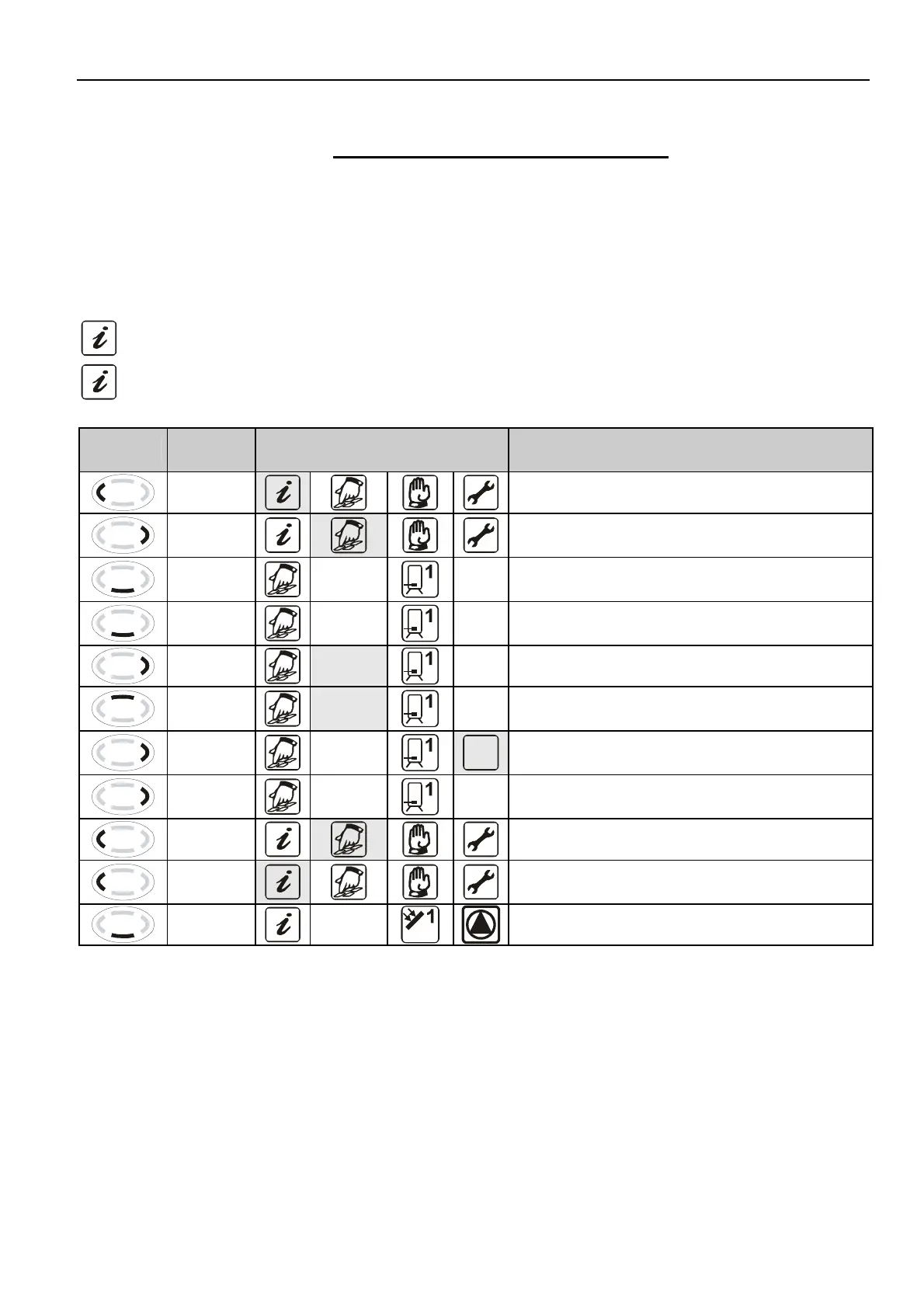
An operational example is illustrated below.
The starting point is the current collector
temperature on the “Info” menu. Aim:
Change to “Solar circuit Td stop” circuit from
3K to 4K in “Program” menu
White: symbol lights up continuously
Grey: symbol flashes
Button Function
Graphic display following
operational step
Description
“Exit“
Exit the “Info” menu
“Scroll
right“
Selection of “Programming” menu
“Access”
max
65°C
Access of “Programming” menu; the first
menu item appears
“Down”
Td min
3 K
Keep pressing until the menu item “S1 Td
min” appears
“Select”
Td min
3 K
Select the parameter shown
“Up”
Td min
4 K
Increase the parameter value from 3K to
4K
“Confirm
”
Td min
4 K
Confirm the parameter
“Confirm
”
Td min
4 K
Store the parameter
“Exit“
Exit “Programming” menu
“Scroll
left“
Select the “Info” menu
“Access”
60°C
Access of “Info” menu


 To Next Page