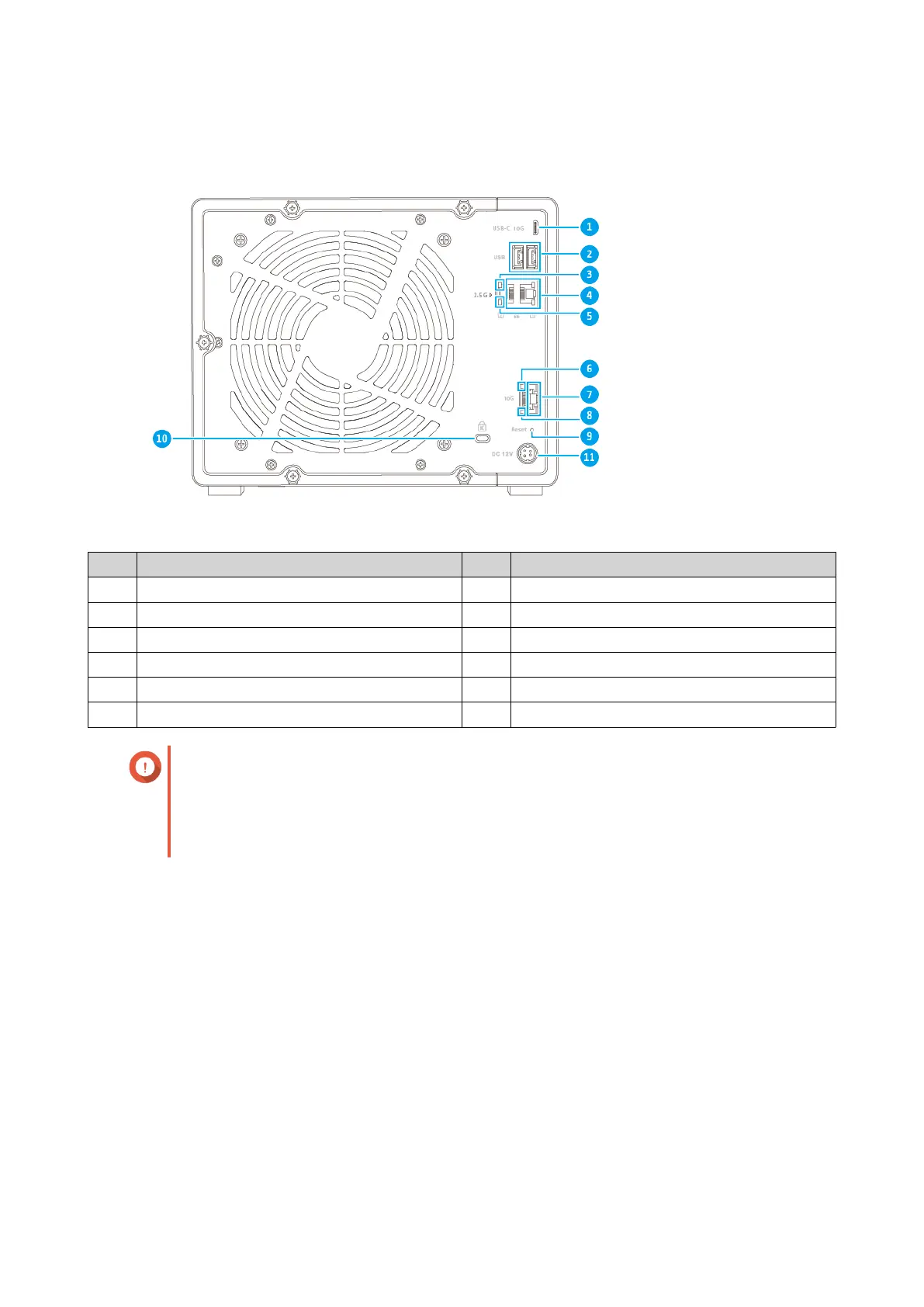
Rear Panel
No. Component No. Component
1 USB 3.2 Gen 2 (10Gbps) Type-C port 7 10 Gigabit Ethernet port
2 USB 3.2 Gen 2 (10Gbps) Type-A ports 8 10 Gigabit Ethernet speed LED
3 2.5 Gigabit Ethernet activity LED 9 Reset button
4 2.5 Gigabit Ethernet ports 10 Kensington security slot
5 2.5 Gigabit Ethernet speed LED 11 Power input
6 10 Gigabit Ethernet activity LED - -
Important
• QNAP USB expansion units only support connections to USB ports on the rear panel.
• If the USB connection speed appears abnormal, see the final optional step in
Connecting USB Expansion Units for instructions on how to fix this problem.
TS-h973AX User Guide
Product Overview 8



 To Next Page
 Loading...