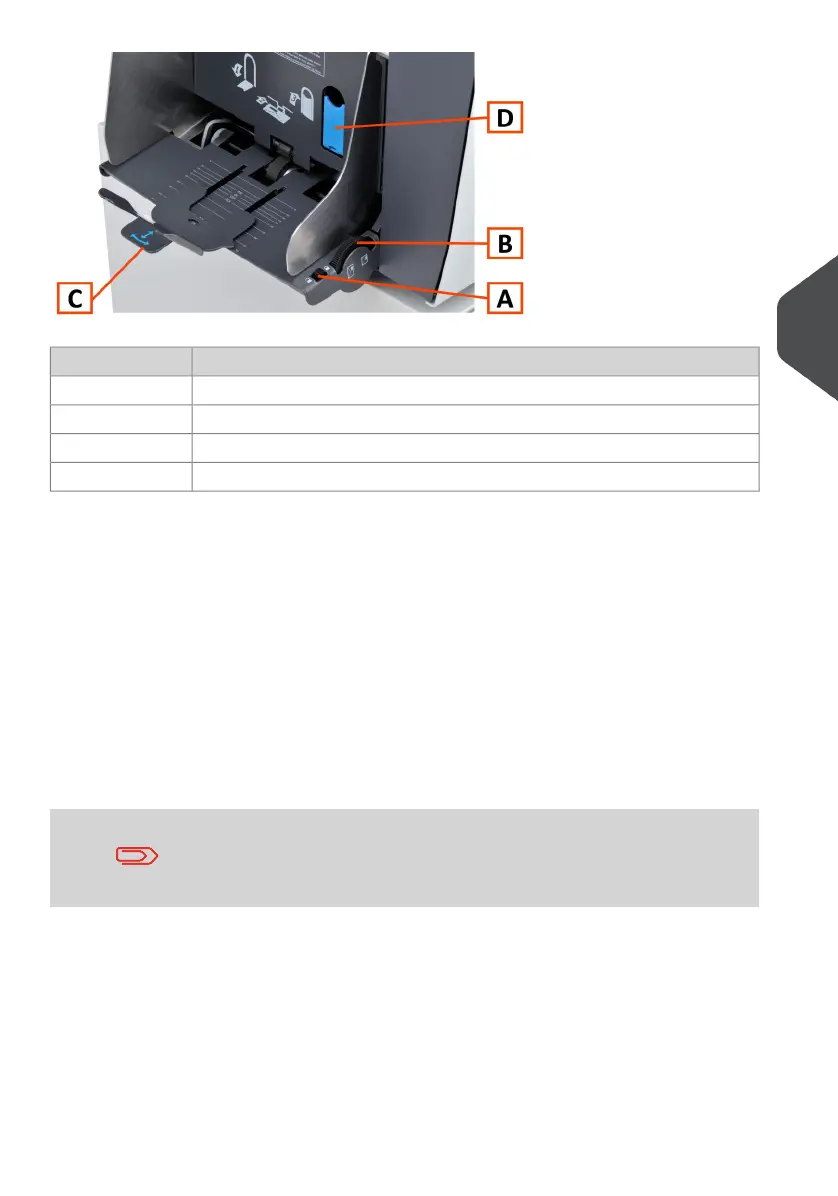
DescriptionItem
Side guide adjustment lock (to prevent unintentonal misadjustments).A
Thumbwheel for side guide adjustment.B
Envelope support to ensure correct feed angle.C
Lever to set/reset envelope separation.D
Loading envelopes correctly will help to prevent jams and mis-feeds. Make sure the envelope
separation and side guides are correctly set. Proceed as follows:
Make sure the locking knob A is in the unlock position.1.
2. Rotate thumb wheel B to move the side guides apart.
3. Shift the envelope support C out.
4. Loosen a stack of envelopes and place the stack between the side guides.
5. Move the side guides towards the envelopes.
The space between the side guides and the envelopes should be such that the
envelopes have just enough play to move freely.
If the distance between the side guides is too large, the envelopes
will twist sidewards, when transported into the machine.
6. Lock the side guides using the locking knob A.
7. Remove the stack of envelopes.
5
English
73
| Page 73 | Jul-11-2022 07:45 | Loading the System



 To Next Page