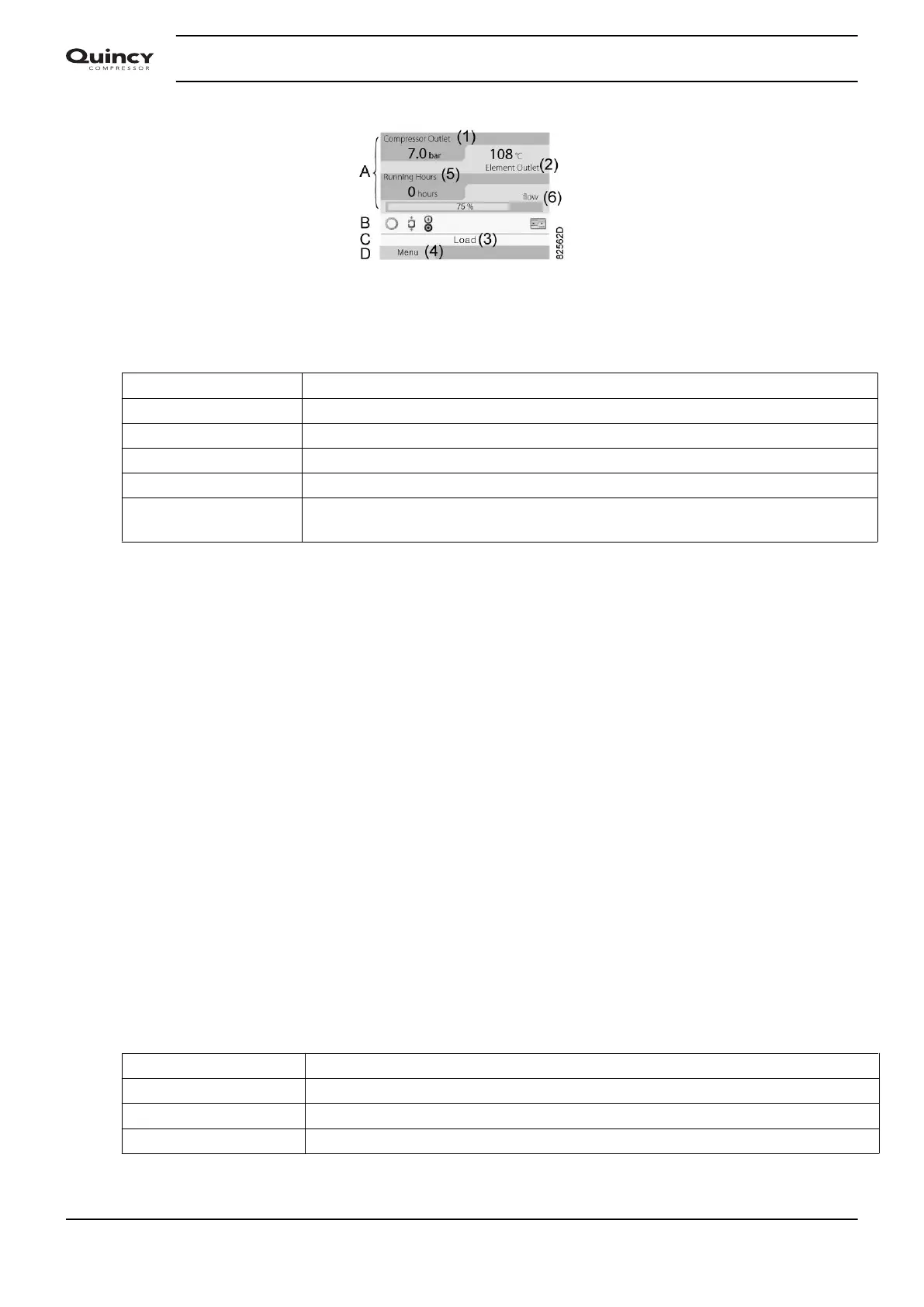
Typical Main screen (4 value lines), compressors with frequency converter
Text on figures
(1) Compressor Outlet
(2) Element outlet
(3) Load, ... (text varies upon the compressors actual condition)
(4) Menu
(5) Running hours
(6) Load relay (one of the input signals of fixed speed compressors)
Flow (compressors with frequency converter)
• Section A shows information regarding the compressor operation (e.g. the outlet pressure
or the temperature at the compressor outlet). On compressors with a frequency converter,
the load degree (flow) is given in % of the maximum flow.
• Section B shows Status icons. Following icon types are shown in this field:
• Fixed icons
These icons are always shown in the main screen and cannot be selected by the cursor
(e.g. Compressor stopped or Compressor running, Compressor status: running,
running unloaded or motor stopped).
• Optional icons
These icons are only shown if their corresponding function is activated (e.g. week timer,
automatic restart after voltage failure , etc.)
• Pop up icons
These icons pop up if an abnormal condition occurs (warnings, shutdowns, service,...)
To call up more information about the icons shown, select the icon concerned using the
scroll keys and press the enter key.
• Section C is called the Status bar
This bar shows the text that corresponds to the selected icon.
• Section D shows the Action buttons. These buttons are used:
• To call up or program settings
• To reset a motor overload, service message or emergency stop
• To have access to all data collected by the regulator
The function of the buttons depends on the displayed menu. The most common functions
are:
Designation Function
Menu To go to the menu
Modify To modify programmable settings
Reset To reset a timer or message
Instruction book
34 2920 7190 02






 To Next Page