Stand-alone use of the device 25
© 2023 Radiacode Ltd.
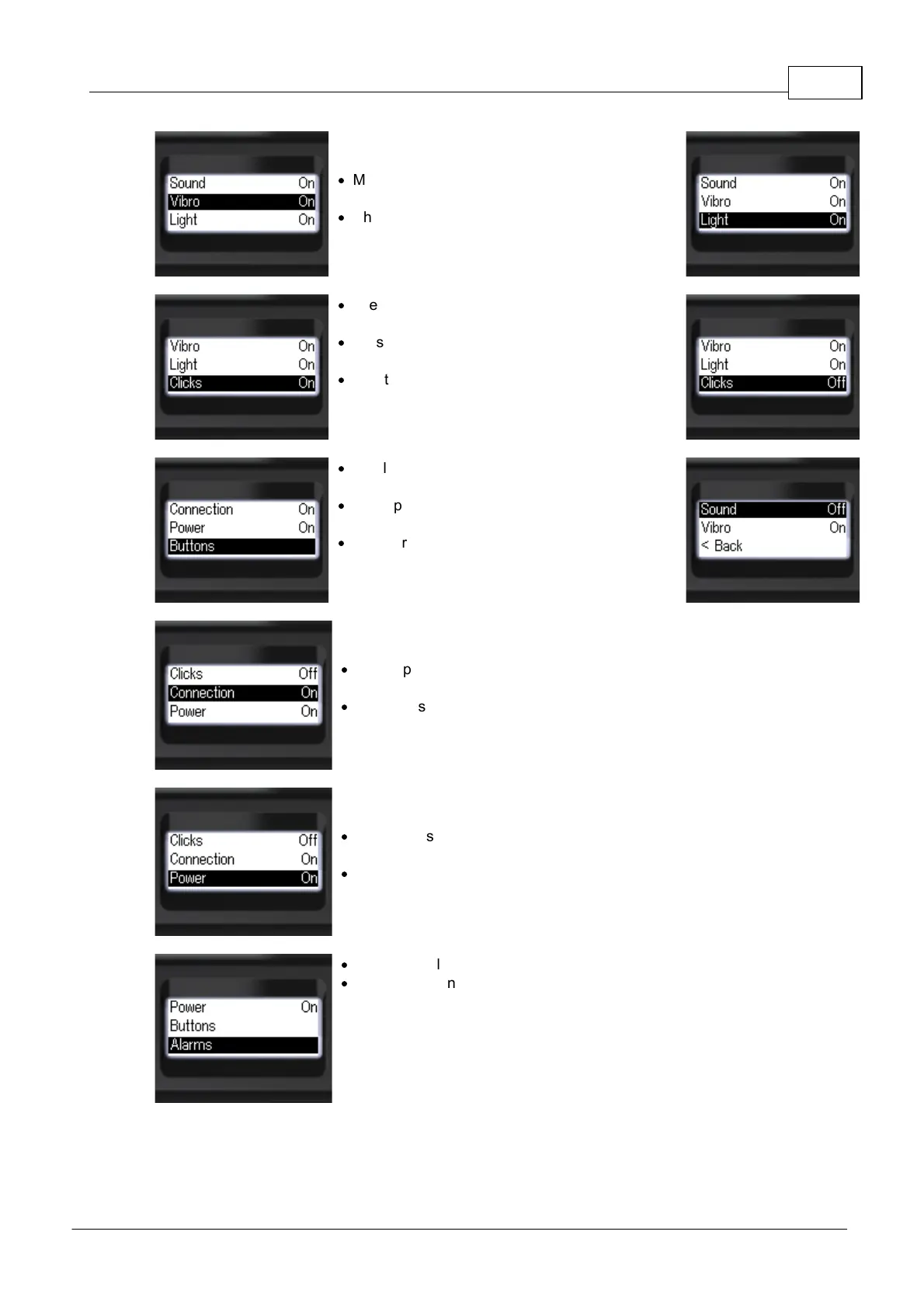
o Vibration and light modes can be set in the same
way:
·
Move the focus to [Vibro] or [Light] by short
presses on the up/down swing buttons;
·
Short presses on the round button to select the
[On] or [Off] mode.
·
The presence of gamma and X-ray photon
registration clicks can be controlled separately.
·
By short presses on the up/down swing buttons
move the focus to the item [Clicks];
·
Short presses on the round button to select the
[On] or [Off] mode.
·
Briefly press the up/down swing buttons to move
the focus to the [Buttons];
·
Short press the up/down swing buttons to move
the focus to [Buttons] or [Vibro];
·
Short press the round button to select the
desired response type.
o Separately, you can control the presence of the
device connection and disconnection signal.
·
Briefly press the up/down swing buttons to move
the focus to [Connection];
·
Short press the round button to select
[On] or [Off].
o The presence of the on/off signal can be controlled
separately.
·
Short press the up/down swing buttons to move
the focus to [Power];
·
Short press the round button to select
[On] or [Off].
·
To set the alarms, move the focus to [Alarms];
·
Press the round button briefly to confirm your
selection.



 To Next Page