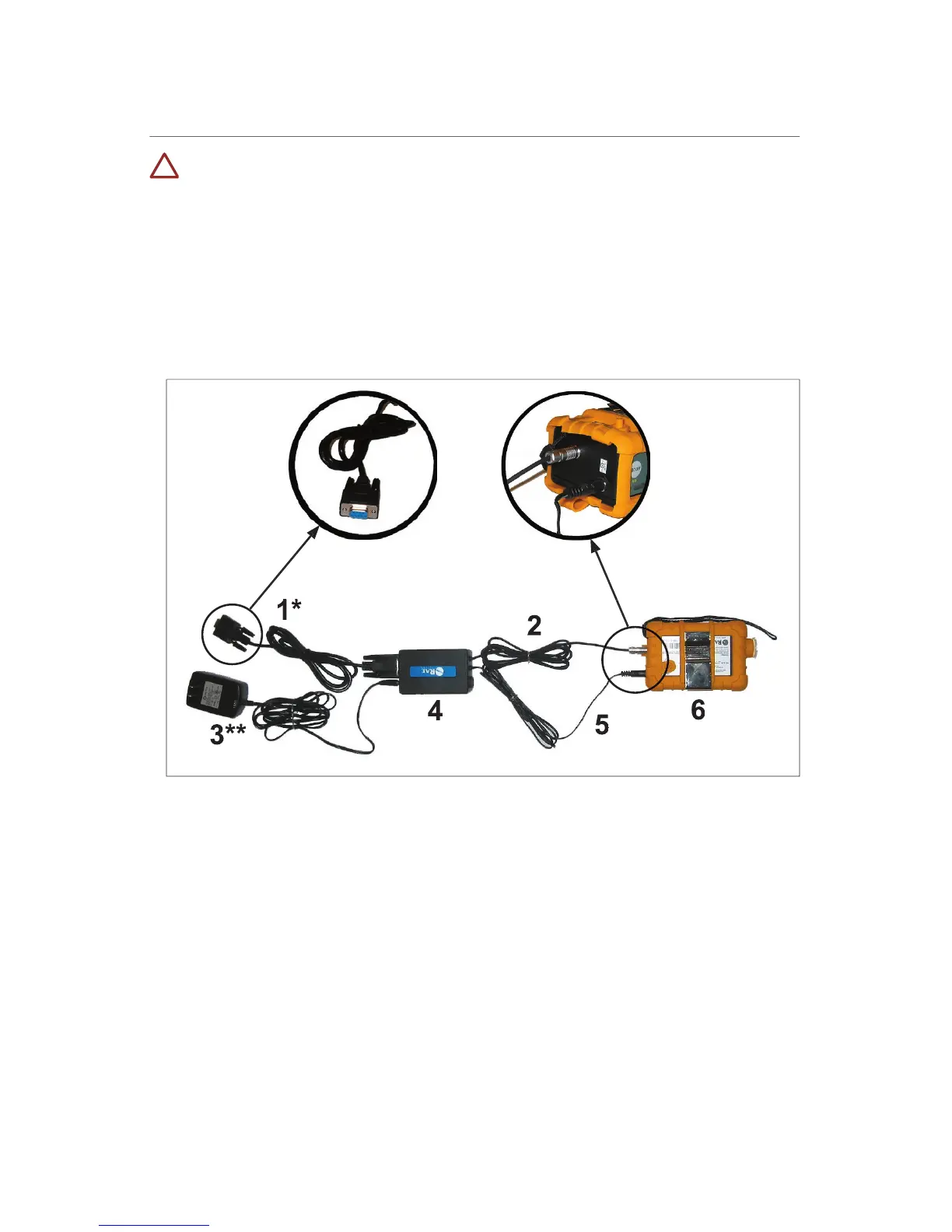
Using the Intrinsically Safe Barrier Box
This does NOT ship with UL/cUL-approved monitors. The barrier box is
only for ATEX European approved MultiRAE monitors.
To conform to ATEX European safety standard, the barrier box
when utilizing an RS-232 cable and/or transformer.
1. RS-232 cable (detachable)*
2. Computer interface cable
3. Transformer (detachable)**
4. Intrinsically safe barrier
Communicating with a Computer
* This connection is not necessary during normal charging.
Connect the RS-232 cable from the barrier box to the monitor.
Connect the computer interface cable to the barrier box.
Plug the computer interface cable into a computer.
** Connection is optional during computer communication.
Connect the power cable from the barrier box to the monitor.
Connect the transformer to the barrier box.
Plug the transformer into an appropriate outlet.



 To Next Page