EasyManua.ls Logo

RAL instruments STAINER - 9 INITIALISATION; 9.1 USER CREATION AND RIGHTS MANAGEMENT

RAL instruments STAINER
49 pages
Print Icon
To Next Page IconTo Next Page
To Previous Page IconTo Previous Page
Loading...
RAL STAINER
26
RAL STAINER User guide
9.1 USER CREATION AND RIGHTS MANAGEMENT
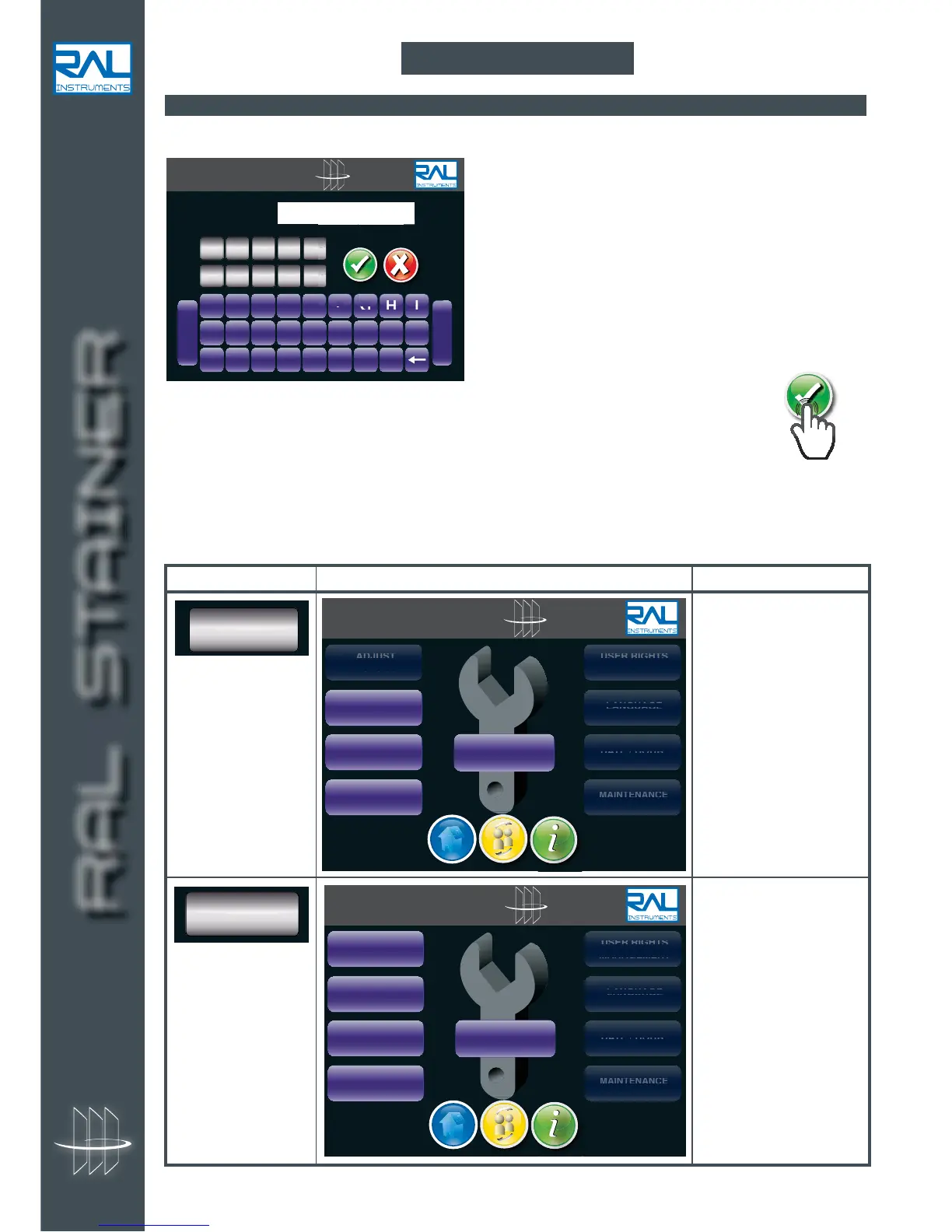
Turn on the appliance using the 0/1 switch located behind the instrument.
Enter the user code created with your RAL Instruments representative during the installation,
On first use, you must record the users and assign them access rights. The user code will then suffice to
start up the machine.
Four authorisation levels can be used:
9 INITIALISATION
Type Screen Rights
User level
This level makes it
possible to use the
machine and to load
protocols that have been
defined by an Expert or
Administrator user.
USER
RAL STAINER
SET
PROTOCOL
LOAD/CHANGE
REAGENTS
EMPTY
REAGENTS

USE
USE
USE
USE
RR
RR
RR
R R
IGH
IGH
IGH
IGH
TS
TS
TS
TS
MAN
MAN
AGE
AGE
MEN
MEN
T
T
LANGUAGE
LAN
LAN
LAN
GUA
GUA
GUA
GE
GE
GE
DATE
/
HOUR
DAT
DAT
E/
E/
HO
HO
UR
UR
MAINTENANCE
MAI
MAI
MAI
NTE
NTE
NTE
NAN
NAN
NAN
CE
CE
CE
OPEN
COVER LID
ADJ
ADJ
ADJ
ADJ
UST
UST
UST
UST
PRO
PRO
TOC
TOC
OL
OL
User level + creation and
modification of staining
protocols.
This level makes it
possible to use the
machine and to modify
the settings for a
protocol or to create a
new protocol.
EXPERT
RAL STAINER
SET
PROTOCOL
LOAD/CHANGE
REAGENTS
EMPTY
REAGENTS
USE
USE
USE
USE
RR
RR
RR
R R
IGH
IGH
IGH
IGH
TS
TS
TS
TS
MAN
MAN
AGE
AGE
MEN
MEN
T
T
LANGUAGE
LAN
LAN
LAN
GUA
GUA
GUA
GE
GE
GE
DATE
/
HOUR
DAT
DAT
E/
E/
HO
HO
UR
UR
MAINTENANCE
MAI
MAI
MAI
NTE
NTE
NTE
NAN
NAN
NAN
CE
CE
CE
OPEN
COVER LID
ADJUST
PROTOCOL
RAL STAINER
A B C D E F G H I
J K L M N O P Q R
S T U V W X Y Z
-
Space
CODE :
G
H
I
I
F
F
G
G
H
H
01234
56789

Table of Contents