RAL STAINER
34
RAL STAINER User guide
10.5 STAINING
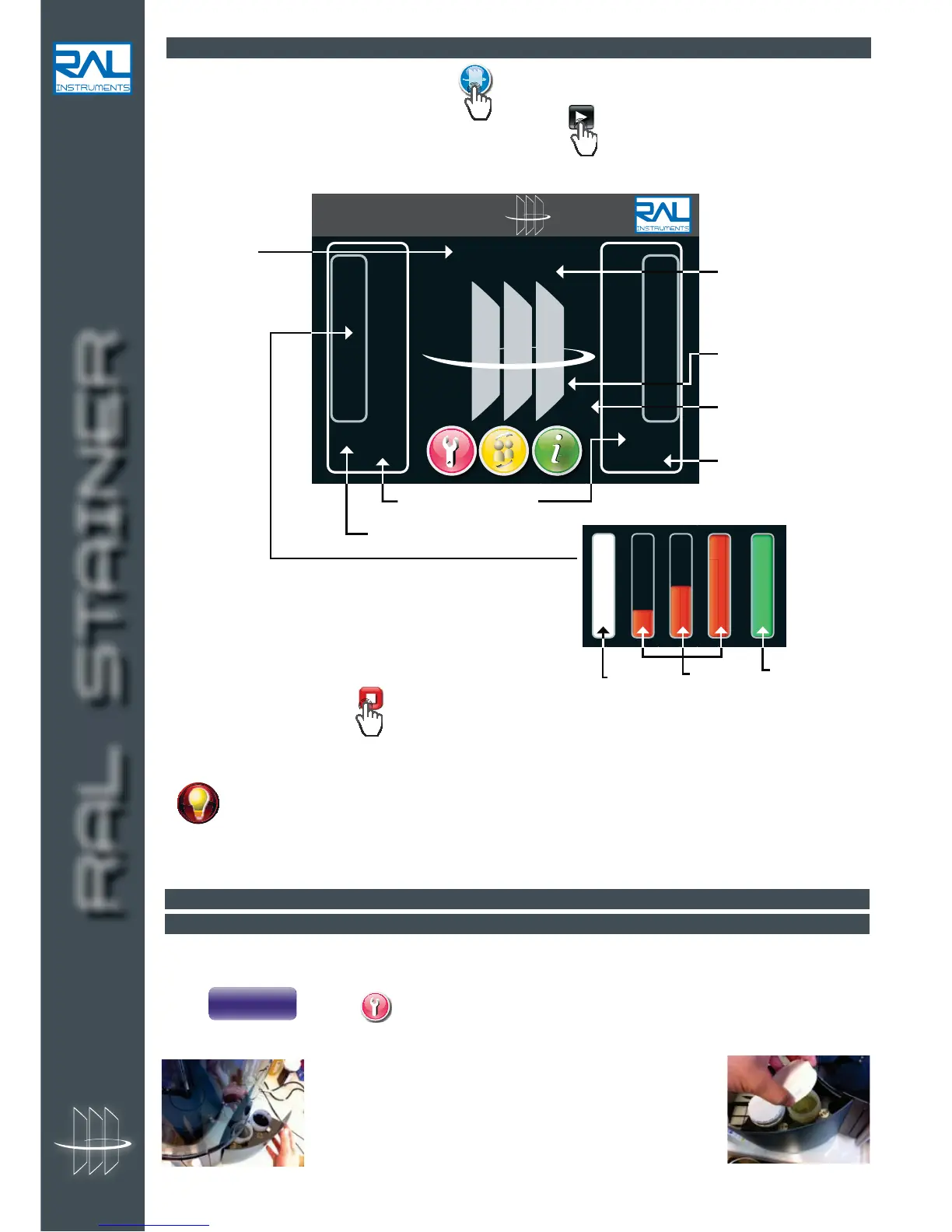
Staining is launched from the staining page, gives access to this page from any other page.
Once the protocol has been selected and the slides placed,
to launch the staining.
The appliance moves into action, the arm picks up the slide holder. Staining begins.
To halt an ongoing staining,
.
At the end of a cycle, unlock the drawer. Your slides are ready to be examined.
If two stainings are launched, the arm will begin the second staining after having dropped the first
slide holder back to its initial position. Before the second cycle begins, you can retrieve an
awaiting slide holder to add or change a slide by pressing on the lock button.
You can retrieve the first batch of slides after drying while the second batch is being stained.
The slide holder can be retrieved while drying is in progress.
10.6 CHANGING THE STAINING KIT OR DRAINING
10.6.1 CHANGING THE STAINING KIT
This is a useful function if you wish to use the appliance for several staining operations.
Press
on page .
The arm opens the lids, the reagent drawers open.
Put the caps back onto the bottles before removing them.
Remember to store the bottles away from light.
Then insert the bottles for the new staining kit and close the
reagent drawers.
The appliance is ready to operate using the new staining kit,
no cleaning cycle is required.
Name of the staining
protocol used
Name of the
staining kit
Control panel of the two
work zone
Error or information
message area
Remaining staining time
Number of staining
cycles remaining
Drawer status
Progress of staining
Staining in
progress
Drying in
progress
Available
zone
RAL STAINER


 To Next Page