RAL STAINER
31
RAL STAINER User guide
10.3.1 PROTOCOL MODIFICATION
RAL Stainer identifies the staining kit that was placed in the appliance and proposes a “Standard” protocol.
It is, however, possible to vary the protocol settings (time, mixing, rinsing).
On page
,
ADJUST
PROTOCOL
This function is only accessible to Administrator and Expert users.
See section 9.1.
Main settings
In the event of an error, returns to the previous screen.
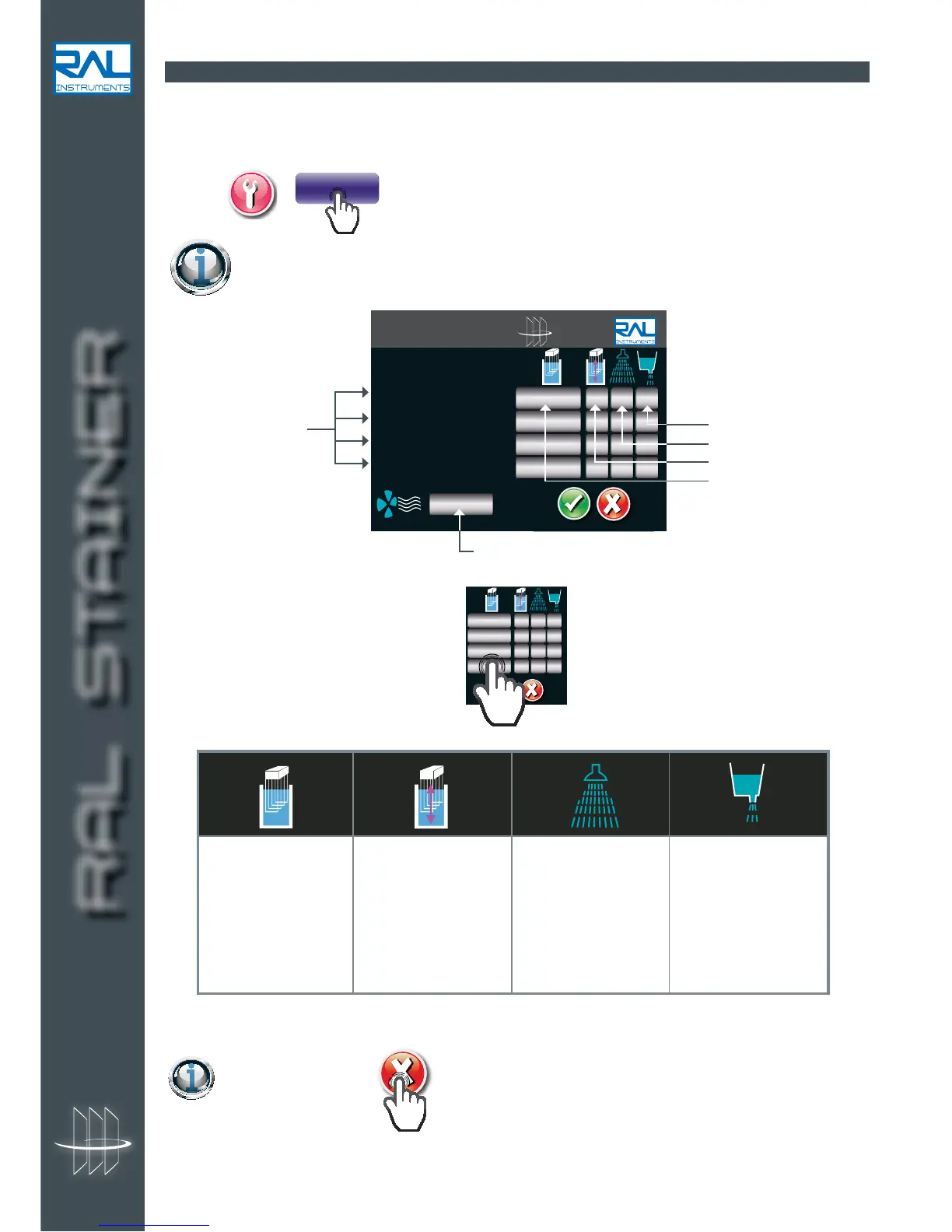
Indicate whether you
wish to drain the rinsing
liquid after each rinse.
A single push on the
key is used to switch
from yes to no.
Indicate the number of
rinses after each tank.
Pressing this key
displays another screen
used to define the
rinsing parameters. See
next section.
A single push on the
key is used to switch
from yes to no.
Select "Yes" if you wish
to agitate the slides in
reagent. If you select
"No" the slide holder
will not move during
soaking.
Press the time bar to
change the soaking
time in tank.
RAL STAINER
yes
min:sec
1
no
1 Reagent name
2 Reagent name
3 Reagent name
4 Reagent name
min:sec
Loaded reagents
Dipping time
Drying time
Slides shaking
Number of rinsing
Rinsing station
draining
To modify a setting,
yes
min:sec
1
no
.


 To Next Page