RAL STAINER
36
RAL STAINER User guide
The traceability file will indicate:
- Dates of each cycle
- User
- Staining kit name and batch
- Dyeing compliant Yes/No with error message. See section 16.1.
- Staining protocol
11.1 USING THE TRACEABILITY SOFTWARE
Insert the supplied CD into your computer.
Execute the file "Trace.exe" Follow the instructions.
The CD will install software which will enable you to decrypt the traceability file that can be retrieved from the
RAL Stainer.
11.2 LOADING THE TRACEABILITY FILE
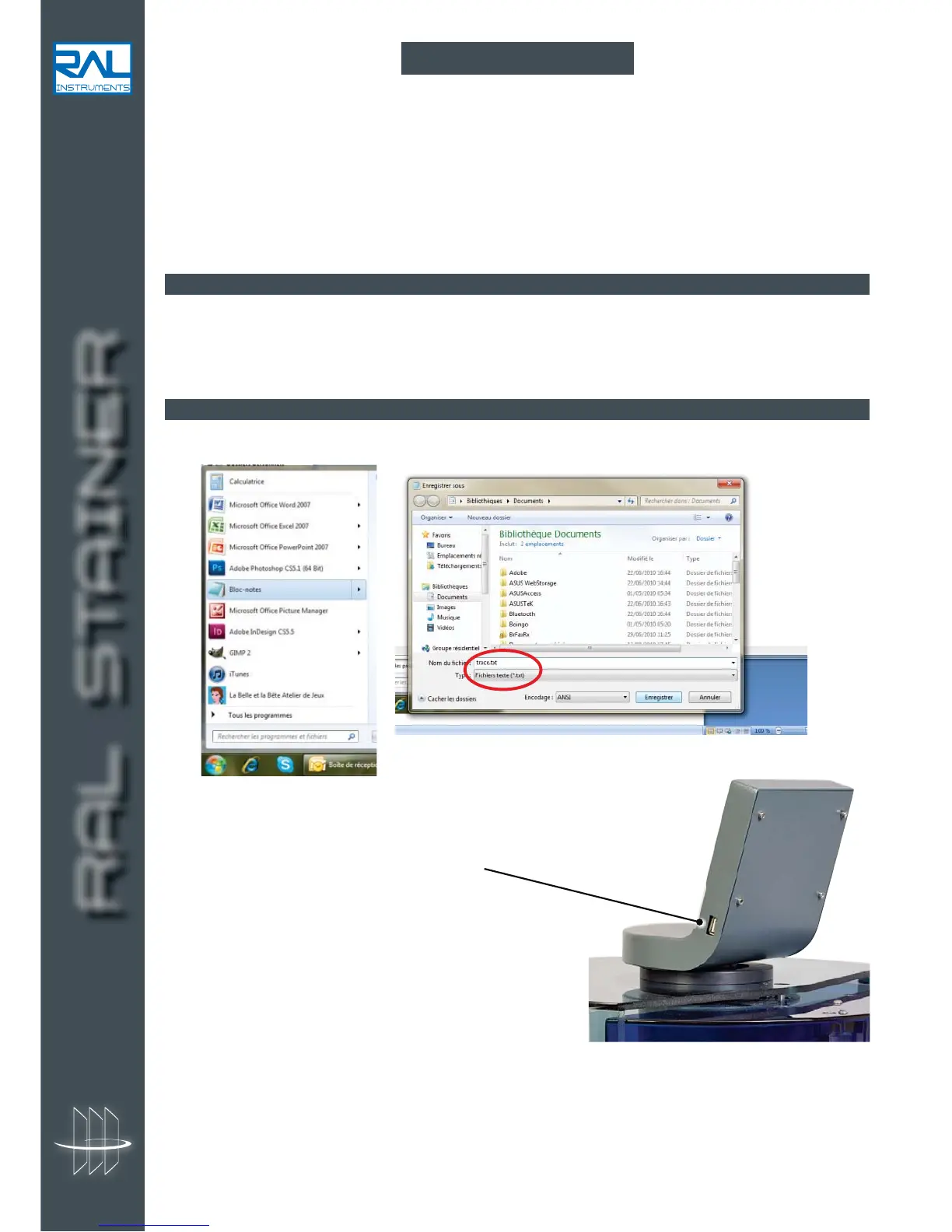
1. Create a new file on the supplied USB stick called "TRACE.txt" (capital letters) using the windows Notepad.
2. Turn off the appliance and insert the USB stick
supplied with the appliance in its location.
3. Turn the machine back on:
- the diode flashes.
- 3 Beeps indicate the end of the download.
4. Open the file on the USB stick named "TRACE.txt" using your traceability software "Trace.exe" on your
computer.
11 TRACEABILITY


 To Next Page