21
17. M
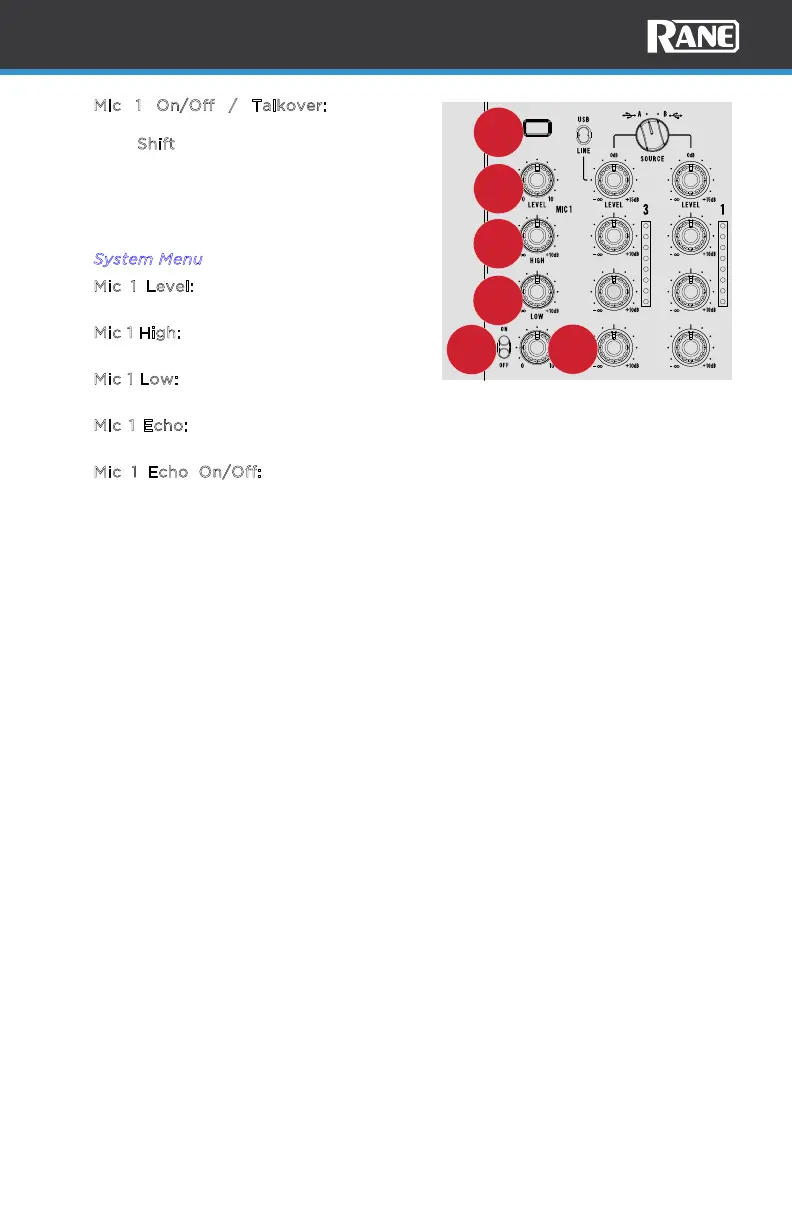
ic 1 On/Off / Talkover: Press this
button to turn Mic 1 on and o. Press and
hold S
hift and press this button to use
the “talkover” feature, which
automatically reduces the volume level of
the main mix when you speak into the
microphone. Talkover settings can be
adjusted in the system menu. See the
S
ystem Menu section for more details.
18. M
ic 1 Level: Turn to adjust the level of
Mic input 1.
19. M
ic 1 High: Turn this knob to boost or cut
the high frequencies of the Mic 1 input.
20. M
ic 1 Low: Turn this knob to boost or cut
the low frequencies of the Mic 1 input.
21. M
ic 1 Echo: Turn this knob to adjust the
Echo level of Mic input 1.
22. M
ic 1 Echo On/Off: Use this switch to
turn Echo on or o for Mic input 1.
/
VOCAL
/
MELODY
/
DRUMS
/
VOCAL
/
MELODY
/
DRUMS
HIGH
MID
LOW
HIGH
MID
LOW
MIC 1 FX
MIC 1 ON
TALKOVER
17
18
21
22
20
19



 To Next Page