User Manual
3
1. Audio Inputs
2. Video Outputs
3. VGA Output (Optional)
4. USB Port (Optional)
5. POWER Switch
6. LAN: Ethernet port
7. Audio Outputs
8. CH1-CH4:Video input1- video input4
9. RS-485/SENSOR/ALARM
10. Power Input Jack
11. Grounding
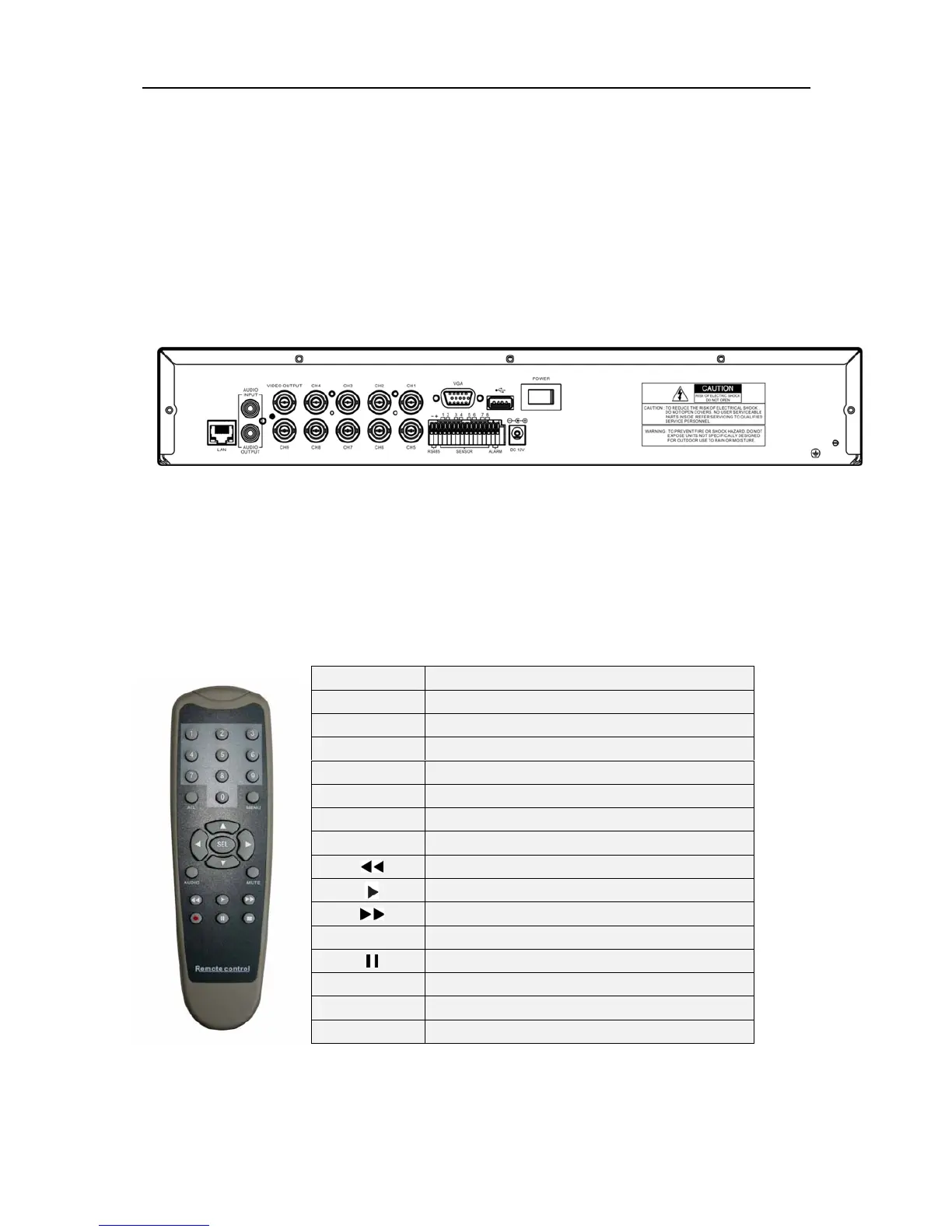
2.2.2 9-ch DVR rear panel
1.Audio output
2.Audio input
3.Video output
4.CH1-CH9:Video input1- video input9
5.VGA output (Optional)
6.USB port (Optional)
7.POWER Switch
8.LAN: Ethernet port
9.RS-485/Sensor/Alarm
10.DC Power input jack
11.Grounding
2.3 Remote Control
1-9 Channel Select 1-4/9
0 Number
ALL Display all Channels
Menu Enter or Exit Menu
▲
Move Up
▼
Move Down
◄ / ►
Left/ Right
SEL Select /Modify Item
Rewind/Focus
Play Recording/Zoom
Fast Forward/Iris
●
Record
Pause/Auto sequence display
■
Stop Recording/Playback
Audio/Search Search (9-ch)or switch the audio channels(4-ch)
Mute Turn on/off audio output



 To Next Page