÷
TO MEMORIZE CHANNELS
(CONTINUED)
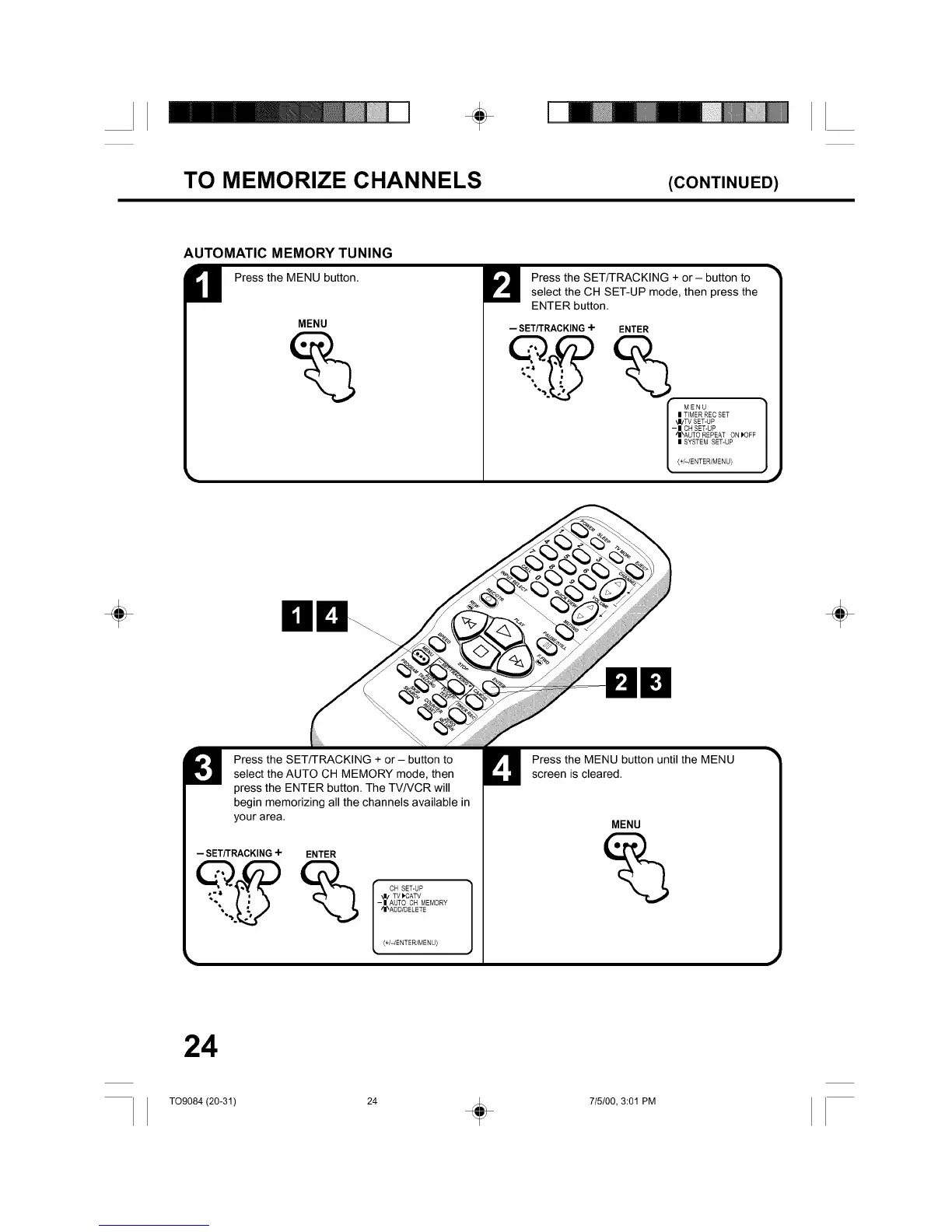
AUTOMATIC MEMORY TUNING
H Press the MENU button.
MENU
%
Press the SET/TRACKING + or - button to
select the CH SET-UP mode, then press the
ENTER button.
-- SET/TRACKING ÷ ENTER
MENU
| TIMER RECSET
'J/TV SET-UP
- | CHSET-UP
_I\AUTO REPEAT ON _OFF
| SYSTEM SET-UP
(+I-IENTER/MENU)
÷ ÷
Press the SET/TRACKING + or - button to
select the AUTO CH MEMORY mode, then
press the ENTER button. The TV/VCR will
begin memorizing all the channels available in
your area.
-- SET/TRACKING÷ ENTER
CH SET-UP
_I/TV)CATV
-| AUTO CH MEMORY
_I_AOD/DELETE
_+I-IENTER/MENU)
Press the MENU button until the MENU
screen is cleared.
MENU
24
T09084 (20-31) 24 _ 715/00, 3:01 PM



 To Next Page