÷
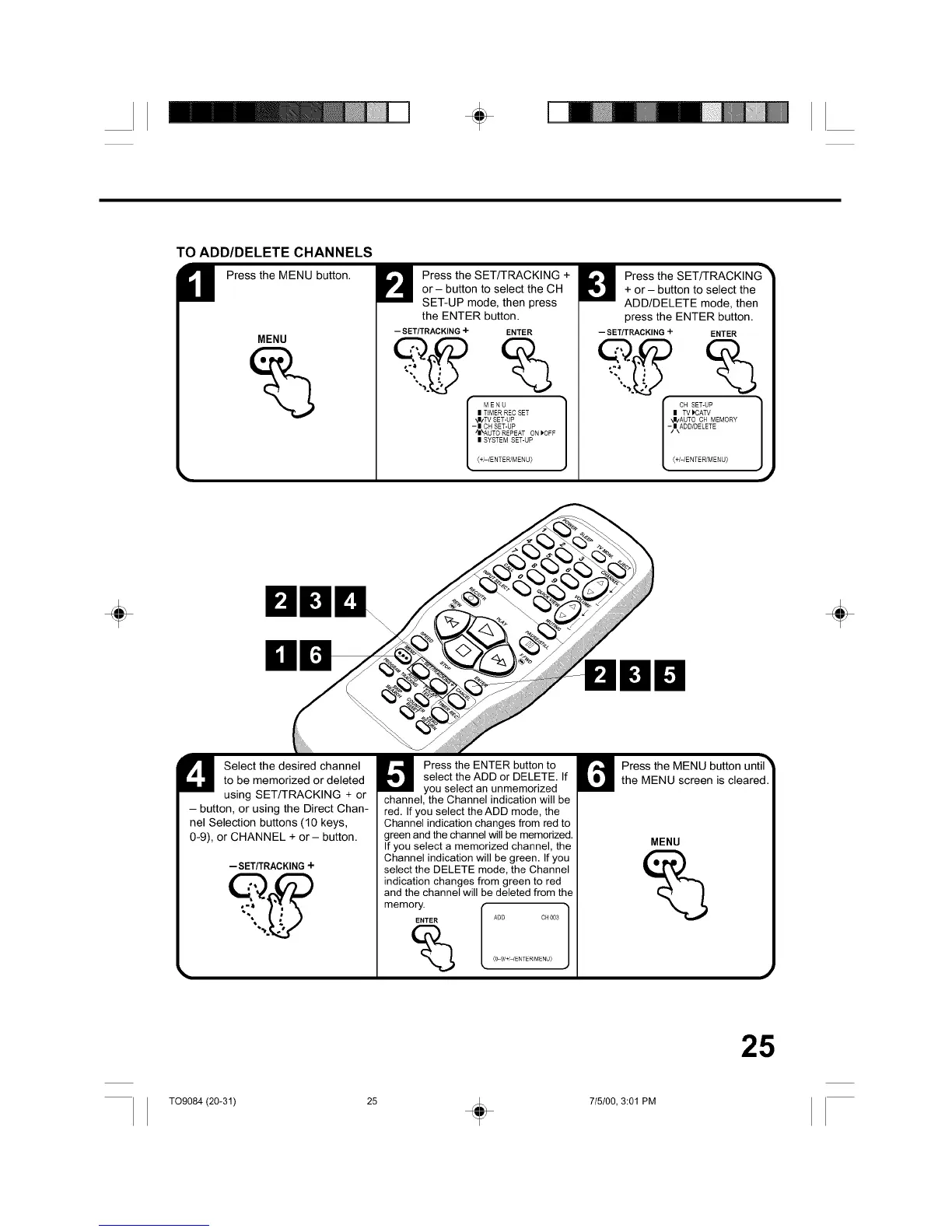
TO ADD/DELETE CHANNELS
M Press the MENU button.
MENU
Press the SET/TRACKING +
or - button to select the CH
SET-UP mode, then press
the ENTER button.
-- SETITRACKING + ENTER
MENU
| TIMER REC SET
_I/TV SET-UP
- | CH SET-UP
/|\AUTO REPEAT ON _OFF
| SYSTEM SET-UP
(+/-/ENTER/MENU_
Press the SET/TRACKING
+ or - button to select the
ADD/DELETE mode, then
press the ENTER button.
-- SET/TRACKING + ENTER
I CH SET-UP
| TV )CATV
"JI/AUTO CH MEMORY
-/I\ADD/DELETE
(+/-/ENTER/MENU_
÷ ÷
U elect the desired channel
to be memorized or deleted
using SET/TRACKING + or
- button, or using the Direct Chan-
nel Selection buttons (10 keys,
0-9), or CHANNEL + or - button.
-- SET/TRACKING+
Press the ENTER button to
select the ADD or DELETE. If
you select an unmemorized
channel, the Channel indication will be
red. If you select the ADD mode, the
Channel indication changes from red to
green and the channel will be memorized.
If you select a memorized channel, the
Channel indication will be green. If you
select the DELETE mode, the Channel
indication changes from green to red
and the channel will be deleted from the
memory. ]
ENTER ADD CH003
{O-9/+/qENTER/MENU)
Press the MENU button until3
the MENU screen is cleared.
MENU
J
25
T09084 (20-31) 25 + 715100, 3:01 PM



 To Next Page