SAM 400 SPEED-AREA-DISTANCE METER
10
Set Implement Width/Nozzle spacing
The factor to be programmed is the full, effective working width of the
implement.
NOTE: If an ACI is connected on a sprayer, the implement width is equal to the
nozzle spacing, e.g. 0.5 metres, You must then programme the ACI input
(number of nozzles per section).
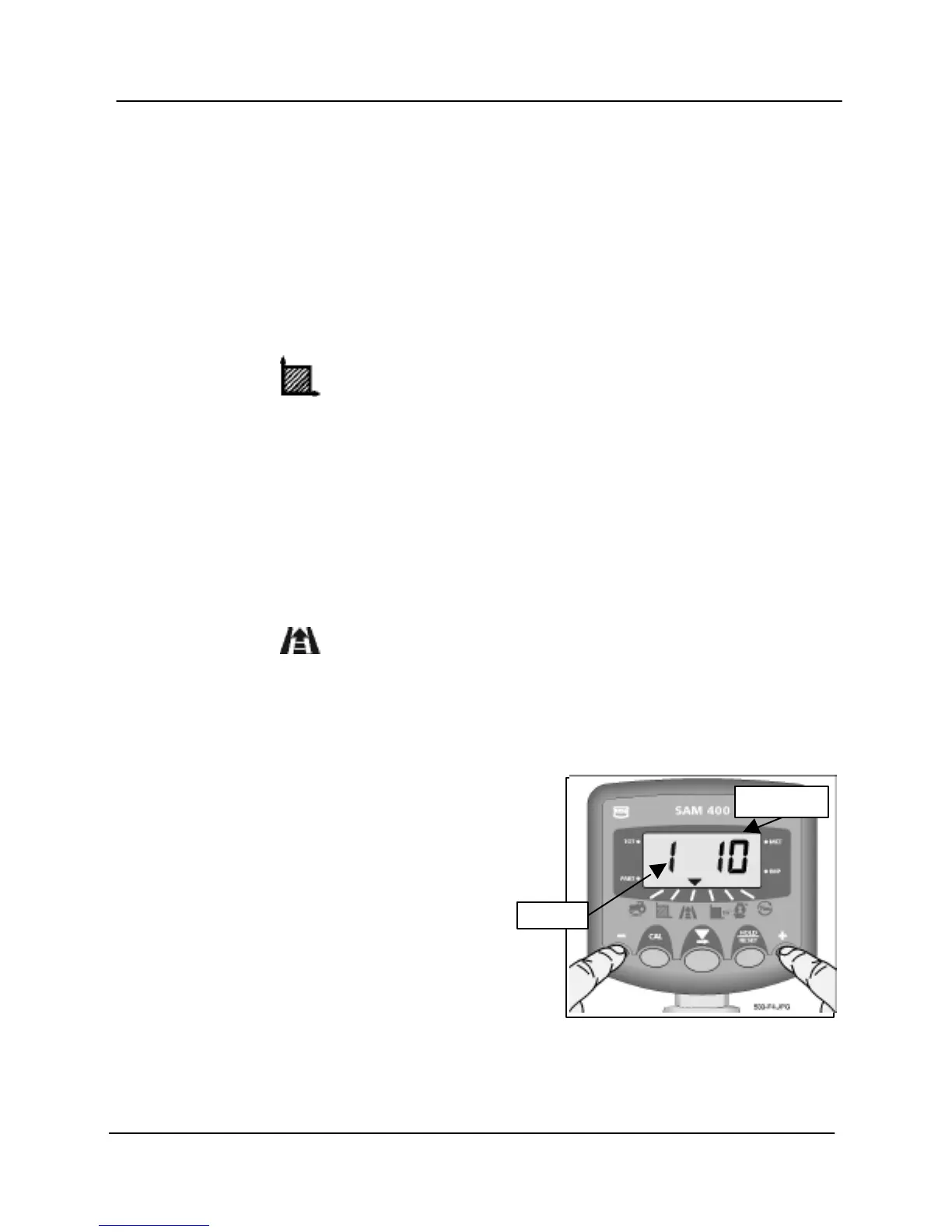
1. Press and hold the CAL button while switching the instrument on.
2 Select the channel.
3. Use the small left and right buttons to set the width/nozzle spacing in metres
or inches as appropriate.
ACI Input - Set No. of Nozzles per Section
1. Press and hold the CAL button while switching the instrument on.
2 Select the channel.
NOTE: For single section sprayers fitted with a simple cutout switch, the number
should be the total no. of nozzles for the boom.
If none or more than one section is switched on, the display will show "- - - -"
and you can't programme the no. of nozzles.
3. If connecting an ACI module into the
sprayer switchbox, switch on one section
at a time.
4. Using the small left and right buttons, set
the number of nozzles for that section.
5. Repeat for each section in turn.



 To Next Page