SAM 400 SPEED-AREA-DISTANCE METER
6
For both area and distance there are two memory registers - a 'Part' total
("tot.1") and a 'Full' Total ("tot.2"), which can be independently reset. For
example the part total register may be utilised for individual jobs, fields etc,
whereas the 'full' total register may be the daily total.
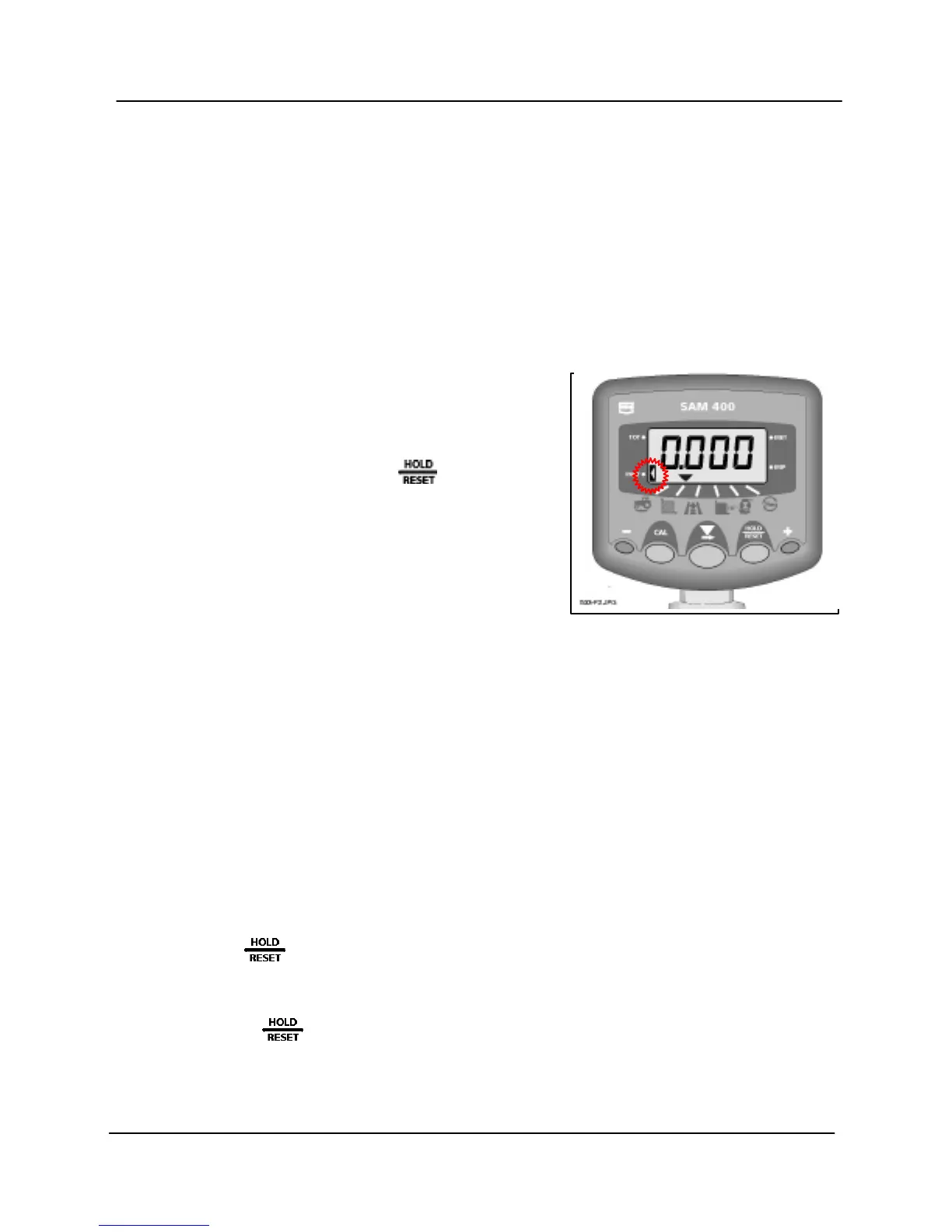
The lefthand indicator indicates which total is currently displayed. To display
the appropriate total, first select the area or distance channel. Then press the
CAL button to toggle between "tot.1" (part total) and "tot.2" (full total).
Reset Area / Distance Totals
The full total ("tot.2") can only be reset
with the security link in place on the
instrument connector.
Select the appropriate total (as above)
then press and hold the button.
The lefthand indicator will flash and the
instrument will beep for 5 seconds after
which the total is reset to zero.
Area Override and Part Width operation
(i) On-Off Switch
As standard the system will have an on-off override switch installed.
Depending on the particular application, this may be a simple manually
operated switch, or it could operate automatically. The area/distance will
stop accumulating when the implement is put out of work. The channel
indicator will flash when area/distance accumulation is overridden and will
be on permanently when area/distance is being recorded.
Area/distance accumulation can also be overridden at any time by pressing
the button.
Whichever channel is selected, the display will then alternate between the
channel readout and the message 'HeLd'.
Press to resume area/distance accumulation.



 To Next Page