BlackMax – Installation and Operation Manual
Page 23 of 36
Issue date: 24/11/2023. Version 13.0
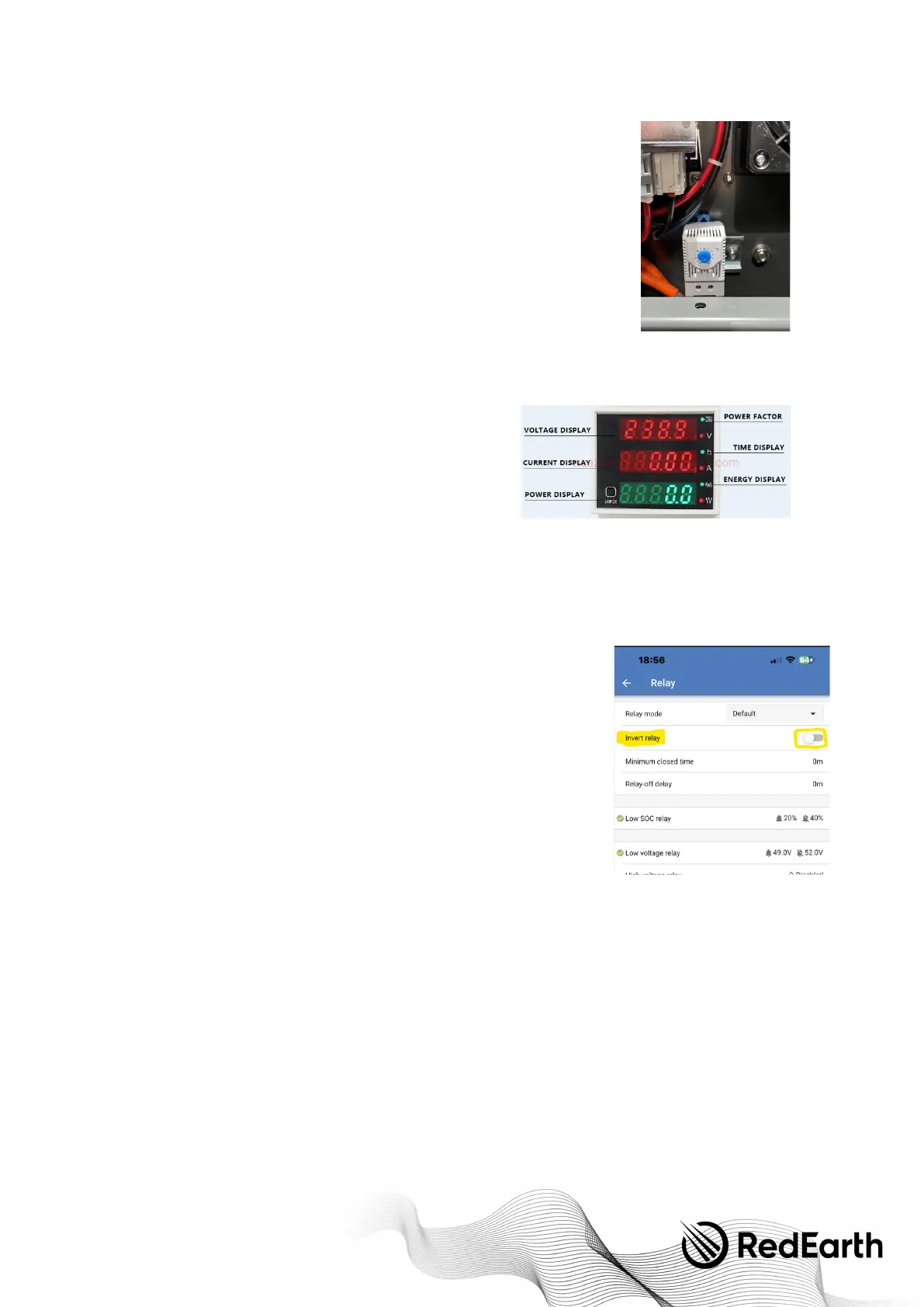
Fan Control Adjustment
The thermostat that controls the fan operation is located inside the unit near the fan. This
automatically starts the fans once the temperature rises above the set-point. This set-point
can easily be adjusted with a small screwdriver. It is set to 25
Celsius in the factory.
Tu r n this screw until the fan comes on then reset it to 25
Celsius, or the desired setting.
Te s t t h e o p eration of the backup generator, if available.
If the customer has a generator, now is the time to test that it charges the BlackMax, and to
demonstrate this to the customer.
Many future issues can be avoided if the customer's generator is tested during installation to
confirm that it syncs with the inverter and chargers the batteries.
Note: when the generator is connected the battery will be charged as a priority. Other loads
will also be powered by the generator at the same time. The amount of load that will be drawn by the generator is dependant
on the configuration of the BlackMax (Default Max 1.5KW), please ensure this is set appropriately as if the other loads are too
high the generator may become overloaded, and if set to low, the generator will be underutilised. If the generator starts due to
low SOC it is always recommended to reduce your other loads while the battery is being charged.
The 'GENERATOR USAGE METER (AC)' on the right side of the system
shows the load the generator is supplying. The power display in Watts
can be used to ensure that the generator does not become
overloaded.
The generator is only needed if the battery becomes depleted. This
usually occurs when after the sun has gone down, and the solar panels
are not charging the battery. If the BlackMax shuts down during the
night, then it will automatically begin recharging itself in the morning
when the sun comes up.
NOTE: When using the grid instead of a generator the 'GENERATOR USAGE METER (AC)' display will remain on. The current
reading will however show 0amps unless the grid is called upon (e.g. low soc), or is force enabled through settings. Note: in the
event of a blackout this screen will turn off and no power will be available from the grid until the blackout passes,
Flashing light alert
The flashing light will come on when the State-of-charge (SOC) of the battery drops to
20% or the battery voltage drops below 51 volts, whichever comes first. The flashing
light will continue until the battery reaches an SOC of 40% or 53.8 volts.
During installation this can only be tested if the battery voltage or SOC drops below
these settings, which may not occur while the installer is onsite. A partial test can be
conducted by logging into the VictronConnect app and manually closing the
Invert relay
switch. This will start the light flashing.
Generator 2-wire auto-start
If the generator 2-wire auto-start option has been installed during installation at the
customer's site, then it will be necessary to confirm the generator auto starts during
installation. To do this complete the following steps to force start the generator.


 To Next Page