
 Need help?
Do you have a question about the RedEarth BlackMax and is the answer not in the manual?
Warning about the weight of the BlackMax and proper lifting techniques.
Instructions for fire safety, emphasizing LFP battery type and water prohibition.
Guidance on handling and disposal of damaged batteries.
Requirements and qualifications for qualified installers, including understanding of electrical systems and risks.
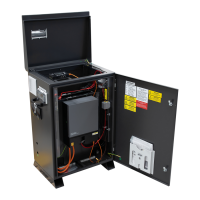
Instructions on how to open the BlackMax unit for access via the lid or front door.
Description of the internal layout, divided into AC, DC, inverter, and battery areas.
Instructions for safely transporting the BlackMax system, noting its weight and handling precautions.
General overview of how electrical components are connected within the system.
Detailed instructions for connecting the solar array using MC4 connectors.
Instructions for connecting the Troppo batteries within the BlackMax unit.
Connecting generators or the grid to the BlackMax terminals.
Connecting an AC-coupled renewable energy source to the system.
How to configure the generator input port for smart load output functionality.
Step-by-step guide to powering up the BlackMax system and checking displays.
Steps to access the Local Mode on the SolarMan app for parameter adjustment.
Recommended settings for Battery configuration 1 in the inverter.
Recommended settings for Battery configuration 2 in the inverter.
Recommended settings for Battery configuration 3 in the inverter.
Recommended settings for System Work Mode 1, including Zero Export.
Configuration options for SmartLoad functionality, including generator input.
Recommended settings for System Work Mode 2, focusing on Time of Use scheduling.
Configuring the generator port for smart load output, e.g., for an air-conditioner.
Configuring the generator port for AC-coupled renewable energy input.
Parameters for AC-coupled input: Micro Inv Input OFF/ON, AC Couple Fre High, MI Export to Grid Cutoff.
How to set up the Victron BMV for accurate battery SOC measurement and calibration.
Procedure for testing the generator's functionality and syncing with the inverter.
Explanation of the flashing light indicator for low battery SOC.
How to test the generator's 2-wire auto-start functionality during installation.
Overview of the four local displays on the BlackMax unit for monitoring and control.
Explanation of the inverter's display, icons, and operating modes.
Details of the various summary screens showing system status (Home, Gen, Load, Solar, Battery).
Details on the Victron SOC display, its parameters, and button operation.
Explanation of the AC power input/output displays and their functions.
Guide to setting up remote monitoring using the RedEarth EMU app via QR code scanning.
Explaining the Victron meter and side AC displays to the customer.
Demonstrating the generator charging the BlackMax to the customer.
Assisting customers with downloading and registering the RedEarth EMU app.
Steps to take when the system loses power, focusing on SOC and generator use.
What to do if Troppo batteries go completely flat and the system is in Emergency Power Mode.
Steps to diagnose why the generator is not charging the batteries.
How to estimate battery SOC based on voltage readings.
Single line diagram illustrating the power flow within the BlackMax system.
Single line diagram detailing the communications connections for the system.
Single line diagram showing the connection to a generic main switchboard.
Detailed technical specifications for the BlackMax unit, including PV, battery, and AC parameters.
Technical specifications for the Deye SUN-6K-SG04 inverter model.
Detailed technical specifications for the RedEarth Troppo battery, including capacity and safety.
 General
| Voltage | 48V |
|---|---|
| Capacity | 3.3 kWh |
| Chemistry | Lithium Iron Phosphate (LFP) |
| Cycle Life | >8000 cycles at 80% DoD |
| Operating Temperature | -20°C to 50°C |
| Terminal Type | M8 |

 To Next Page


