BlackMax – Installation and Operation Manual
Page 27 of 36
Issue date: 24/11/2023. Version 13.0
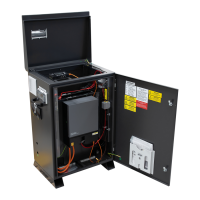
§ Victron state-of-charge meter in the lid. (option to show them the Victron Bluetooth monitoring App)
§ Internal Battery display readings
§ Left side displays - explaining and demonstrating AC power OUT and IN readings. Connect a range of
loads to demonstrate their different power consumption.
o Demonstrate the customers generator charging the BlackMax (also confirms that the customers generator is
suitable). Confirm that the charge rate is set correctly for the generator available. The default setting is 1.5kW.
Explain to the customer that if other loads are on while the generator is charging the battery then these will be
additional load on the generator, which may overload a smaller generator.
o If remote monitoring in installed, assist the customer to download the RedEarth EMU app on their mobile phone
and register their system and warranty using the QR code on the side of the system.
• Check screws holding the lid down are in place. Check the vents and fans are properly attached.
• Provide all Manuals, documents, and spare parts to the customer.
• The system is now ready for handover.


 To Next Page