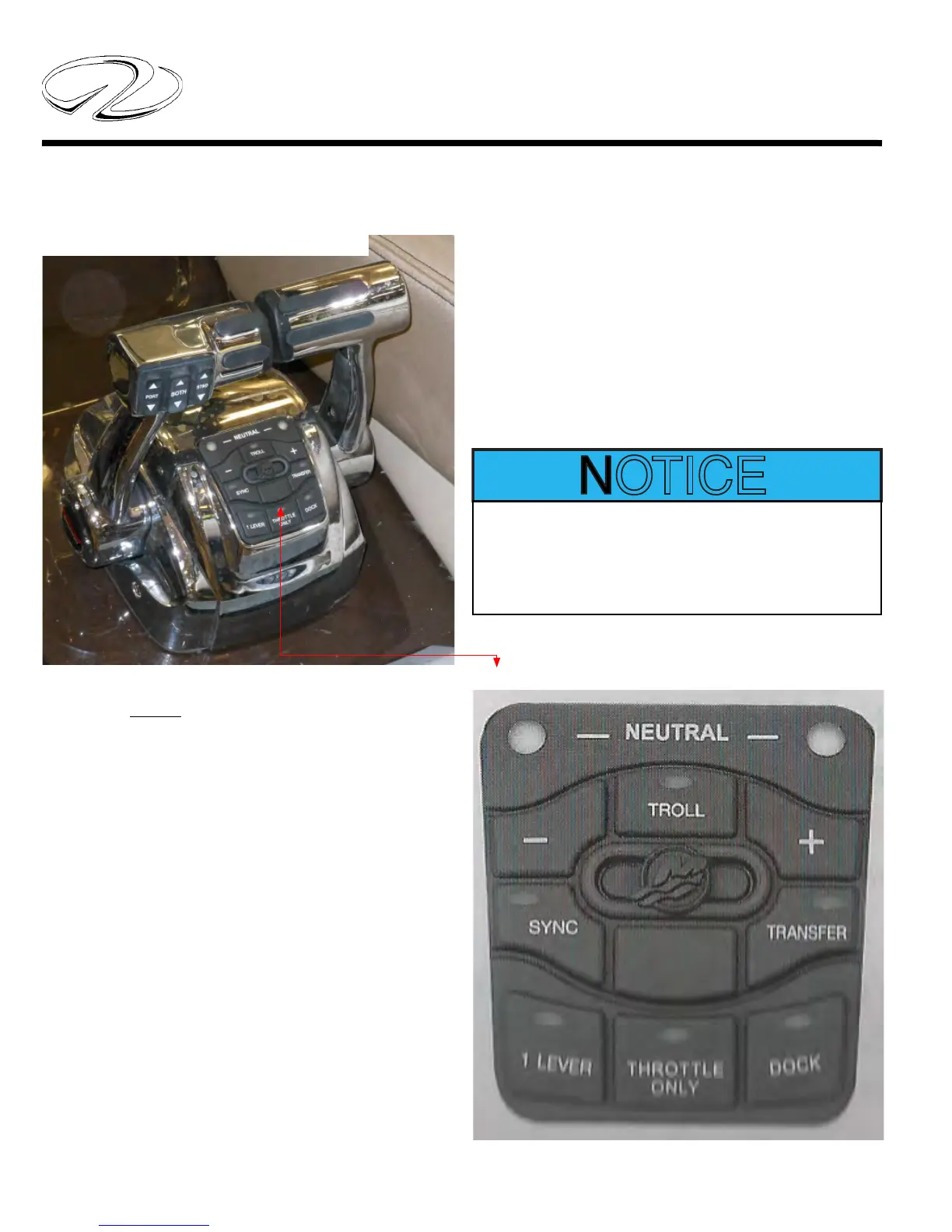
MERCRUISER DTS CONTROL SHOWN
MerCruiser- General Button Functions
Below is a general description of the MerCruiser elec-
tronic control functions. Consult you engine operator’s
manual for more in-depth information.
The Axius electronic control system converts manual
control movements to digitial readings which tell the en-
gines how to maneuver.
Trim button- The port handle offers power trim with
3 functions available: port engine trim, starboard engine
trim, and a button that synchronizes both trim systems.
Syn- Allows the use of one control handle to throttle
both engines. With both engines running over 1500 rpm’s
when the syn button is pressed you put the port handle
in the neutral position and press the lever button. Now
the port handle controls both engine throttle functions
and you can put the stbd. handle in an out of the way
position.
Throttle Only- When the button throttle only button
is depressed, put both throttles in neutral and push the
handles forward as desired for throttle only positions.
Dock Mode- When actuvated the system cuts power by
50% for docking situations. Basically it provides “room
for error” assisting in tight maneuvering.
Transfer- This button is used on vessels with more than
1 helm station. It is currently not being used in the Regal
model line-up.
TYPICAL MERCRUISER DTS CONTROL PAD



 To Next Page