Instruction Manual
Radio control devices T3, T5 and T7.
version 1.4 Genn. 10
Programming the transmitter functions
It is possible to programme the following functions:
1 - Self cut-out
2 -Radio frequency output power
3 - Enabling of AUXILIARY 7 button (relay CR13)
4 - Operation of AUXILIARY 7 button (relay CR13 or A-B)
5 - Low power start-up
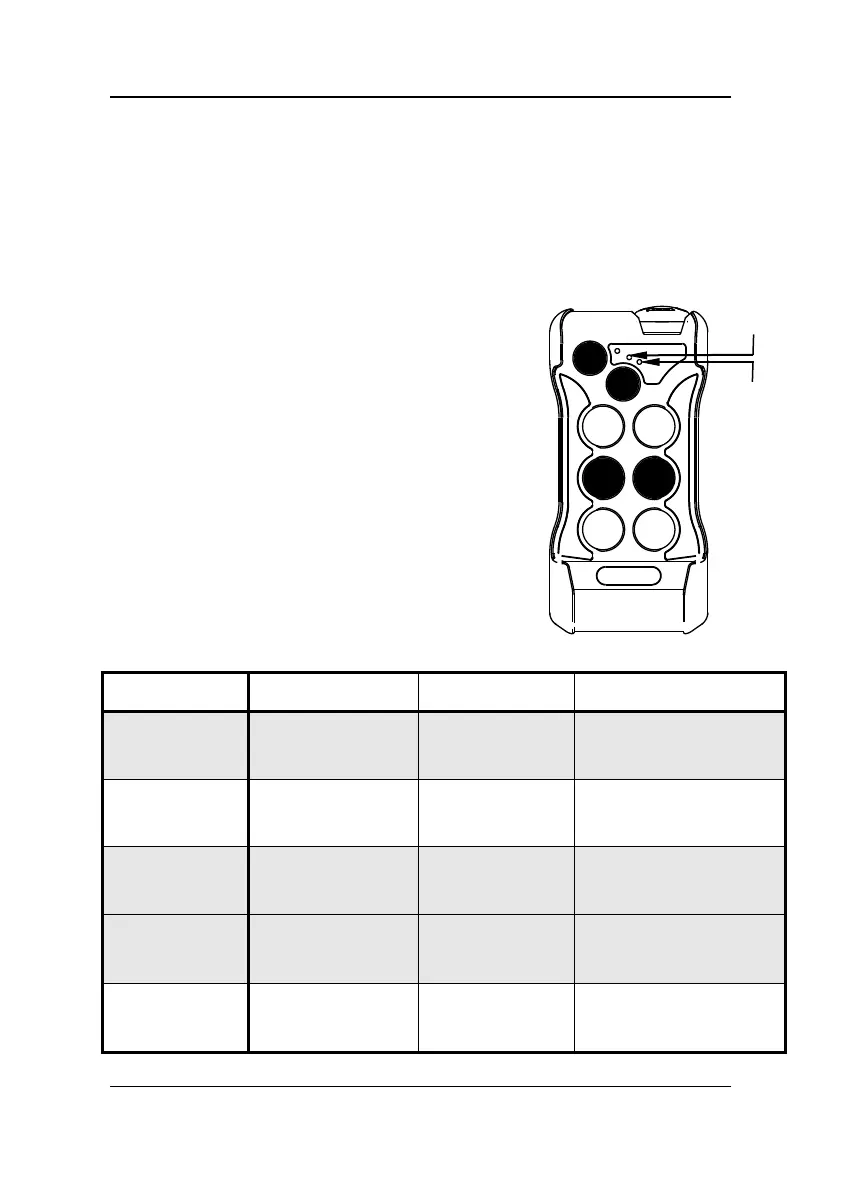
To enter function programming mode
• Supply power to the transmitter by releasing
the red Stop/Emergency mushroom button.
• Press the buttons 3, 4, 7 together and
simultaneously the Start button S, then
release.
After this sequence the green Led blinks
rapidly.
Programme the functions following the table
given below.
Each time the button chosen (1, 2, 3, 4, 5) is
pressed the associated function changes status
as displayed by the red Led.
To quit programming mode, press the red
Stop/Emergency mushroom button.
Button to press
programmed function
Button 1
SELF CUT-OUT
EXCLUDED
ACTIVE
after 3 minutes’
inactivity
Button 2
RADIO POWER
MEDIUM NORMAL
Button 3
AUXILIARY
BUTTON
Button 7
EXCLUDED
Button 7
ACTIVE
Button 7
Relay A – Relay A+ B
with CR1 or CR3
Button 4
AUXILIARY
BUTTON
Relay CR13
Pulse
Relay CR13
Step by step
Relay A - Relay B -
Relay A+B
LOW POWER
EXCLUDED ACTIVE
page 22 of 28 REMdevice
®
- ITALY



 To Next Page