14
On
O
7 Getting started
Once you have placed the hearing aids on your ears, you can turn them on.
The hearing aid always starts in program 1 and with the pre-set volume.
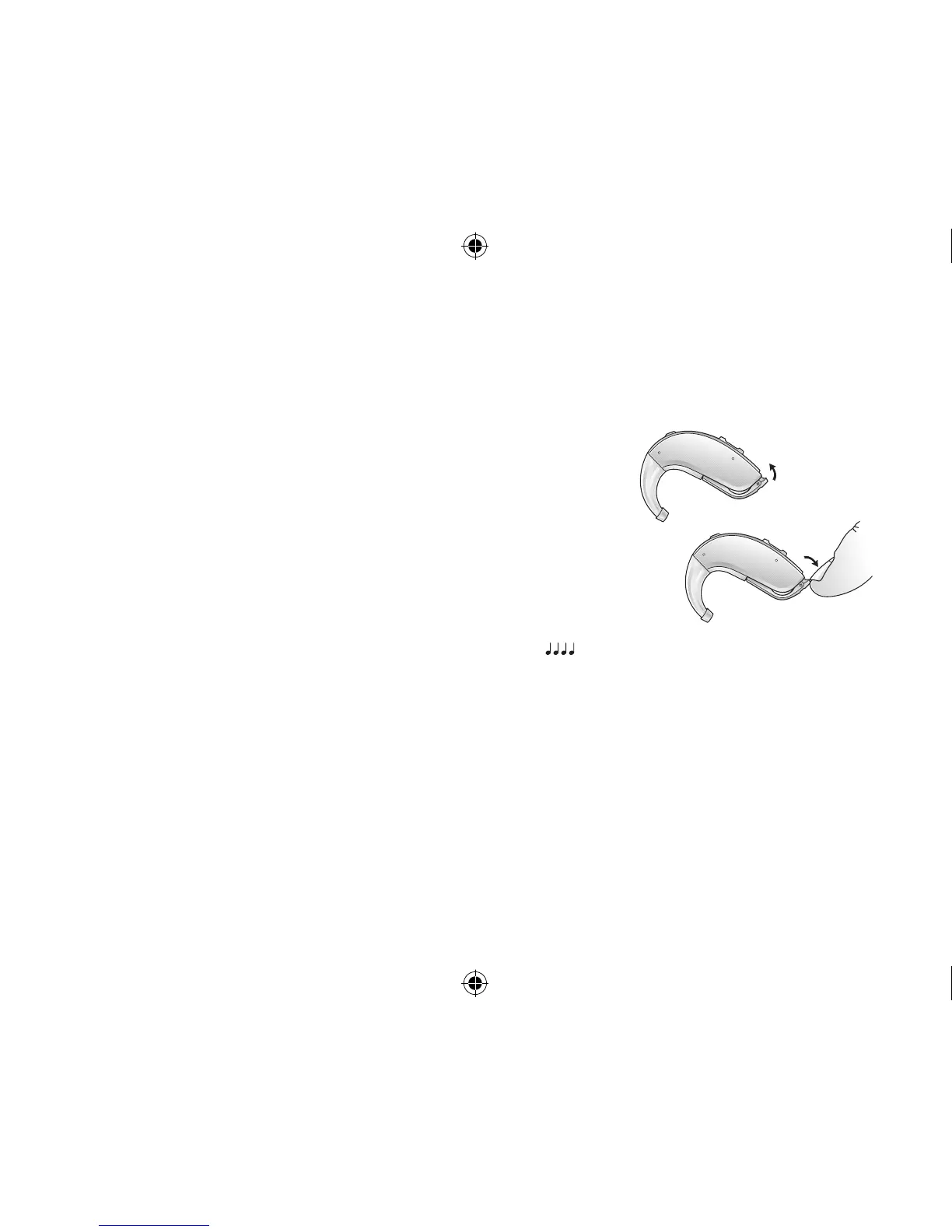
7.1 On/O function
1. Close the battery door to turn on the hearing aid in program 1
(one).
2. Open the battery door to turn o the hearing aid. Use your
fingernail to pull it open.
7.1.1 Smart Start
Smart Start delays the time before the hearing aid turns on after you
close the battery door. With Smart Start, you will hear a beep ( etc.)
for each second of the delay period (5 or 10 seconds delay).
If you do not want to turn on the hearing aids prior to placing them on your ear, ask your hearing care
professional to de-activate Smart Start.
7.2 Inserting/Replacing the battery
1. Open the battery door completely by using your fingernail. Remove the used battery if present.
2. Prepare the new battery (please refer to page 2 for information on appropriate battery type/size
for your hearing aid). Remove the protective foil to activate the battery.
3. Wait for 2 minutes before inserting the battery into the hearing aid.
400618011US-17.01-Rev.A.indd 14 25-01-2017 09:59:10








 To Next Page