20
7.5 Operation of the hearing aid
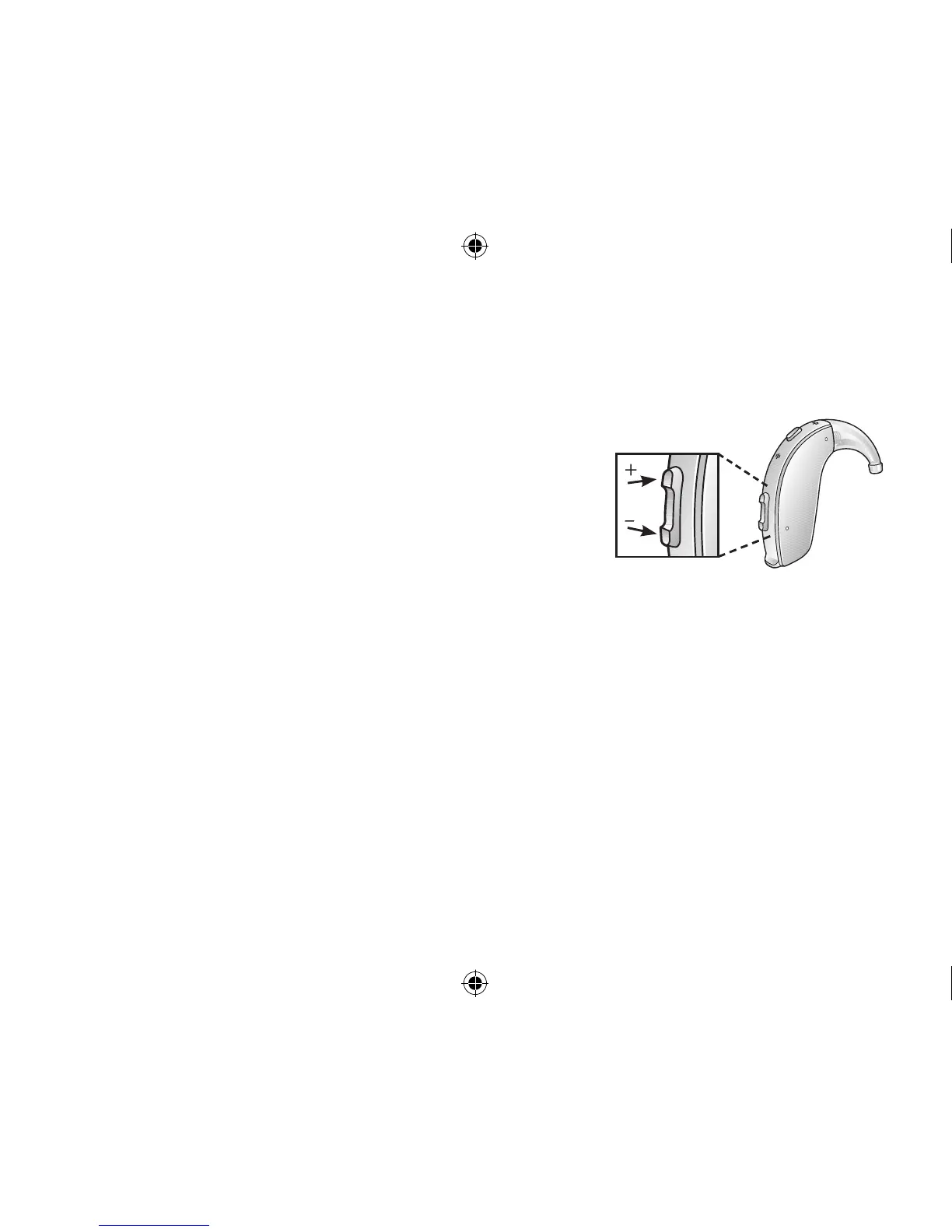
7.5.1 Volume control (not for LT67)
Your hearing aid has automatic volume control, which is individually set during the fitting session.
However, the volume control allows you to adjust the volume of
your hearing aids to your liking.
1. To increase the volume, push the volume control up.
2. To decrease the volume, push the volume control down.
When you change the volume, the hearing aid responds with a beep.
When you reach the upper or lower limits, the hearing aid responds
with a low-pitched beep.
i
NOTE: Not available for LT67.
i
NOTE: If you have two hearing aids with the Synchronized Volume Control or Synchronized Push
Button function enabled, volume control adjustments to one hearing aid automatically repeat in
the second hearing aid. When you change the volume on one of the hearing aids, it responds with
one or more beeps. A beep in the second aid follows.
i
NOTE: Your hearing care professional can disable the volume control or replace the volume con-
trol with a non-functional cover.
400618011US-17.01-Rev.A.indd 20 25-01-2017 09:59:12








 To Next Page