First
Time Setup
Device
Settings
CAUTION!
IMPORTANT!
WARNING!
3.
Verify/Change
the device settings. To start the setup menu, press the
ramp button. (The
airflow
must be turned off.)
DO
NOT use the
REMstar
Plus
if
the
display
is erratic. Contact your
home care provider for further instructions.
Eor
REmstar Plus devices
with
serial numbers of2,000,000 or
greater,
the
display
screen has been changed. Both
display
screens are shown
below.
n
n
1111
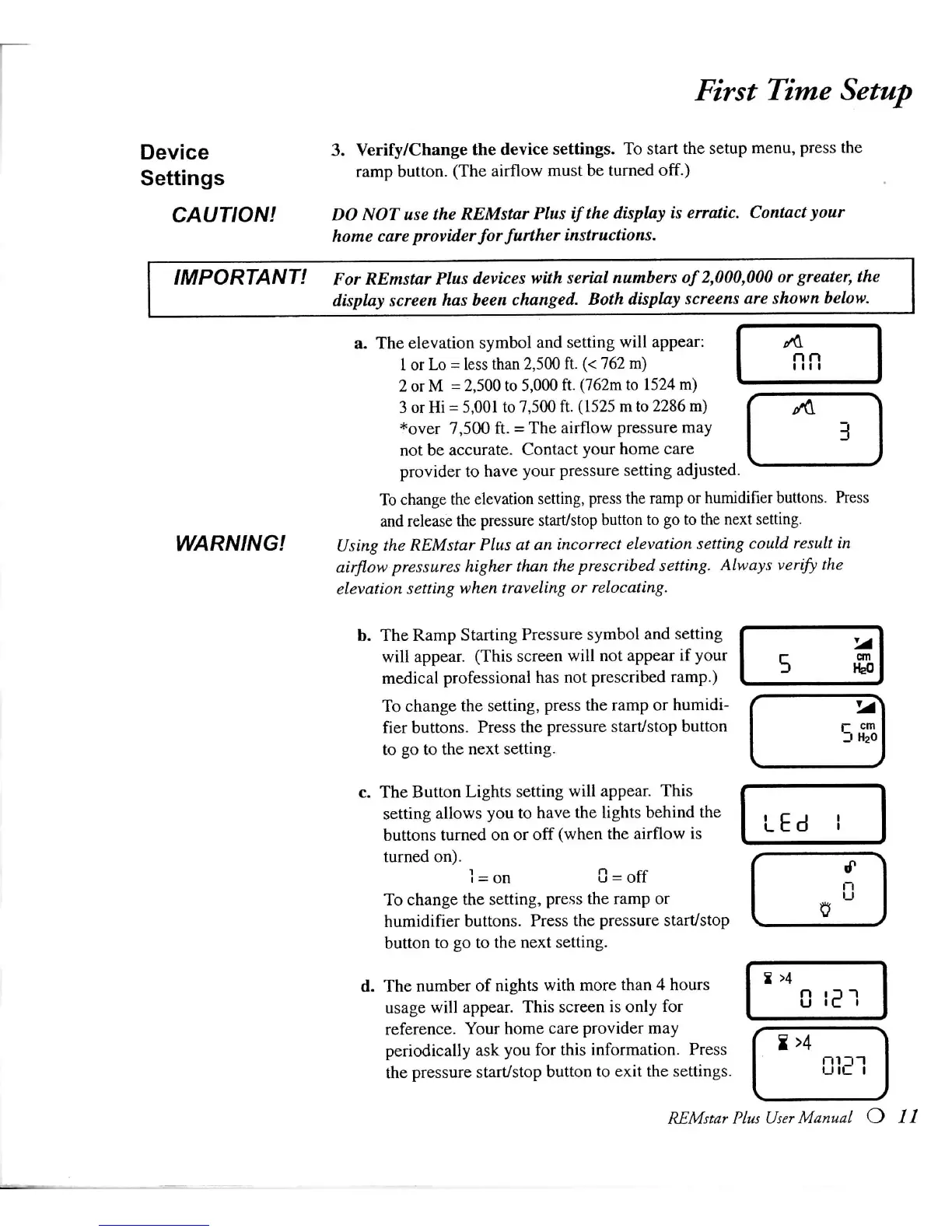
a.
The elevation symbol and setting
will
appear:
1
or
Lo
= less than
2,500
ft. (< 762 m)
2
or
M
= 2,500 to 5,000 ft.
(762m
to 1524 m)
3
or
Hi
=
5,001
to 7,500 ft.
(1525
m to 2286 m)
*over
7,500 ft. = The
airflow
pressure may
not be accurate. Contact your home care
provider
to have your pressure setting adjusted.
To
change the
elevation
setting, press the ramp or
humidifier
buttons. Press
and
release the pressure start/stop button to go to the next setting.
Using
the
REMstar
Plus
at an
incorrect
elevation setting
could
result
in
airflow
pressures
higher than the
prescribed
setting.
Always
verify the
elevation
setting when
traveling
or
relocating.
b. The Ramp Starting Pressure symbol and setting
will
appear.
(This
screen
will
not appear if your
medical
professional has not prescribed ramp.)
To
change the setting, press the ramp or humidi-
fier
buttons. Press the pressure start/stop button
to go to the next setting.
c.
The Button
Lights
setting
will
appear.
This
setting
allows
you to have the lights behind the
buttons
turned on or off
(when
the
airflow
is
turned on).
1
- on 0 = off
To
change the setting, press the ramp or
humidifier
buttons. Press the pressure start/stop
button to go to the next setting.
d.
The number of nights
with
more than 4 hours
usage
will
appear.
This
screen is only for
reference.
Your
home care provider may
periodically
ask you for this information. Press
the pressure start/stop button to
exit
the settings.
LEd
REMstar
Plus
User
Manual







 To Next Page