RAMP® System Operation
Operator’s Manual, RAMP
®
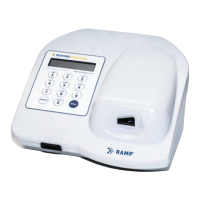
Reader 12
2.2 RUN/OPTIONS Menu
When the Reader is turned on, it initially performs a Power-On Self-Test and displays the following
animation on the display for one second while emitting two short beeps:
The following message scrolls across the screen from right to left and remains displayed for a few
seconds (X.XX corresponds to the software version):
NOTE: If errors are found during the Power-On Self-Test, see Section 4.1 for detail.
When the Reader is ready for operation, the RUN/OPTIONS Menu is displayed:
At this point, the following actions may be performed:
Insert a Lot Card to upload lot information (Section 2.3).
Run an Assay (Section 2.4).
Access the OPTIONS menu (Section 2.5).
NOTE: If a critical system failure is found during the Power-On Self-Test or during IQC, the
Reader will lock out the operator from running samples or Liquid Quality Control (LQC).
Pressing [Enter] at either the RUN/OPTIONS or RUN LQC/EXIT prompts will display this
message:
Press any key to return to the menu. The OPTIONS Menu is still accessible to output, print or view
results.
2.3 Using Lot Cards
Each Kit includes a Lot Card that is individually packaged in an anti-static pouch. The Lot Card
provides information, including lot-specific data and the expiration (Use-by) date of each Kit. Use the
Lot Card to input the specific lot information into the Reader before using the Cartridges. This step is
only required once prior to the use of a new lot.
SERVICE REQUIRED
PRESS KEY TO PROCEED
RUN TEST: <Enter>
OPTIONS: <Options>
*** RAMP READER ***
*** Version X.XX ***
■■■■■■■■■■■■■■■■■■■■
■■■■■■■■■■■■■■■■■■■■


 To Next Page