Operator’s Manual, RAMP
®
2-2A
CAUTION!
To prevent damage to internal components of the Reader, it is important to
prevent excess sample from getting onto the
Clean any spills before inserting the
NOTE:
Reader following sample addition. If the
seconds of sample addition, the
displayed. This will
If the Reader is unable to detect the
CARTRIDGE, THEN RE-
INSERT is displayed (Section
When the inserted Cartridge
is detected, the Reader automatical
displays the following:
Once the Cartridge
barcode is successfully read, the Reader searches its memory for the
corresponding lot-
specific data. If the matching data cannot be found, the operator is prompted to
INSERT LOT CARD FOR LOT #Mxxxxx (Section
If the Reader’s memor
y contains the corresponding lot information for the
prompts indicating the progress of the analysis are displayed, as shown in the following example of a
Troponin test:
Running time is displayed as a count
RAMP
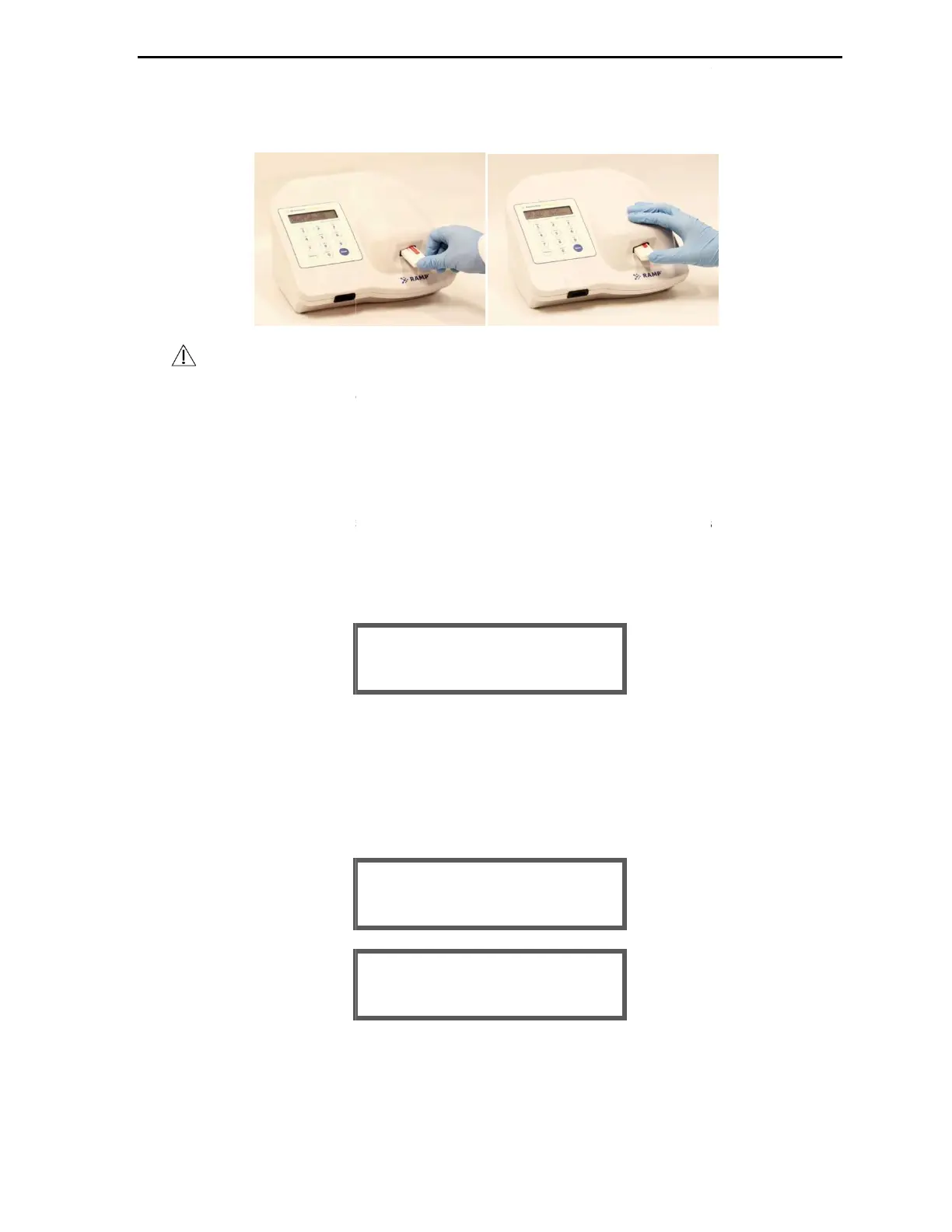
2-2: Inserting a Test Cartridge
2-2B
To prevent damage to internal components of the Reader, it is important to
prevent excess sample from getting onto the
Cartridge
or spilling out of the sample well.
Clean any spills before inserting the
Cartridge into the Reader.
it is important to IMMEDIATELY insert the
Reader following sample addition. If the
Cartridge
is not inserted into the Reader within 30
seconds of sample addition, the
Cartridge may be rejected and
the test and require another test to be performed (Section
If the Reader is unable to detect the
Cartridge
a beep is emitted and the error message REMOVE
INSERT is displayed (Section
4.4).
is detected, the Reader automatical
ly pulls the
barcode is successfully read, the Reader searches its memory for the
specific data. If the matching data cannot be found, the operator is prompted to
INSERT LOT CARD FOR LOT #Mxxxxx (Section
4.2).
y contains the corresponding lot information for the
Cartridge
prompts indicating the progress of the analysis are displayed, as shown in the following example of a
Running time is displayed as a count
-up timer until sample flow is detected.
TEST: TnI mm:ss
RUNNING: 00:00
TEST: TnI
BEGINNING TEST
TEST IN-PROGRESS,
READING BARCODE...
17
To prevent damage to internal components of the Reader, it is important to
or spilling out of the sample well.
into the
is not inserted into the Reader within 30
the test and require another test to be performed (Section
4.4).
a beep is emitted and the error message REMOVE
inside and
barcode is successfully read, the Reader searches its memory for the
specific data. If the matching data cannot be found, the operator is prompted to
prompts indicating the progress of the analysis are displayed, as shown in the following example of a


 To Next Page