Controlling the Device
29
7 Controlling the Device
7.1 Operating Controls, Displays and Functions
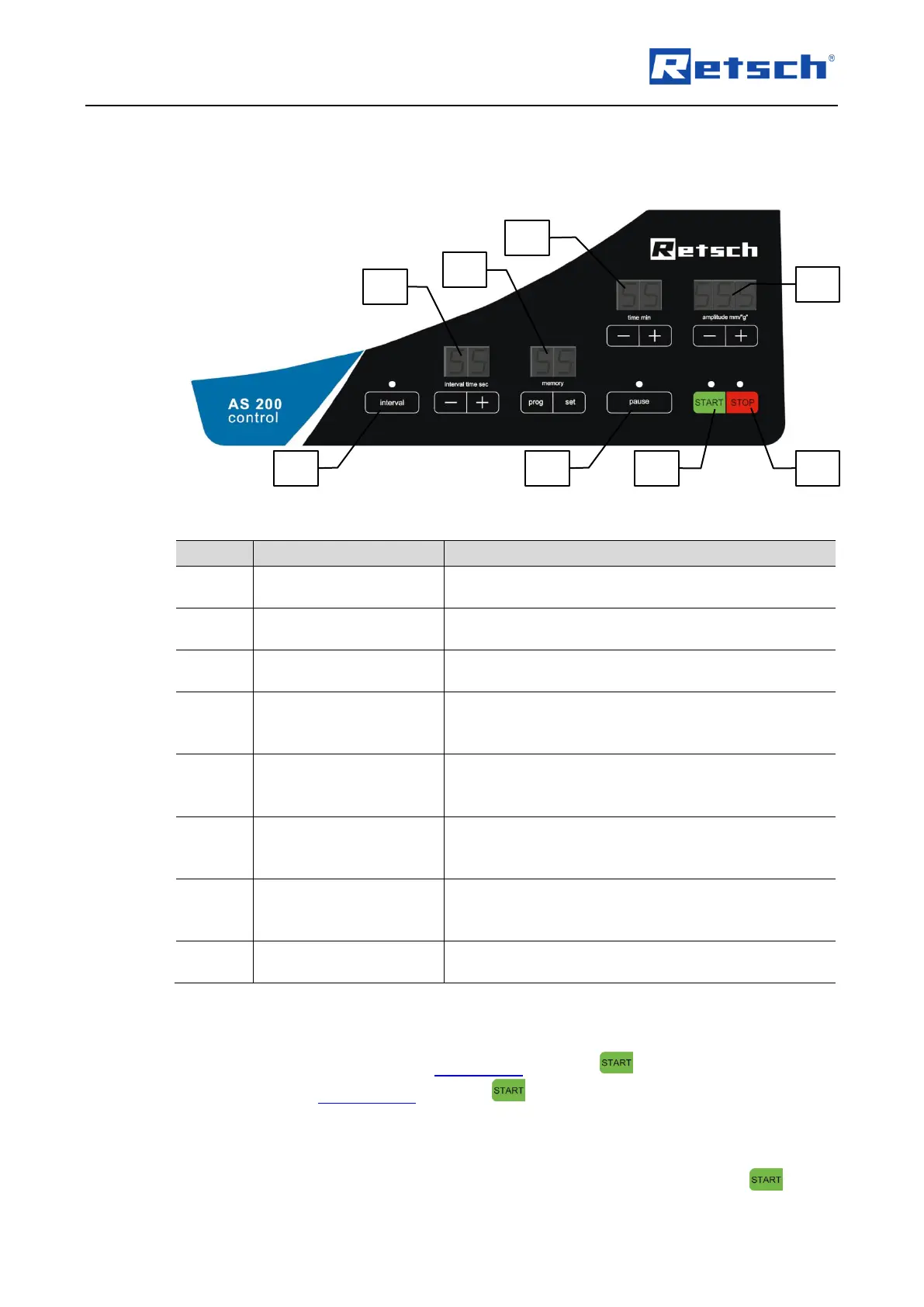
Fig. 10: Operating controls and functions
Stops the sieving process. In standby or setting mode,
the red LED is lit
Starts the sieving process. During operation, the
green LED is lit
Interrupts the sieving process. During the pause, the
green LED flashes
Decreases or increases the amplitude by pressing the
"-" or "+" button, respectively in the range of 0.20 to
3.00 mm or 1 to 25.5 g
Reduces or extends the sieving time by pressing the
"-" or "+" button, respectively in the range of 1 to 99
minutes
Switches the device between interval and continuous
operation. During the interval operation, the green
LED is lit
Reduces or extends the sieving time between the
interval pauses by pressing the "-" or "+" button,
respectively in the range of 1 to 99 seconds
Allows for the saving, editing and selection of up to 99
programmes
7.2 Start Process
To start the sieving process in the setting mode, press the button (H2).
If the device is in standby mode, press the button (H2) twice to start the sieving
process.
The green LED lights up and the sieving process is started. If a process time has been set
beforehand, the time in the display "time" (H5) starts to count down on pressing the button.



 To Next Page