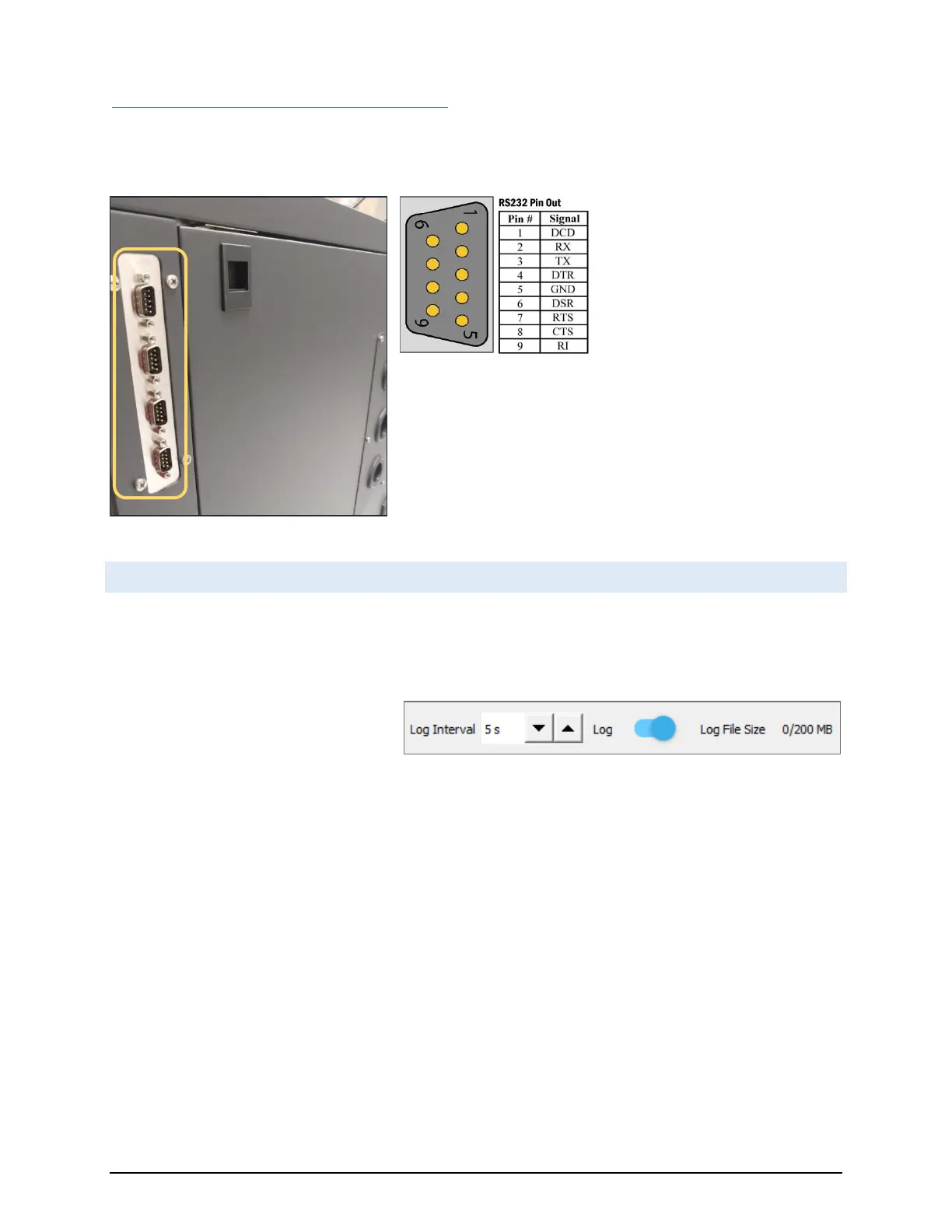
Four Serial Port Panel CGS-240 (optional on CGS-240)
These ports mimic the operation and pinout of standard PC serial ports and can independently operate at a variety
of baud rates and communication protocols.
Generally, instrument connections
are made using an RS-232 Extension
Cable with male connection on one
end, female connection on the other
end, and wired straight through
(pins 1-1, 2-2, 3-3, … , 9-9.) Note that
all RH Systems branded instruments
connect directly using only a straight
through extension cable. If manufacturing your own cables, generally
only pins 2, 3, and 5 are required for connection to most instruments.
If a Null-Modem adapter would normally be required for the
instrument to communicate with a standard PC, a Null-Modem
adapter (which crosses pins 2 and 3) will then also be required when
connecting to these ports of the CGS-240.
4.8 DATA LOGGING
All instrument data is stored in log files. Logging is defaulted to ON upon startup of RHS Control. Each connected
instrument has a separate log file with common time stamps for easy post-run analysis using Excel or other
programs of your preference. Data files are stored in CSV (comma separated value) format for easy import.
The data is logged at a time interval
defined by the ‘Log Interval’ spinbox
located at the lower left corner of RHS
Control.
Located to the immediate right of the Log Interval spinbox is the Log toggle switch. The Toggle switch will be blue
in color when logging is enabled, and red in color when logging is disabled. Yellow color indicates that the size is
approaching its maximum. The act of toggling this OFF will close the file and stop data collection for all
instrumentation connected to RHS Control. Toggling it back to ON will start a new log file.
Log files are stored in: RHS Control\logs\
Files names are identifiable by instrument name, serial number, and time stamp.
The current log file size is indicated. If the file reaches the maximum size limit, the file closes and a new file is
automatically started.
Maximum log file size is user selectable by accessing the System Settings window.


 To Next Page