DEVICE USER INTERFACE
8
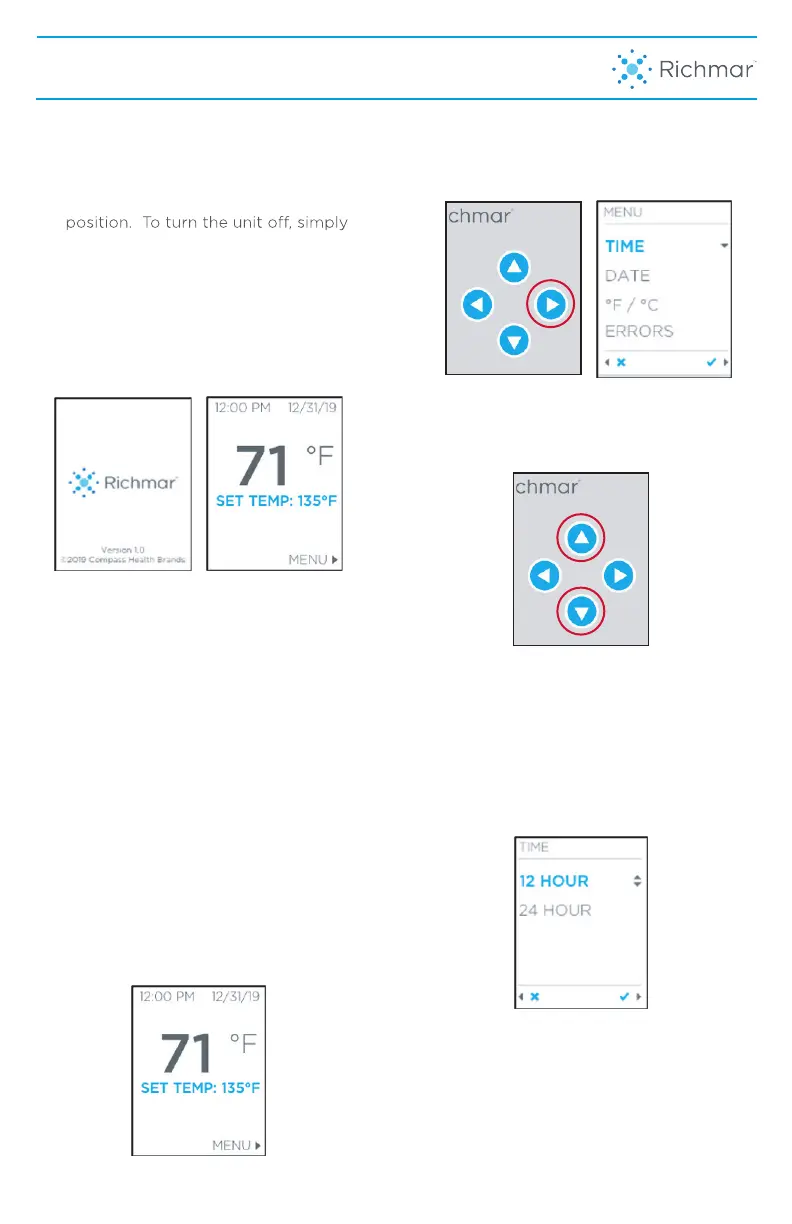
1. To turn the unit on, simply plug the
supplied power cord into the back of
the unit and then into the appropriate
115-120VAC, 50/60Hz outlet and
push the Power Switch to the “I”
press the switch to the “O” position
and unplug from the power outlet.
2. The unit will go through a self-
test check and will display a start
up screen showing the Richmar
logo and then automatically
switch to the Home Screen.
NOTE: If the Home Screen displays an
Error Code at start up, please go to the
Troubleshooting section of this manual to
determine next steps
3. The Home Screen will display the
current temp of the unit (black) and the
set temp underneath (blue). The unit
defaults to a Set Temp of 135°F (57°C).
To increase or decrease the SET TEMP,
press the up or down arrow until the
SET TEMP (in blue on home screen)
displays desired temperature. It should
4. To program the device time, date and
temperature measurement preference,
press the right arrow on the keypad to
enter the Settings Menu.
5. To change the desired settings, press
the up or down arrow on the keypad to
highlight the selection in blue.
6. To change the time, press the right
arrow on the keypad to display the
time options. Highlight the preferred
time option in blue and then press the
right arrow on the keypad to accept the
selection. To go back to the previous
menu, press the left arrow on the
keypad.
7. Press the up or down arrow until
you reach the correct hour. Then
press the right arrow on the key
take approximately 8 hours for the tank
to heat to 135˚F (57˚C) and 14 hours for the
tank to heat to 150˚F (65˚C) if water starts
at room temperature.
NOTE: The HydraTherm DT should not
increase above 150˚F (65˚C).



 To Next Page