Sending Scan File by E-mail
128
6
Selecting Destinations and a Subject
You can specify up to 100 destina-
tions at a time, by selecting from the
registered destinations on this ma-
chine. You can also specify Cc desti-
nations and a subject of an e-mail.
Selecting Destinations
A
AA
A
Press the {
{{
{1}
}}
} key.
Note
❒ You can skip this step when the
E-mail/Send File standby
screen is displayed.
The E-mail/Send File standby
screen is displayed.
B
BB
B
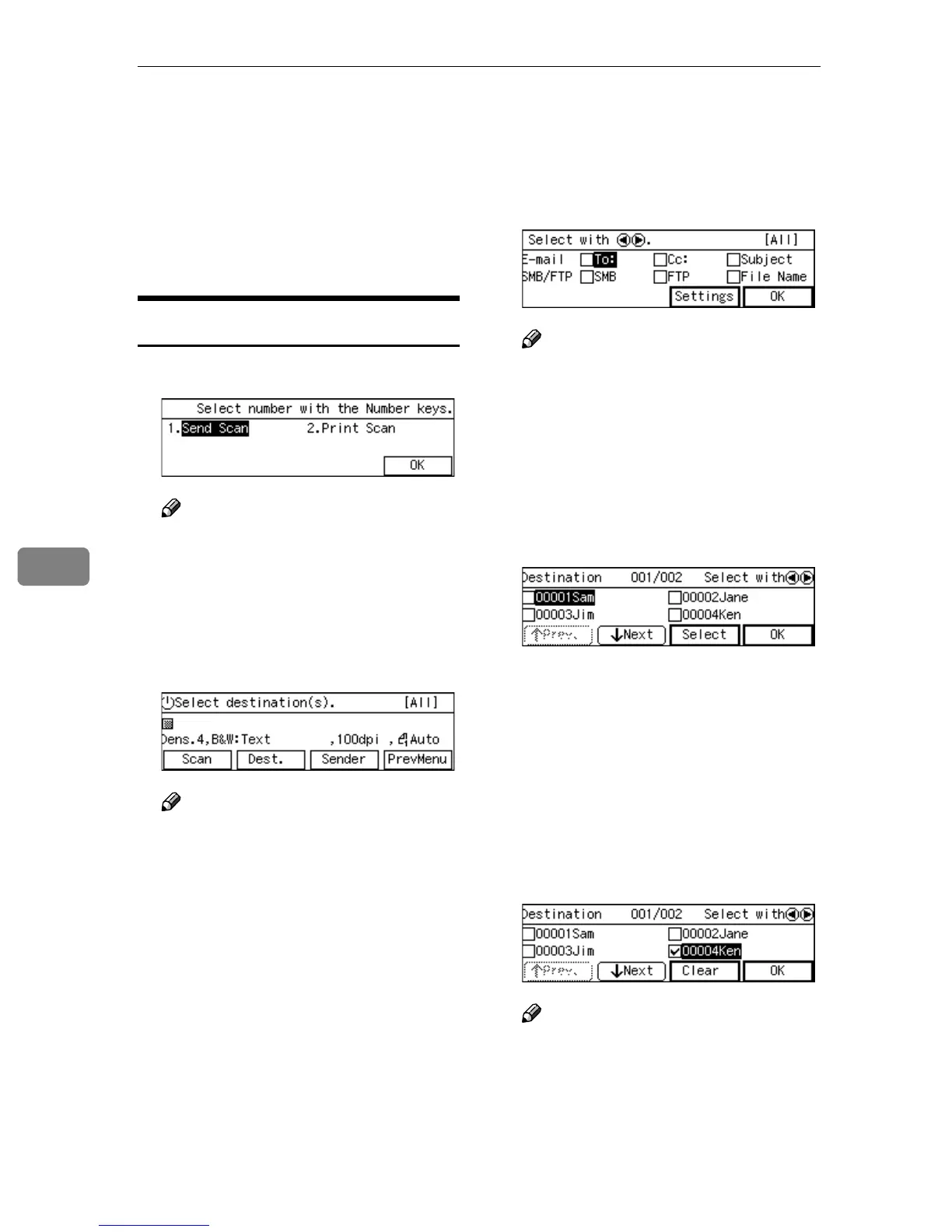
Press [Dest.].
Note
❒ If “ On ” is selected for [Auto Up-
date Destination List] in [2.Send
Scan Settings] under the Scanner
Features menu on this machine,
the destination list is automati-
cally updated when you press
[Dest.]. See p.61 “Auto Update
Destination List” for details.
C
CC
C
While [To:] is highlighted,
press [Settings].
Note
❒ If [To:] is not highlighted,
use the {
{{
{1
11
1}
}}
} and {
{{
{0
00
0}
}}
} keys to
select it.
The list of the destinations that are
registered to this machine appears.
D
DD
D
Use [Next] and [Prev.] to scroll
through the pages, and display
the destination you want to select.
E
EE
E
Use the {
{{
{1
11
1}
}}
} and {
{{
{0
00
0}
}}
} keys to
highlight the destination you
want to select, and then press [Se-
lect]
This selects the check box next to
the destination.
F
FF
F
Repeat steps
D
DD
D
and
E
EE
E
for selecting
each of the additional destina-
tions.
Note
❒ While highlighting a destina-
tion with its check box selected,
press [Clear] to clear the check
box (this deselects the destina-
tion).



 To Next Page