Setting Up the Scanner
24
2
❖ Installation environment
Important
❒ Do not set up the scanner in any
of the following types of loca-
tions. Doing so creates the risk
of malfunction of the scanner.
• In a location exposed to di-
rect sunlight
• In a location where the scan-
ner will be subjected to blow-
ing air or radiant heat, such
as near an air conditioner or
heater
• In a location near other elec-
tronic devices, such as a ra-
dio or television set
• In a location subject to ex-
treme temperatures or hu-
midity
• Near a humidifier
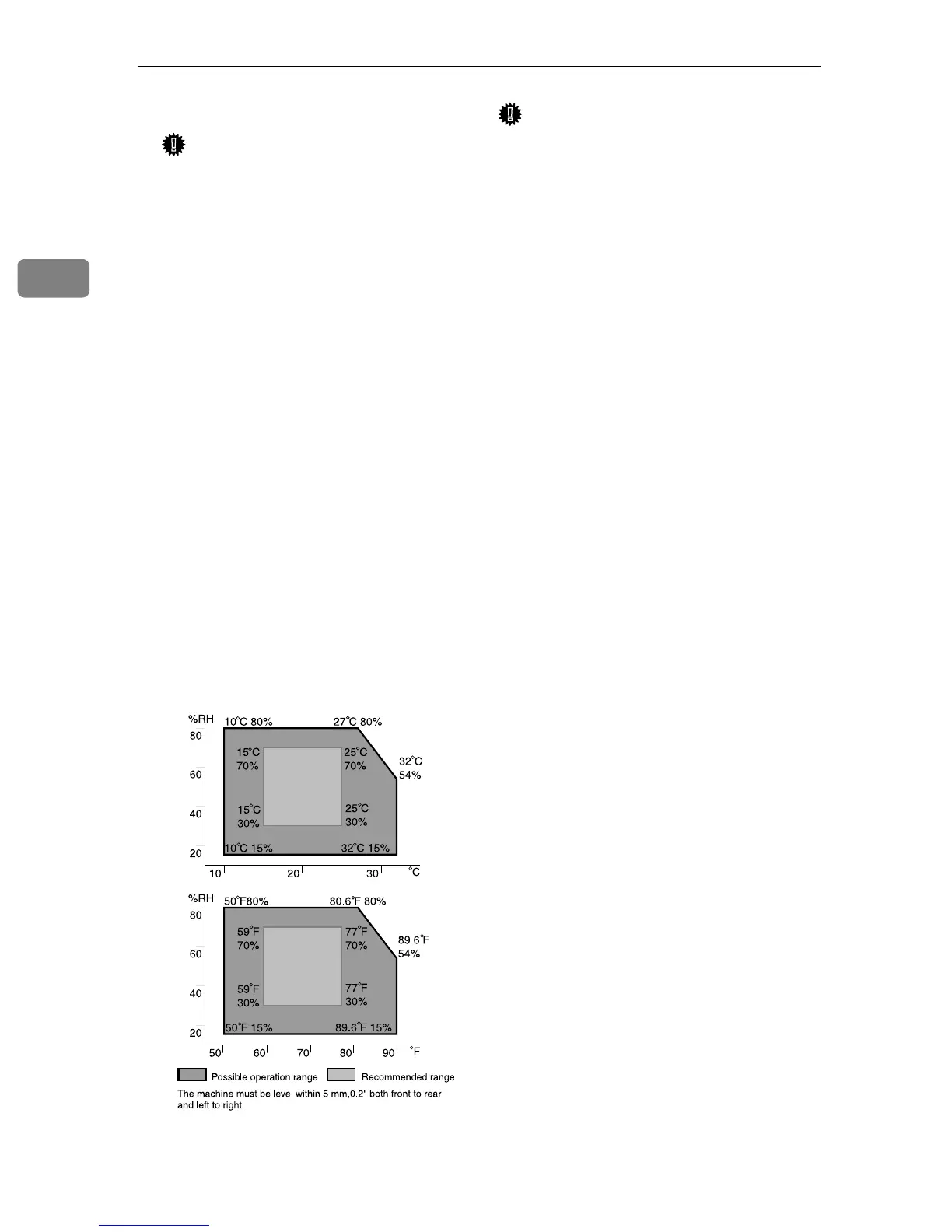
Set up the scanner in a location
where the temperature and hu-
midity will fall within the ranges
shown below.
Important
❒ Save the box and cushioning mate-
rial in which the scanner was
packed so that they can be used if
it is necessary to transport the
scanner in the future.
❒ When the machine is moved from
a cold location to a warm location,
sudden temperature changes
cause condensation inside of the
scanner. Wait one hour or more be-
fore turning on the scanner to al-
low the condensation to evaporate.
ADG022S


 To Next Page
 Loading...




