20160576
38
Calibration and operation
6.6.1 Displaying the Service values
Error history
See Parameter with index, with or without direct display/Example
of parameter 701: Error history
Note:
They can be cancelled for assistance (see Parameter list page)!
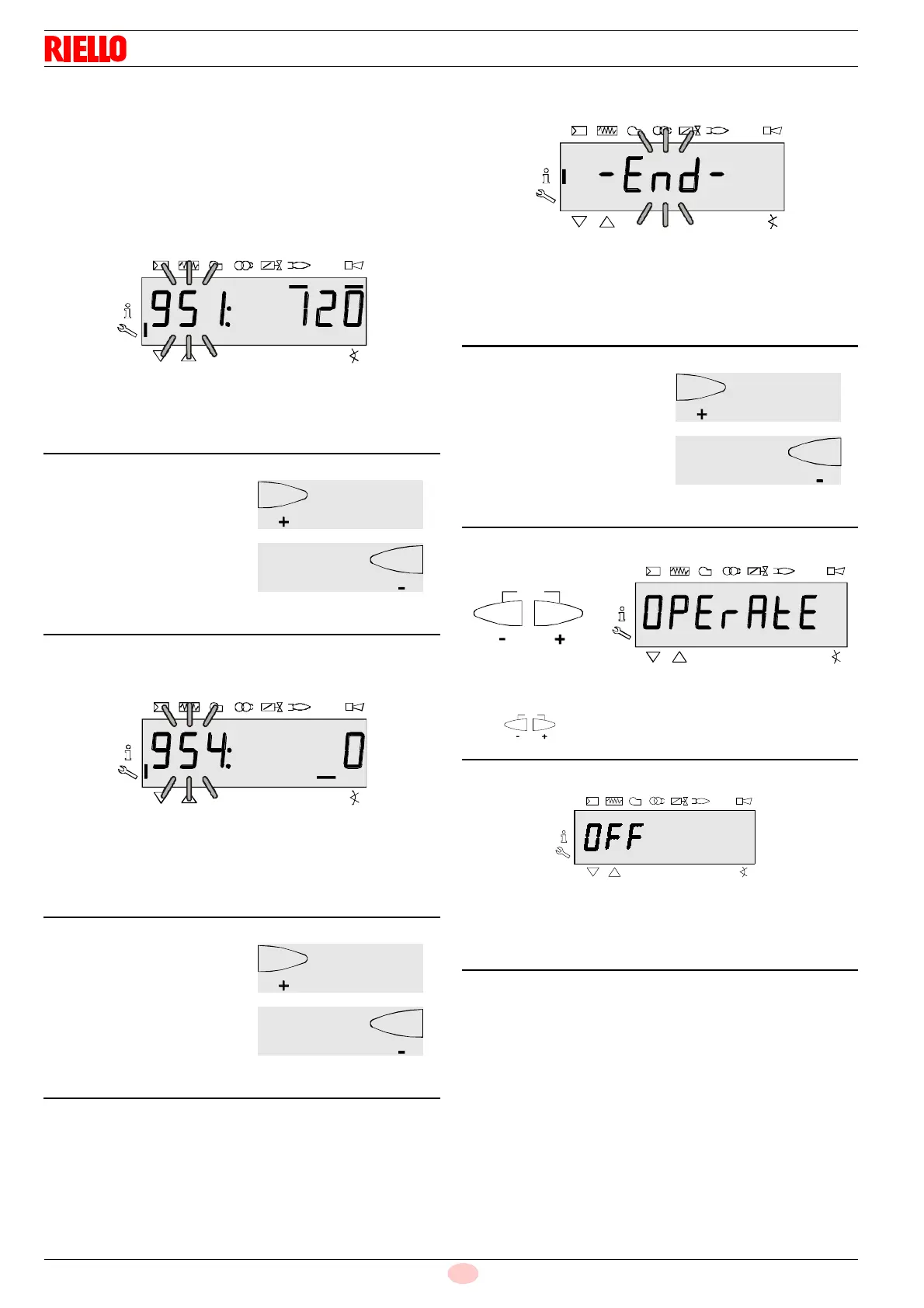
Mains voltage
Parameter 951 is displayed: blinking.
The mains voltage is displayed on the right.
Example: 951: 120
Flame intensity
The display shows the parameter 954: blinking.
On the right, the flame intensity is displayed in a percentage
from 0 to 100%.
Example: 954: 0
End of the Service level
When this page appears you have reached the end of the Service
level.
The display shows – End – blinking.
Press to return to standby mode.
The display shows OPErAtE.
When this screen appears you return to the normal display and
you can pass to the successive level mode.
Fig. 71
S9062
On to next parameter
S9058
Goes back to the previous
parameter
Fig. 73
S9062
End of the Service level – End –
S9058
Goes back to the previous
parameter
Fig. 75
S9062
At the start of the Service level
S9058
At the end of the Service level



 To Next Page